


Introduction: The Evolution of Virtualization and Resource Orchestration
The modern enterprise data center is a dynamic, fast-paced ecosystem where computational demands fluctuate by the second. In the early days of server virtualization, the primary goal was consolidation taking dozens of underutilized physical servers and collapsing them onto a single, robust hypervisor host. VMware vSphere and vCenter transformed IT infrastructure by abstracting the physical hardware layer, decoupling operating systems and applications from underlying servers. However, as virtualization matured and datacenters grew into massive, highly dense clusters supporting thousands of virtual machines, consolidation alone was no longer enough. Administrators needed granular control over how physical compute resources namely Central Processing Units (CPUs) and Random Access Memory (RAM) were distributed, prioritized, and governed.
Enter the VMware vCenter Resource Pool. Resource pools serve as the foundational building blocks for hierarchical compute management within vSphere clusters. They allow administrators to slice and dice cluster-wide hardware capacity into logical, manageable segments. Whether you are managing a multi-tenant cloud environment, isolating development workloads from mission-critical production systems, or enforcing service-level agreements (SLAs) across different business units, resource pools provide the dynamic governance required to keep your infrastructure running smoothly, predictably, and efficiently.
Despite their immense power, resource pools are frequently misunderstood or misconfigured. A poorly designed resource pool hierarchy can lead to artificial bottlenecks, erratic workload performance, and administrative headaches. Conversely, a well-architected resource pool strategy unlocks the full potential of VMware Distributed Resource Scheduler (DRS), ensures optimal hardware utilization, and guarantees that your most important applications always get the resources they need, exactly when they need them. This comprehensive guide will take you deep into the mechanics of resource pools, exploring their core components, architectural best practices, step-by-step configuration workflows, and advanced optimization strategies.
Demystifying VMware vCenter Resource Pools: What Are They Really?
At its core, a resource pool is a logical abstraction residing within a vSphere cluster. It is not a physical entity, nor is it bound to a single ESXi host. Instead, a resource pool is a management construct that pools the aggregate CPU and memory capacity of an entire vSphere cluster or a subset of hosts within that cluster allowing administrators to allocate and monitor those resources collectively.
To understand resource pools, it helps to look at how vCenter manages compute resources natively. When you create a standard vSphere cluster enabled with VMware DRS, the cluster acts as a massive pool of raw CPU and memory power. Virtual machines placed directly in the cluster draw from this aggregate pool based on their individual configurations. However, as the number of virtual machines scales into the hundreds or thousands, managing them individually becomes unwieldy.
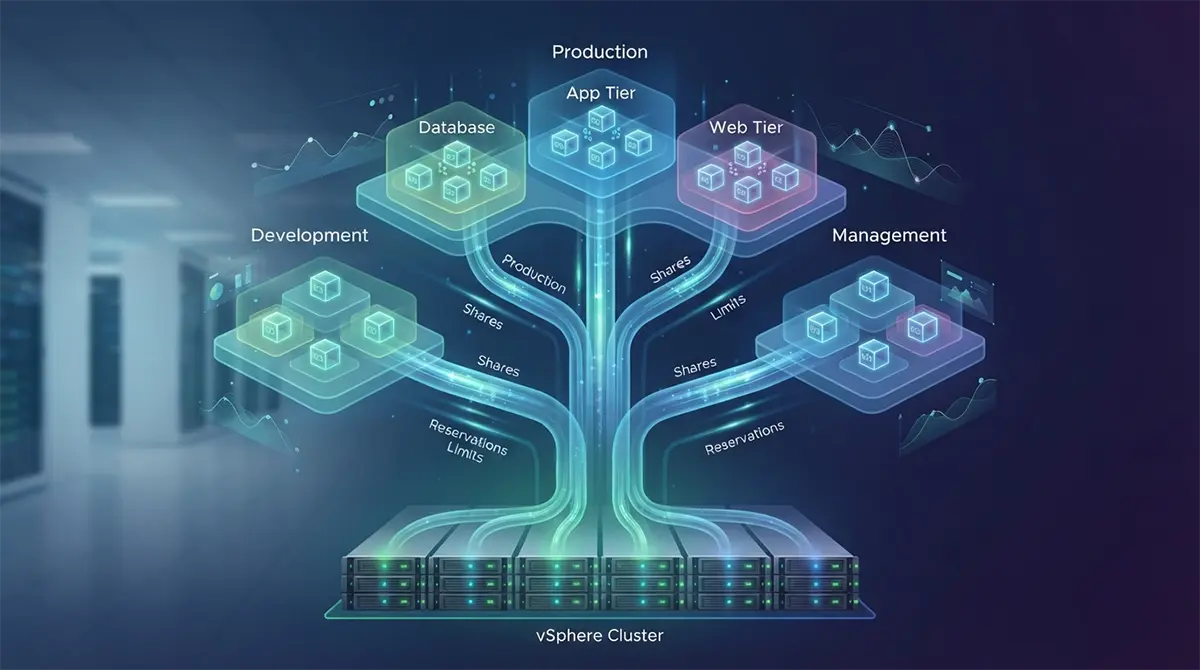
Resource pools introduce hierarchy into this management model. You can create a parent resource pool and nest child resource pools beneath it. Each child pool can then contain its own set of virtual machines or further nested sub-pools, creating an inverted tree-like structure. This hierarchical design mirrors organizational structures, departmental silos, or application tiers. For example, a root resource pool for a production cluster might branch out into child pools for Database Workloads, Application Tier Workloads, and Web Tier Workloads.
Crucially, resource pools decouple resource allocation from physical placement. Because they operate at the cluster level via DRS, virtual machines residing within a specific resource pool do not need to run on the same ESXi host. DRS dynamically migrates these virtual machines across hosts using vMotion to maintain load balancing while strictly enforcing the resource boundaries, shares, reservations, and limits defined at the resource pool level.
The Anatomy of a Resource Pool: Shares, Reservations, and Limits
Configuring resource pools effectively requires a deep understanding of the three primary control mechanisms provided by VMware vSphere: Shares, Reservations, and Limits. These three parameters govern how compute resources are allocated during normal operation and how contention is resolved when demand exceeds supply.
Shares: Prioritizing Workloads During Contention
Shares represent the relative priority or weight of a resource pool or virtual machine when the underlying cluster experiences resource contention. They do not dictate how much resource an entity receives when the cluster has plenty of free capacity; rather, they determine who gets what proportion of the pie when resources are scarce.
-
Low, Normal, and High: VMware provides preset share values. By default, resource pools and virtual machines are set to Normal shares. High shares give an entity twice as many shares as Normal shares, while Low shares give half as many.
-
Custom Shares: Administrators can also assign exact numerical values to shares, allowing for hyper-granular prioritization hierarchies between different business units or application tiers.
-
How Shares Work in Practice: Imagine a resource pool with a total capacity of 10 GHz of CPU power that is currently fully contended. If Pool A has 2,000 shares and Pool B has 1,000 shares, Pool A is entitled to twice as much of the available CPU cycles as Pool B during the contention period, regardless of their absolute sizes.
Reservations: Guaranteeing Minimum Resource Allocations
A reservation is a guaranteed minimum allocation of CPU or memory that vCenter ensures is always available to a resource pool or virtual machine. Once a reservation is set, the underlying cluster sets aside that exact amount of physical hardware, preventing other workloads from consuming it even if the resource pool is currently powered off or idle (unless the resource pool is configured with specific expandable settings).
-
Admission Control: When you power on a virtual machine or create a resource pool with a reservation, vCenter performs an admission control check. If the cluster lacks sufficient unreserved capacity to satisfy the request, the operation is blocked, preventing over-commitment of guaranteed resources.
-
Overhead Considerations: Administrators must account for virtualization overhead (memory overhead for the hypervisor kernel) when calculating memory reservations to avoid unexpected admission control failures.
Limits: Capping Maximum Consumption
A limit specifies the absolute ceiling on the amount of CPU or memory that a resource pool or virtual machine can consume, regardless of how much unutilized capacity exists in the cluster.
-
Default Behavior: By default, resource pools and virtual machines have their limits set to “Unlimited,” meaning they can consume all available free resources in the cluster up to the physical hardware maximums (subject to shares and reservations).
-
Use Cases for Limits: Limits are typically used to restrict non-production workloads (such as development or testing environments) from hoarding resources during off-peak hours, or to enforce software licensing caps where an application is only licensed to use a specific number of CPU cores.
-
The Pitfall of Over-Limiting: Setting artificial limits without a clear business or technical justification can degrade performance by preventing idle workloads from absorbing burst capacity, leading to artificial queuing and latency.
Designing a Resource Pool Architecture
Before clicking through the vCenter user interface to create resource pools, you must invest time in architectural planning. A poorly structured hierarchy can introduce administrative complexity and counterproductive resource starvation. Successful resource pool design relies on several core architectural principles.
The Golden Rule: Avoid Mixing Virtual Machines and Resource Pools at the Same Level
One of the most common architectural mistakes made by novice administrators is placing virtual machines and child resource pools at the exact same level beneath a parent resource pool or cluster.
-
The Mechanics of the Conflict: When a resource pool contains both direct child virtual machines and child resource pools, vCenter treats the collection of direct virtual machines as an implicit, invisible resource pool alongside the explicit child resource pools. This makes calculating and predicting share distributions incredibly difficult and often results in unpredictable resource starvation for the direct virtual machines.
-
The Best Practice: Always isolate your virtual machines inside dedicated leaf resource pools. If a parent resource pool or cluster needs to hold virtual machines, create a dedicated child resource pool called “Unassigned VMs” or “General VMs” for them, ensuring that every workload sits at the same structural depth within the hierarchy.
Sizing and Hierarchy Design Patterns
Your resource pool hierarchy should directly reflect your operational governance model. Consider the following common design patterns:
-
Departmental Segregation: Splitting a shared enterprise cluster into resource pools for Finance, Human Resources, Engineering, and Marketing, with each department managing its own child pools for production and development.
-
Lifecycle Isolation: Creating top-level resource pools for Production, Staging, Testing, and Development. This ensures that a runaway development script running a stress test cannot starve mission-critical production financial databases of CPU cycles or memory.
-
Application-Centric Tiers: Grouping resources by application architecture such as separating multi-tier e-commerce applications into database pools, application server pools, and presentation layer pools.
Step-by-Step Configuration Guide in vCenter
Configuring resource pools in the VMware vSphere Client is a straightforward process, but it requires careful attention to detail. Follow this comprehensive workflow to create and configure a resource pool effectively.
Step 1: Navigating to the Cluster and Initiating Creation
-
Log in to the vSphere Client using your administrative credentials.
-
Navigate to your inventory and select the Cluster or parent Resource Pool under which you want to create the new resource pool. Ensure that VMware DRS is enabled on the cluster, as resource pools rely heavily on DRS for intelligent placement and load balancing.
-
Right-click the target cluster or parent resource pool and select New Resource Pool.
Step 2: Naming and Defining Basic Parameters
-
In the New Resource Pool wizard, enter a descriptive, standardized name for the pool (e.g.,
PROD-Database-Pool). Avoid ambiguous names that do not convey the workload type or environment. -
Configure the CPU allocation parameters:
-
CPU Shares: Select the appropriate priority level (Low, Normal, High) or choose Custom and enter a specific numerical value.
-
CPU Reservation: Enter the guaranteed CPU capacity in Megahertz (MHz). Leave at
0unless a strict minimum guarantee is required. Check the Expandable Reservation box if you want the pool to borrow unreserved CPU capacity from its parent when local reservations are exhausted. -
CPU Limit: Set the maximum CPU consumption ceiling in MHz, or leave it as Unlimited.
-
-
Configure the Memory allocation parameters:
-
Memory Shares: Choose the appropriate share level or custom value.
-
Memory Reservation: Enter the guaranteed RAM capacity in Megabytes (MB) or Gigabytes (GB). Decide whether to enable Expandable Reservation.
-
Memory Limit: Set the maximum memory consumption ceiling, or leave it as Unlimited.
-
Step 3: Finalizing and Verifying the Configuration
-
Review your configured settings on the summary page to ensure reservations do not exceed available unreserved cluster capacity.
-
Click Finish to create the resource pool.
-
Once created, select the resource pool in the inventory and navigate to the Monitor tab, then select Resource Allocation to verify that the CPU and memory metrics display correctly and align with your capacity planning goals.
Advanced Resource Management Policies and DRS Integration
Resource pools do not operate in a vacuum; they work in tandem with VMware DRS and the ESXi VMkernel memory management subsystems to maintain cluster health. Understanding these advanced interactions allows administrators to fine-grained tune their environments for maximum performance.
Expandable Reservations in Depth
The concept of expandable reservations is one of the most powerful yet misunderstood features of vCenter resource pools. When a resource pool has an expandable reservation enabled, its parent resource pool (or cluster root) can supply additional resources if the child pool’s local reservation is fully consumed and additional capacity is needed to power on virtual machines or satisfy active workloads.
-
How It Relates to Admission Control: If a child resource pool has a local reservation of 10 GHz but requires 15 GHz, and expandable reservation is enabled, vCenter will look up the hierarchy to the parent pool to fulfill the remaining 5 GHz deficit. If expandable reservation is disabled, the operation will be rejected if local capacity is insufficient, even if the parent pool has gigahertz of idle capacity sitting unused.
-
Architectural Implication: Use expandable reservations carefully in multi-tenant environments where strict resource isolation and chargeback models are enforced. In environments where resource sharing is collaborative, expandable reservations provide excellent flexibility.
Shares vs. Reservations: Choosing the Right Strategy
When designing resource allocation policies, administrators often debate whether to rely primarily on shares or reservations.
-
When to Use Reservations: Reservations should be reserved for tier-one applications that have strict, non-negotiable performance SLAs, or for regulatory compliance requirements where specific workloads must be guaranteed a fixed slice of hardware. Overusing reservations can severely handcuff a cluster, leading to wasted hardware capacity because reserved resources cannot be reclaimed by other virtual machines even when the reserved workload is entirely idle (unless expandable reservations or advanced DRS automation rules come into play).
-
When to Use Shares: Shares are the preferred mechanism for general resource management because they are inherently elastic. They allow the cluster to run at maximum efficiency during normal operations, utilizing 100% of available hardware while gracefully scaling back low-priority workloads only when actual resource contention occurs.
For organizations scaling rapidly across regions from corporate headquarters in London to branch offices relying on partners like Best tech support dubai maintaining predictable workload performance without over-provisioning hardware is a constant balancing act, making a share-first strategy with selective reservations the industry standard.
Common Pitfalls and Best Practices
Even experienced virtualization administrators can fall into traps when configuring resource pools. Avoiding these common mistakes ensures long-term cluster stability and optimal application performance.
Common Pitfalls to Avoid
-
Over-Reservation: Reserving too much CPU or memory across multiple resource pools locks up physical capacity. This often triggers frustrating admission control errors where vCenter refuses to power on healthy virtual machines despite the cluster appearing mostly idle.
-
Deep Hierarchy Nesting: Creating resource pool trees that are four, five, or six levels deep introduces severe mathematical complexity in share calculations. It becomes nearly impossible to predict how resources will be distributed during contention. Keep your hierarchies flat ideally no more than two or three levels deep.
-
Ignoring Virtualization Overhead: Failing to account for hypervisor memory overhead when calculating reservations leads to sudden cluster memory exhaustion. Always leave a buffer (typically 10% to 15%) of unreserved cluster capacity to accommodate hypervisor overhead and DRS migration headroom.
Essential Best Practices
-
Monitor Contention Metrics Continuously: Use VMware Aria Operations (formerly vRealize Operations) or vCenter performance charts to monitor CPU ready time, memory swap rates, and active resource pool contention. Do not configure resource pools blindly; base your adjustments on historical utilization data.
-
Document Your Hierarchy: Maintain clear architectural documentation mapping your resource pool tree to business units, application tiers, and SLA commitments. When troubleshooting performance issues, knowing the share and reservation structure at a glance saves critical minutes during outages.
-
Test Changes in Staging: Before applying sweeping resource pool adjustments or strict limits to production environments, test your configurations in a staging cluster to observe how DRS and the VMkernel react to your share and reservation modifications.
Conclusion
VMware vCenter resource pools are indispensable instruments for modern enterprise virtualization management. By mastering the delicate balance of shares, reservations, and limits, administrators can transform a monolithic cluster of ESXi hosts into a finely tuned, highly predictable, multi-tenant powerhouse.
A thoughtful architectural design avoiding mixed-level pitfalls, keeping hierarchies shallow, and leveraging elastic share models ensures that your infrastructure remains resilient, efficient, and aligned with core business objectives. As virtualization continues to evolve alongside modern containerization and cloud-native workloads, the foundational principles of resource governance learned through mastering vCenter resource pools remain critically important for any IT professional dedicated to operational excellence.