


Every time an individual drafts an email, attaches a document, and clicks send, a sophisticated network infrastructure leaps into action behind the scenes. Within a fraction of a second, messages travel across global networks, pass through security checkpoints, navigate complex routing pathways, and arrive in a recipient inbox halfway across the world. To the average user, this seamless experience feels instantaneous and effortless. However, the underlying technology relies on a carefully orchestrated system of specialized software components and standardized network protocols.
At the heart of every digital correspondence system sits the email server. Far from being a single monolith, an email server is an interconnected ecosystem of software agents that handle distinct stages of message creation, transport, storage, and retrieval. Understanding how these servers operate requires looking closely at the three core protocols that govern modern email: Simple Mail Transfer Protocol (SMTP), Internet Message Access Protocol (IMAP), and Post Office Protocol version 3 (POP3). Each protocol addresses a specific challenge in the lifecycle of a digital message, creating a universal standard that allows disparate systems, operating systems, and email clients to communicate without friction.
The Architectural Anatomy of an Email Server
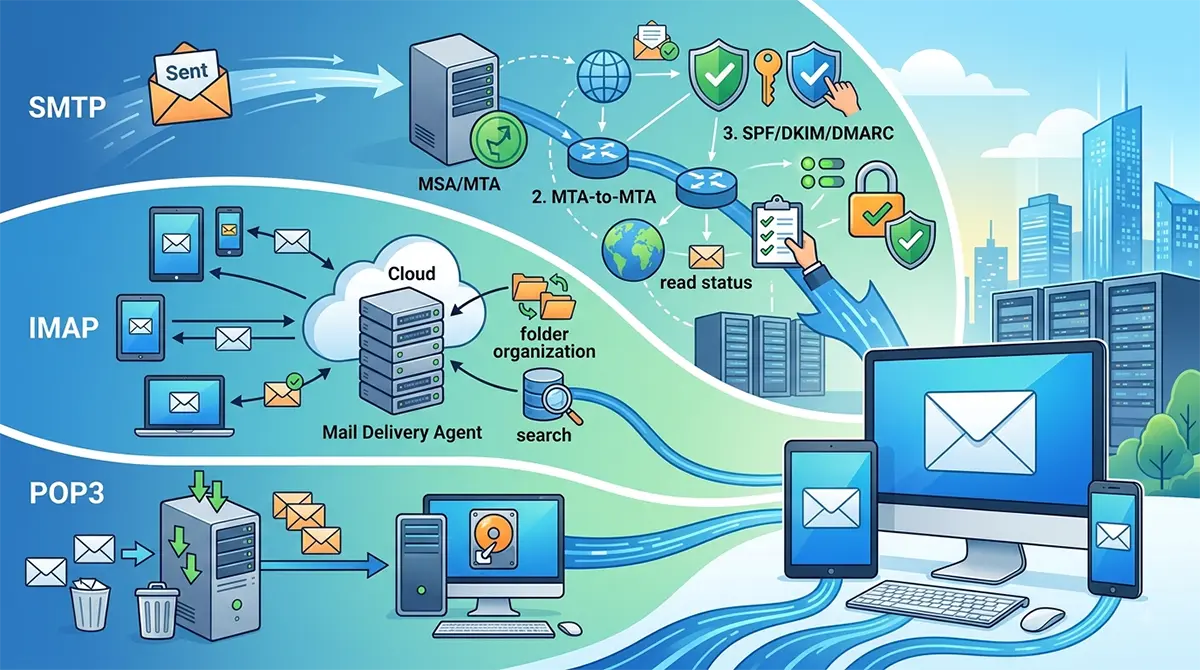
To comprehend how protocols like SMTP, IMAP, and POP3 interact, one must first explore the broader architectural pipeline of an email server setup. An email system divides responsibilities among four specialized software roles: the Mail User Agent, the Mail Submission Agent, the Mail Transfer Agent, and the Mail Delivery Agent.
The Mail User Agent (MUA) represents the client-side application that humans interact with directly. Examples include desktop software like Microsoft Outlook or Mozilla Thunderbird, mobile apps, and web browser interfaces like Gmail. The primary job of the MUA is to provide an intuitive user interface for composing, reading, organizing, and sending messages.
When a user hits send inside their MUA, the message is handed off to the Mail Submission Agent (MSA). The MSA validates the sender identity, verifies that the message formatting complies with global internet standards, and enforces outbound security policies such as transport encryption.
Once validated, the message enters the domain of the Mail Transfer Agent (MTA). The MTA acts as the virtual post office relay. It inspects the destination domain name in the recipient email address, queries Domain Name System (DNS) records for the corresponding Mail Exchanger (MX) record, and establishes a network connection to the target domain server. The MTA uses SMTP to pass the email across intermediate servers until it reaches the destination system.
Finally, upon arrival at the destination server, the message is received by the Mail Delivery Agent (MDA). The MDA takes the incoming message payload and writes it directly to the recipient mailbox storage on disk. From there, protocols like IMAP or POP3 allow the recipient MUA to fetch or synchronize those stored messages onto a personal device.
Simple Mail Transfer Protocol (SMTP): The Outbound Engine
Simple Mail Transfer Protocol is the universal engine driving outbound email transport across the internet. Defined originally in RFC 821 and updated extensively in RFC 5321, SMTP is a push protocol. This means it is designed exclusively to move messages forward from a sender client to a server, or from one server to another server along a delivery route. SMTP cannot pull messages from a remote mailbox storage system; its sole purpose is forward momentum.
The Mechanics of an SMTP Conversation
SMTP operates on a text-based, command-response architecture built over Transmission Control Protocol (TCP). When an outbound connection is initiated, the sending server and receiving server enter an interactive dialogue consisting of ASCII text commands sent by the initiator and three-digit numerical status codes returned by the receiver.
A typical SMTP dialogue proceeds through several distinct structural phases:
-
Establishment and Handshake: The sending client or MTA opens a TCP connection to the receiving server. Upon connection, the receiver issues a 220 service ready code. The sender responds with an EHLO (Extended Hello) or legacy HELO command, passing its fully qualified domain name to establish its identity.
-
Authentication and Encryption Negotiation: If the server supports secure extensions, the sender issues a STARTTLS command. This upgrades the plaintext TCP connection into an encrypted Transport Layer Security (TLS) session. Once encrypted, authentication details are securely transmitted using SASL protocols.
-
Sender Identification: The sender issues the MAIL FROM command, specifying the envelope sender address. The receiving server validates whether this sender is authorized to send through the system or if the sending domain is blocked by spam reputation filters.
-
Recipient Identification: The sender transmits one or more RCPT TO commands, designating the intended recipients. The receiver evaluates each recipient address to determine whether it hosts that mailbox locally or if it must act as a relay agent.
-
Payload Transmission: The sender issues the DATA command. The receiving server responds with a 354 code, signaling that it is ready to consume the message body. The sender then transmits the message headers, plain text, HTML bodies, and base64-encoded attachments, finishing the data stream with a single period on a line by itself.
-
Termination: Upon acknowledging successful receipt with a 250 OK status code, the session is formally terminated using the QUIT command, and the underlying TCP socket closes.
Essential SMTP Ports
The operation of SMTP relies on distinct network ports, each assigned to specific security contexts and delivery scenarios:
-
Port 25: This is the traditional port designated for server-to-server MTA relays. Because historic implementations lacked authentication, Port 25 became a primary target for malware networks sending unauthorized spam. Today, most residential Internet Service Providers (ISPs) and cloud platform providers block outbound traffic on Port 25 to prevent rogue spam distribution, reserving it strictly for legitimate server-to-server traffic.
-
Port 587: Assigned specifically for client-to-server email submission (MSA). Port 587 requires mandatory sender authentication and uses explicit TLS (STARTTLS) to encrypt user credentials during the initial login phase.
-
Port 465: Originally assigned for SMTPS (SMTP over implicit SSL), Port 465 was initially revoked in favor of STARTTLS on Port 587. However, it has seen a formal resurgence under RFC 8314 as a recommended port for implicit TLS email submission, where security wrapping occurs immediately upon TCP connection establishment without requiring an explicit upgrade command.
Outbound Security: Authentication and Anti-Spoofing Standardizations
Because base SMTP was authored during an era when the internet was a trusted academic and research environment, it possessed no native features to verify sender identity. Anyone could open an SMTP connection and claim to send mail from any domain name. To combat identity theft, phishing, and spam, modern email architectures overlay three critical authentication frameworks over standard SMTP operations:
-
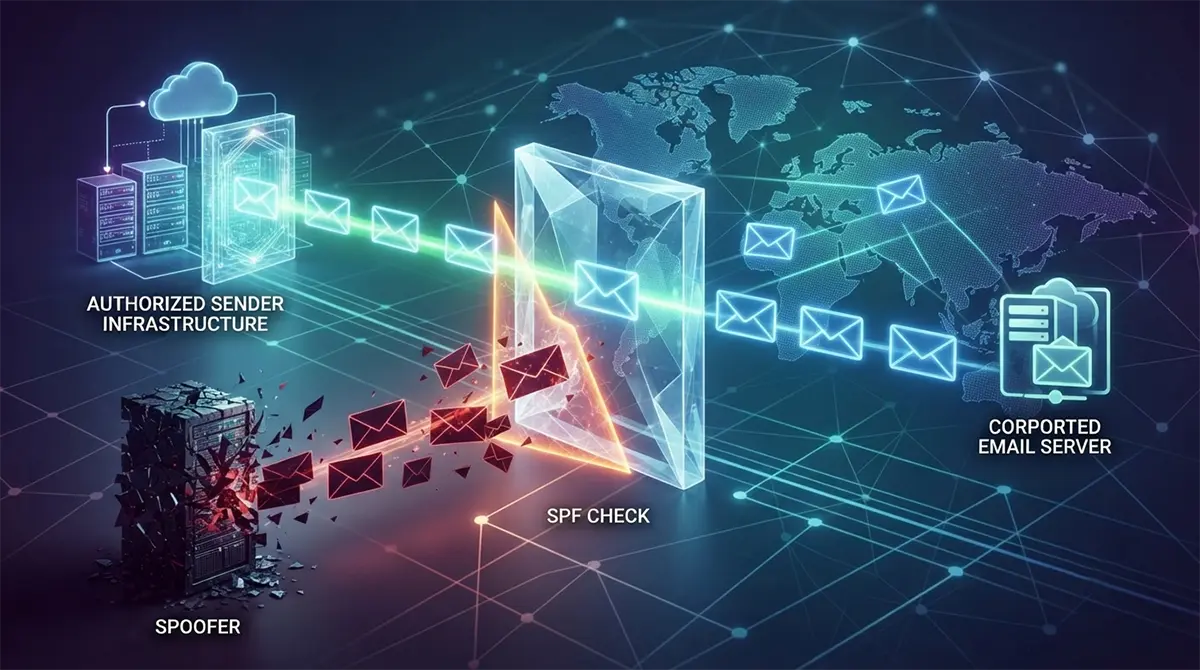
Sender Policy Framework (SPF): SPF allows domain owners to publish specialized TXT records within their public DNS zones. These records specify a strict whitelist of IP addresses and network ranges authorized to send emails on behalf of that domain. Receiving MTAs check the IP address of the incoming SMTP connection against the SPF record of the claimed domain to detect impersonation.
-
DomainKeys Identified Mail (DKIM): DKIM adds a cryptographic layer to outbound messages. The sending server generates a unique public-private key pair. Outbound messages are signed with the private key, inserting a digital signature header into the email headers. The receiving server fetches the public key from the sender domain DNS record and verifies that the signature matches, proving that the message was authorized and was not modified in transit.
-
Domain-based Message Authentication, Reporting, and Conformance (DMARC): DMARC acts as the policy enforcement layer that ties SPF and DKIM together. It instructs receiving servers on how to handle incoming emails that fail SPF or DKIM checks, offering three policy stances: none (monitor only), quarantine (route to spam folder), or reject (block delivery entirely). DMARC also generates automated reporting feedback loops sent back to domain administrators.
Internet Message Access Protocol (IMAP): The Synchronized Cloud Engine
While SMTP handles outbound delivery, retrieving incoming messages from server storage requires a localized protocol. The Internet Message Access Protocol, currently in its fourth major version (IMAP4rev1 / RFC 3501), was engineered specifically to support modern, multi-device usage patterns through centralized message management.
The Architectural Philosophy of IMAP
The core design principle of IMAP is that the email server remains the canonical single source of truth. Unlike older protocols that download messages to a local device and purge them from the server, IMAP leaves all message payloads, directory structures, and metadata permanently stored on the central server filesystem.
When a user opens an IMAP-configured email client on a smartphone, laptop, or web client, the application opens a connection to the server and creates a synchronized local view of the remote mailbox. Any action performed within the client interface is executed as a command against the server storage:
-
Reading a message updates its read state flag on the server.
-
Moving an email into a custom folder moves the message object on the server directory structure.
-
Deleting a message sets a deleted flag on the server, eventually purging it from central disk space.
-
Drafting a message saves the draft remotely, making it instantly accessible across every other connected device.
Advanced Capabilities of IMAP
IMAP includes several advanced technical features that make it suitable for high-efficiency enterprise environments:
-
Stateful Connection and Real-Time Push Notifications: Standard client-server interactions often rely on periodic polling, where the client checks the server every few minutes for new mail. IMAP supports the IDLE extension (RFC 2177). Under IDLE, the client establishes an open TCP socket, and the server leaves the connection active. The moment a new email arrives, the server proactively pushes an asynchronous notification to the client over the existing socket, delivering instant notifications without wasting mobile battery or network overhead.
-
Selective Data Downloading: IMAP allows clients to parse message structures remotely before downloading the actual content. A client can request only the envelope headers (sender, subject, timestamp) to populate an inbox list quickly. It can download plain text body segments while ignoring large binary attachments until the user explicitly clicks a download button.
-
Server-Side Search Capabilities: Because all mail remains stored centrally, complex search operations are offloaded entirely to the server engine. Instead of forcing a mobile client to index gigabytes of text locally, the client issues a search command to the server, which executes the query against indexed storage and returns only matching message IDs.
-
Shared Mailboxes and Granular Access Flags: IMAP natively supports shared folder structures and system flags. Multiple users can access a single corporate inbox concurrently, seeing real-time updates when a team member marks a customer query as answered or flags a ticket for review.
Standard IMAP Ports
IMAP interactions take place over two designated TCP ports:
-
Port 143: The default non-encrypted port for standard IMAP traffic. Modern systems immediately mandate a STARTTLS command on Port 143 to upgrade the unencrypted connection into a secure TLS socket before transmitting login credentials.
-
Port 993: The dedicated port for IMAPS (IMAP over implicit TLS). The network session is wrapped in TLS encryption from the instant the TCP connection opens, offering strong protection against credential interception and packet sniffing.
Post Office Protocol Version 3 (POP3): The Local Storage Specialist
Developed prior to the era of ubiquitous mobile internet and multi-device setups, Post Office Protocol version 3 (POP3), standardized under RFC 1939, offers a fundamentally different approach to email retrieval compared to IMAP.
The Physical Post Office Metaphor
POP3 is built upon a literal translation of traditional physical mail delivery. In the physical world, a postal worker deposits letters into a local post office box. The mailbox owner walks to the post office, empties the box, and brings the physical papers home. Once collected, the physical mailbox at the post office is empty.
POP3 replicates this exact store-and-forward workflow:
-
Incoming emails arrive at the mail server via SMTP and accumulate in a spool file assigned to the user.
-
The client MUA opens a network connection to the POP3 server, authenticates, and requests a list of pending messages.
-
The client downloads every message payload to local storage on the computer hard drive.
-
By default, once the download finishes successfully, the POP3 server deletes the remote copies from server storage.
-
The network connection is closed, and the user interacts with their email completely offline.
The Three Operational States of a POP3 Session
A POP3 session progresses through three structured state machines:
-
Authorization State: The client opens a TCP socket to the POP3 server and transmits authentication credentials using commands like USER and PASS, or through encrypted SASL mechanisms.
-
Transaction State: Once authenticated, the client queries the server for mailbox status using the STAT command, which returns the total count and total byte size of pending messages. The client executes LIST to view message identifiers, RETR to download message contents, and DELE to mark specific messages for removal.
-
Update State: The client issues the QUIT command. At this exact moment, the server enters the Update State, executing all pending DELE commands by permanently removing those emails from the server disk storage, and then closes the socket connection.
Contemporary Use Cases for POP3
While IMAP has largely supplanted POP3 in modern enterprise settings due to the prevalence of smartphones and webmail interfaces, POP3 remains relevant in specific architectural scenarios:
-
Severe Server Storage Limits: Organizations operating on strict storage budgets or managing legacy hosting plans use POP3 to offload storage responsibilities entirely to local endpoint storage, keeping server disk usage near zero.
-
Enhanced Data Privacy and Compliance: In high-security environments where holding sensitive client data on cloud-hosted servers poses legal or regulatory risks, POP3 ensures that messages exist solely on encrypted local workstations once fetched.
-
Intermittent or High-Cost Connectivity: Environments operating over low-bandwidth satellite links or remote field offices benefit from POP3 because connections are opened briefly to batch-download messages and immediately severed, allowing users to process mail offline without ongoing data overhead.
Standard POP3 Ports
POP3 operates over two dedicated TCP ports:
-
Port 110: The traditional non-encrypted port for POP3 traffic. Like IMAP on Port 143, modern deployment standards mandate upgrading Port 110 sessions to TLS via the STLS command.
-
Port 995: The dedicated port for POP3S (POP3 over implicit TLS), providing encrypted communications from connection startup.
Architectural Trade-Offs: IMAP versus POP3
Choosing between IMAP and POP3 requires evaluating operational priorities across hardware resources, workforce mobility, network stability, and long-term data retention strategies.
Multi-Device Access and Synchronization
IMAP is the clear winner for multi-device workflows. Because state synchronization happens centrally on the server, a user can read an email on an iPhone, organize it into a folder on a laptop, and review sent messages on a desktop client seamlessly.
POP3 struggles in multi-device environments. If a POP3 client downloads mail and deletes it from the server, those messages become entirely invisible to any secondary device. While POP3 clients can be configured with an optional setting to leave a copy of messages on the server for a specified number of days, this setup is prone to duplicate downloads, fragmented read states, and out-of-sync sent folders across devices.
Server Resource Overhead and Management
IMAP places heavy demands on server infrastructure. Because all messages, large attachments, and folder trees remain on the server indefinitely, storage consumption grows continuously over time. Server administrators must implement solid storage arrays, high-speed database indexing engines, and regular backup strategies to preserve data integrity across thousands of high-capacity mailboxes.
POP3 dramatically reduces server infrastructure costs. Because the server acts merely as a temporary queue rather than a permanent archive, storage requirements remain minimal and predictable. Once messages are downloaded, the compute and storage burden transfers entirely to the endpoint devices.
Network Dependency and Offline Resilience
IMAP relies heavily on active, reliable network connections. Although modern clients cache local copies for offline viewing, advanced actions like full-text searching across historical archives, folder creation, or flagging require active communication with the central server to guarantee state consistency.
POP3 excels in true offline environments. Because the protocol downloads the entire message body and all attachments locally during the initial retrieval phase, users can work seamlessly in environments with no internet access for extended periods without experiencing software degradation or missing attachment files.
Modern Enterprise Integrations and Strategic Optimization
In contemporary enterprise IT environments, email protocol configuration is rarely treated as an isolated administrative task. Modern email architectures must integrate tightly with identity access management systems, endpoint security suites, regulatory compliance archives, and network firewalls.
When modernizing corporate communications, companies across the Middle East frequently engage technology optimization consulting in UAE to evaluate network bandwidth, compliance storage laws, and protocol suitability before committing to enterprise-wide migrations. These initiatives often involve migrating legacy POP3 configurations or on-premises IMAP setups to modern hybrid systems or cloud-native productivity suites like Microsoft 365 and Google Workspace.
In large-scale enterprise deployments, email infrastructure often incorporates complex relay architectures:
-
Hybrid Mail Relays: Organizations maintain on-premises SMTP relay servers to handle high-volume transactional mail from internal line-of-business software, enterprise resource planning (ERP) platforms, and IoT scanner devices, while routing user mailboxes through cloud IMAP providers.
-
Secure Email Gateways (SEGs): Outbound and inbound SMTP traffic is routed through inline security appliances. These gateways inspect message payloads in real time, performing sandboxing on suspicious attachments, analyzing URL reputations, and blocking phishing campaigns before messages ever hit the primary MDA.
-
Journaling and Compliance Archival: To meet strict financial and medical compliance mandates, enterprise email servers utilize SMTP journaling. The server automatically generates a duplicate, unalterable copy of every inbound and outbound message stream, routing it directly to an isolated, write-once-read-many (WORM) compliant storage vault.
Advanced Security Layering for Email Protocols
Given that email remains the single largest vector for cyberattacks, securing the communication channels used by SMTP, IMAP, and POP3 is critical. Standard password-based authentication over plaintext channels is no longer acceptable in modern network administration.
Transport Layer Security: Explicit versus Implicit
To protect email content and credentials from interception by malicious actors on intermediate network nodes, transport protocols must be encrypted using TLS.
Implicit TLS establishes an encrypted channel before any application-level commands are exchanged. The client opens a connection to a specific port reserved exclusively for secure traffic (such as Port 465 for SMTP, Port 993 for IMAP, or Port 995 for POP3). The TLS handshake happens immediately at the TCP socket layer. If the handshake fails, the session terminates instantly.
Explicit TLS, commonly referred to as STARTTLS, begins as an unencrypted plain text session on a standard port (such as Port 587 for SMTP or Port 143 for IMAP). The client queries the server capabilities, receives confirmation that STARTTLS is supported, and issues the command to negotiate encryption. Once the TLS handshake completes over the existing socket, all subsequent commands and data payloads are encrypted. While flexible, explicit TLS can be susceptible to SSL stripping attacks if the client is not strictly configured to require encryption.
Authentication Frameworks: SASL and OAuth 2.0
Modern email servers use Simple Authentication and Security Layer (SASL) protocols to decouple authentication mechanisms from the underlying mail protocols. Through SASL, email servers can support advanced authentication mechanisms:
-
CRAM-MD5 / DIGEST-MD5: Legacy challenge-response mechanisms that allow a client to prove knowledge of a password without transmitting the plaintext password over the wire.
-
OAuth 2.0 (Modern Auth): The current enterprise standard for secure email access. Rather than storing static account passwords inside an email client, the client uses OAuth 2.0 token-based authorization. The user authenticates through a centralized Identity Provider (IdP) supporting Multi-Factor Authentication (MFA). The IdP issues a short-lived access token that the MUA presents to the IMAP, POP3, or SMTP server to grant access. If a mobile device is stolen, administrators can revoke the OAuth token centrally without forcing a domain-wide password reset.
Evolution and the Horizon Beyond Traditional Protocols
As digital communication requirements expand, traditional email protocols face evolving demands. While SMTP remains the irreplaceable, universal standard for inter-domain server-to-server delivery, the edge interfaces between clients and servers are increasingly migrating toward modern API-driven architectures.
RESTful APIs and Web Services
Modern cloud email providers heavily utilize RESTful Web APIs alongside traditional protocols. Platforms like the Gmail API or Microsoft Graph API allow custom applications to send, retrieve, and search emails over standard HTTP/HTTPS connections (Ports 80 and 443).
These API structures offer distinct technical advantages over raw SMTP or IMAP for application developers:
-
They traverse strict corporate firewalls without requiring specialized ports like 587 or 993 to be opened.
-
They leverage native JSON payloads and web-friendly data structures instead of parsing complex MIME message streams manually.
-
They allow fine-grained access control, enabling an app to request permission to draft messages without granting full read access to an entire historical inbox archive.
JSON Meta Application Protocol (JMAP)
Recognizing the technical complexities and bandwidth overhead inherent in aging standards like IMAP, the Internet Engineering Task Force (IETF) standardized the JSON Meta Application Protocol (JMAP) under RFC 8620 and RFC 8621.
JMAP is designed as a modern, lightweight, web-native replacement for IMAP and POP3. Operating entirely over HTTP, JMAP uses structured JSON payloads for state synchronization, batching multiple data requests into single network round-trips. This significantly reduces latency on lossy mobile networks, lowers battery consumption, and simplifies client application development while maintaining full compatibility with existing server storage paradigms.
Proprietary Exchange Protocols
In corporate Microsoft environments, proprietary protocols like MAPI over HTTP (Messaging Application Programming Interface) and Exchange ActiveSync (EAS) often replace IMAP and POP3 altogether. EAS was built specifically to synchronize email, calendar appointments, global address lists, and task items over a single HTTP socket, optimizing mobile synchronization long before modern web standards caught up.
A Unified Synthesis of Email Architecture
The longevity of traditional email protocols stands as a testament to the power of modular, open networking standards. Rather than relying on a single closed application, digital messaging succeeds because it splits complex tasks across specialized, interoperable protocols:
-
SMTP guarantees that messages move forward across disparate global networks, acting as the universal delivery mechanism that bridges isolated platforms together.
-
IMAP provides a dynamic, state-synchronized cloud storage model, enabling seamless access across smartphones, tablets, laptops, and web interfaces.
-
POP3 provides a lean, localized storage model designed for privacy, local archiving, and offline processing.
Understanding the mechanics, port configurations, security extensions, and architectural trade-offs of these core components empowers IT leaders, software engineers, and system administrators to design resilient, secure, and scalable messaging infrastructures capable of supporting modern global business operations.