


The landscape of enterprise information technology has shifted dramatically over the past two decades. Organizations of all sizes now rely heavily on virtualization to maximize hardware efficiency, streamline deployment pipelines, and reduce operational overhead. At the heart of this technological revolution sits VMware ESXi, a powerful bare-metal hypervisor that abstracts physical server hardware into secure, flexible virtual machines. However, as virtualization footprints expand from a handful of servers to massive, globally distributed data centers, keeping a watchful eye on performance becomes increasingly complex.
Managing these sprawling environments requires more than basic observation tools. It demands intelligent, predictive, and comprehensive management platforms. This is where VMware Aria Operations enters the picture. Formerly known as vRealize Operations, this advanced management suite provides the deep visibility, automated analytics, and proactive remediation necessary to keep ESXi hosts performing at their absolute peak.
The Evolution and Importance of Virtualization Monitoring
In the early days of virtualization, administrators monitored virtual machines and physical hosts using rudimentary scripts and fragmented tools. A spike in CPU utilization on a single virtual machine could trigger a cascade of alerts, often leaving IT teams scrambling to identify the root cause. Was the issue isolated to the guest operating system, was the physical ESXi host starved for memory, or was storage latency throttling input and output operations?
As businesses migrated mission critical applications, databases, and customer facing portals onto virtualized infrastructure, the margin for error shrank to nearly zero. Downtime translates directly to lost revenue, diminished customer trust, and potential regulatory penalties. Consequently, virtualization monitoring evolved from a reactive chore into a proactive science.
Modern monitoring solutions must understand the intricate relationships between physical hardware, hypervisor layers, software defined storage, virtual networking, and guest operating systems. VMware ESXi acts as the critical bridge in this hierarchy. If the hypervisor suffers from resource contention, memory ballooning, or network packet drops, every virtual machine running on that host will feel the impact. Monitoring ESXi is therefore not just about watching CPU and memory graphs; it is about maintaining the foundational health of the entire digital enterprise.
Unpacking VMware Aria Operations: The Intelligent Control Center
VMware Aria Operations is designed to meet the demands of modern cloud operating models. It moves beyond traditional threshold based alerts, which often bombard administrators with false positives and noise, relying instead on advanced analytics, machine learning, and predictive modeling.
The platform continuously learns the normal behavior of your ESXi hosts and virtual machines. By establishing dynamic thresholds, VMware Aria Operations can detect anomalous behavior long before it manifests as a catastrophic outage. For instance, if a specific ESXi host experiences a gradual, unusual creep in memory utilization over a two week period, the platform flags the trend and alerts the administrator to investigate potential memory leaks or misconfigured virtual machines.
Furthermore, VMware Aria Operations unifies operations, troubleshooting, capacity planning, and cost optimization into a single, cohesive pane of glass. Administrators no longer need to jump between multiple utilities to diagnose a performance bottleneck. Everything from physical host temperatures to virtual disk latency is analyzed, correlated, and presented in intuitive dashboards.
Architecture and Deployment Best Practices
Successfully monitoring VMware ESXi with VMware Aria Operations begins with a well planned architecture. Deploying the platform correctly ensures that data collection remains seamless, secure, and resilient against network interruptions.
VMware Aria Operations typically deploys as a virtual appliance, often configured in a high availability cluster for enterprise grade reliability. The core components include analytical nodes, which process incoming data and run machine learning algorithms, and remote collectors, which gather metrics from managed ESXi hosts and vCenter servers.
-
Sizing and Scalability: Before deployment, administrators must accurately assess the number of objects, such as ESXi hosts, virtual machines, datastores, and clusters, that the platform will monitor. Proper sizing guarantees that the analytical nodes have sufficient CPU and memory to process metrics without latency.
-
Network Topology and Security: Communication between VMware Aria Operations and ESXi hosts occurs primarily through vCenter Server via secure APIs. Ensuring low latency network paths and open firewall ports is vital for real time metric collection.
-
Role Based Access Control: Security is paramount in virtualized environments. Configuring granular access permissions ensures that developers, database administrators, and network engineers see only the dashboards and metrics relevant to their specific domains.
Key Performance Indicators and Metric Monitoring for ESXi
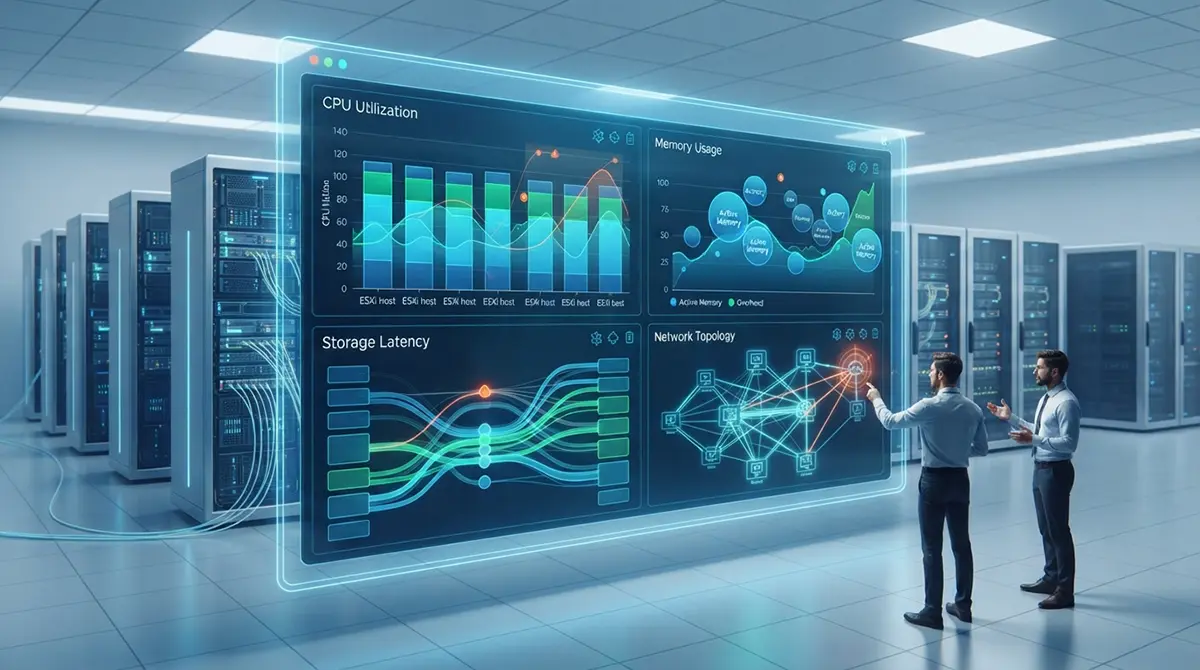
To maintain a healthy ESXi environment, administrators must focus on the core resource pillars: CPU, memory, storage, and networking. VMware Aria Operations simplifies this task by categorizing performance metrics into Health, Risk, and Efficiency scores, allowing teams to instantly identify troubled hosts.
CPU Performance and Contention
CPU monitoring goes beyond simply observing total utilization percentages. An ESXi host might show high CPU utilization because it is doing productive work, or it might be suffering because virtual machines are waiting for CPU scheduling.
-
CPU Ready Time: This is one of the most critical metrics for ESXi performance. It measures the amount of time a virtual machine is ready to run but must wait because the physical CPU cores are busy servicing other tasks. High CPU ready times indicate severe CPU overcommitment on the host.
-
Co-Stop: For multi-vCPU virtual machines, this metric tracks the time spent waiting for all virtual processors to be scheduled simultaneously. Excessive co-stop values point to improperly sized virtual machines.
-
CPU Utilization and Demand: Comparing actual CPU consumption against calculated demand helps administrators determine if a host requires scaling or if workloads need rebalancing across the cluster.
Memory Management and Optimization
Memory allocation in VMware ESXi utilizes advanced techniques such as transparent page sharing, memory ballooning, and hypervisor swapping to squeeze maximum efficiency out of physical RAM. VMware Aria Operations tracks these mechanisms meticulously.
-
Active Memory vs. Consumed Memory: Consumed memory is the amount of physical RAM allocated to a virtual machine, while active memory is the portion currently in active use. Monitoring the delta between these two values reveals opportunities for right-sizing.
-
Ballooning and Swapping: If an ESXi host runs low on physical memory, it activates the balloon driver inside virtual machines to reclaim unused RAM. If ballooning is insufficient, the hypervisor resorts to disk swapping, which dramatically degrades performance. Aria Operations flags ballooning and swapping activity immediately, allowing administrators to add RAM or migrate workloads before performance suffers.
Storage Latency and Datastore Health
Virtual machines are only as fast as the underlying storage subsystem. Whether utilizing traditional SAN arrays, Network Attached Storage, or software defined vSAN architectures, storage bottlenecks can grind applications to a halt.
-
Device Latency: Tracking kernel, device, and queue latency helps isolate whether performance issues originate within the ESXi storage stack, the storage network, or the physical disk array itself.
-
Datastore Capacity and IOPS: Monitoring Input Output Operations Per Second alongside available datastore space prevents sudden storage exhaustion incidents that can freeze virtual machines.
Proactive Troubleshooting and Root Cause Analysis
When a performance degradation occurs, time is of the essence. Traditional troubleshooting involves checking logs, guessing potential causes, and testing fixes iteratively. VMware Aria Operations transforms this reactive cycle into a streamlined, evidence based workflow.
The platform features advanced troubleshooting workbenches that correlate metrics, events, and configuration changes over time. If a performance alert fires on an ESXi host at 2:00 PM, an administrator can view a unified timeline showing that a specific configuration change or a sudden surge in backup traffic occurred precisely at 1:55 PM. This instant correlation drastically reduces Mean Time to Resolution.
Furthermore, VMware Aria Operations utilizes intelligent symptom definitions. Instead of generic alerts, symptoms describe exact operational states, such as high disk latency combined with high queue depth. By grouping related symptoms into actionable alerts, the platform cuts through the noise and directs engineers straight to the root cause.
Capacity Planning, Right-Sizing, and Cost Optimization
Monitoring is not just about keeping the lights on today; it is about preparing for the demands of tomorrow. As organizations grow, hardware resources inevitably fill up. Without proper forecasting, IT departments find themselves emergency purchasing expensive hardware to meet unexpected shortfalls.
VMware Aria Operations excels in predictive capacity planning. By analyzing historical consumption trends using advanced algorithms, the platform calculates precisely when a specific ESXi cluster, datastore, or pool of memory will run out of resources.
-
Time-to-Remaining Metrics: Administrators receive exact projections, such as knowing that a specific datastore has precisely one hundred and twenty days of capacity remaining at current growth rates. This lead time allows procurement teams to purchase and deploy hardware methodically and cost effectively.
-
Right-Sizing Recommendations: In many virtualized environments, virtual machines are vastly over-provisioned because developers and system administrators request maximum resources just to be safe. VMware Aria Operations identifies these idle or oversized virtual machines and generates concrete right-sizing recommendations. Reclaiming wasted CPU and memory resources often frees up enough capacity to delay hardware purchases by months or even years.
-
Cost Visibility: For enterprises operating hybrid clouds or tracking internal chargebacks, the platform translates resource utilization into monetary values. This financial clarity helps organizations understand the true cost of running specific workloads on their ESXi infrastructure.
Modernizing Infrastructure Management and Integration
In contemporary enterprise architectures, virtualization monitoring does not exist in a vacuum. Infrastructure teams work closely with software developers, security officers, and site reliability engineers to deliver robust digital services. Organizations looking to scale their operations often collaborate with providers specializing in DevOps Services in Dubai to streamline deployments and integrate monitoring seamlessly into automated pipelines.
VMware Aria Operations supports this modern collaborative approach through extensive integration capabilities. Using robust REST APIs and webhook notifications, monitoring data and alerts can be forwarded directly to enterprise ticketing systems like ServiceNow, incident management platforms like PagerDuty, or chat applications like Slack and Microsoft Teams.
When an ESXi host experiences a hardware failure or a critical threshold breach, automated workflows can generate tickets, notify on-call engineers, or even trigger self-healing scripts. This level of integration bridges the gap between infrastructure management and modern software delivery lifecycles, ensuring that operations teams remain fully aligned with broader organizational goals.
Best Practices for Sustained Operational Excellence
To extract maximum value from VMware Aria Operations when monitoring VMware ESXi, organizations should adhere to a set of proven best practices.
-
Customize Dashboards for Different Personas: Do not rely solely on default views. Create tailored dashboards for executives, storage administrators, network engineers, and virtualization specialists so each team sees the metrics that matter most to them.
-
Tune Alert Thresholds: While out-of-the-box analytics are remarkably accurate, every environment is unique. Fine-tune alert thresholds over time to eliminate nuisance alerts and ensure that every notification demands genuine action.
-
Regularly Review Recommendations: Make capacity planning and right-sizing reviews a routine monthly or quarterly operational habit. Reclaiming wasted resources keeps the virtual environment lean and efficient.
-
Keep the Management Platform Updated: VMware regularly releases updates for Aria Operations that introduce new analytics capabilities, security patches, and expanded compatibility with newer releases of ESXi and vCenter Server. Maintaining an updated platform ensures access to the latest performance insights.
Conclusion
Virtualization monitoring is the cornerstone of a resilient, high performing IT infrastructure. As businesses continue to depend on VMware ESXi to power their most critical workloads, the need for intelligent, automated, and deeply integrated management tools becomes undeniable.
VMware Aria Operations transforms the daunting challenge of managing complex virtual environments into a structured, proactive discipline. By offering deep visibility into CPU, memory, storage, and networking metrics, alongside predictive capacity planning and automated troubleshooting, the platform empowers IT teams to shift from firefighting mode to strategic innovation. Embracing these advanced monitoring capabilities ensures that your virtualized infrastructure remains secure, efficient, and ready to meet the demands of the future.
What specific challenges are you currently facing with your ESXi performance monitoring and capacity planning workflows?