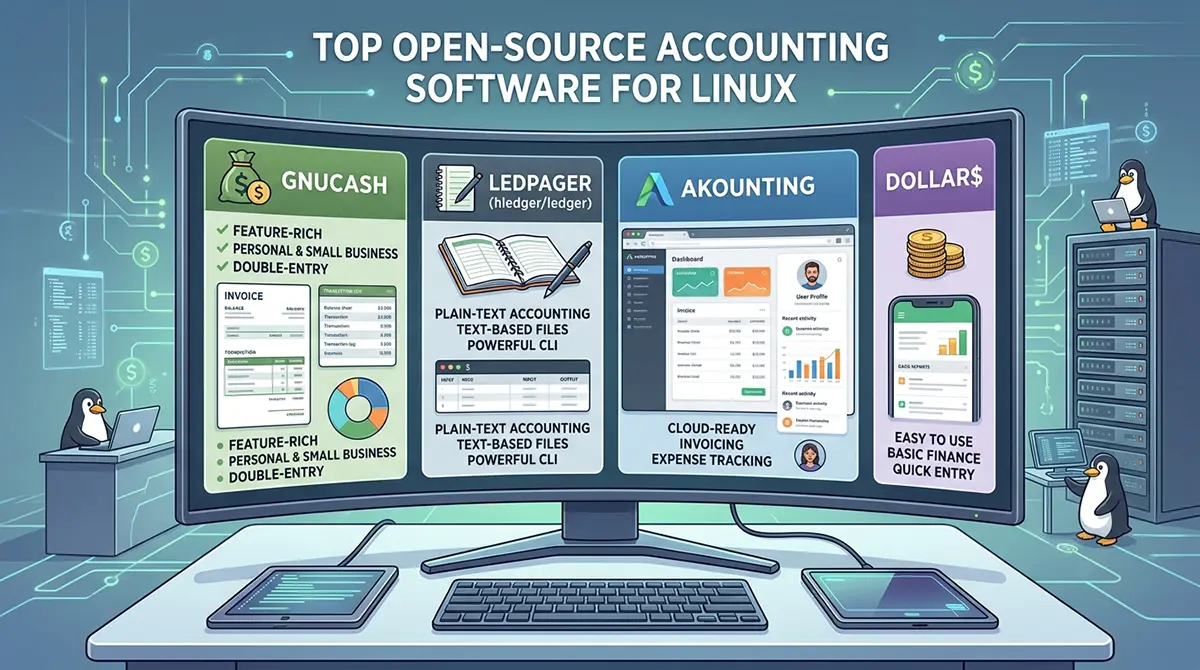



In a world where financial privacy, cost control, and complete ownership of data matter more than ever, Linux users have a distinct advantage. Open-source accounting software thrives on this platform, offering powerful tools that run natively or through simple container setups without forcing users into recurring subscriptions or locked ecosystems. As of 2026, the landscape has matured significantly. Desktop classics continue to receive steady updates, web-based self-hosted options have become more polished and accessible via Docker, and full ERP suites deliver enterprise-grade features at zero licensing cost. Whether you are a freelancer tracking invoices, a small business managing inventory and taxes, or a power user who prefers plain-text ledgers, there is a solution that respects both your workflow and your principles.
This article explores the strongest open-source accounting options available for Linux today. It focuses on tools that are actively maintained, genuinely free under open licenses, and practical for real-world use. The goal is not merely to list software but to help you understand which tool fits specific needs, how the options compare in philosophy and capability, and what practical steps make adoption smooth.
Why Open-Source Accounting Matters on Linux?
Proprietary accounting platforms often create friction for Linux users. Many refuse to offer native clients, push cloud-only models that raise privacy concerns, or lock advanced features behind paid tiers that escalate over time. Open-source alternatives eliminate these problems at the root. Source code is available for inspection, data stays under your control, and community-driven development ensures the software evolves according to user needs rather than quarterly revenue targets.
Linux distributions make installation straightforward. Most major tools appear in official repositories or as Flatpaks and AppImages. Self-hosted web applications install cleanly with Docker Compose, allowing a small VPS or home server to become a private accounting system accessible from any browser. For users who prefer offline work, desktop applications store everything in local files or databases that never leave the machine unless you choose to back them up.
In 2026 the emphasis on data sovereignty has only grown. Regulations around financial data, rising subscription costs from commercial vendors, and high-profile breaches have pushed more individuals and businesses toward self-hosted or local solutions. Open-source accounting software meets this demand head-on while remaining free of charge.
Need a Reliable DevOps Partner in Dubai?
Managing servers, monitoring performance, and automating workflows can be overwhelming when you’re trying to scale your business. If you’re looking for hands-on expertise in cloud migration, server hardening, and pipeline automation, We are here to bridge the gap. Reach out to us and let’s build a resilient infrastructure tailored to your needs.
GnuCash: The Enduring Standard for Double-Entry Bookkeeping
GnuCash remains the most widely recommended desktop accounting application for Linux users. First released in the late 1990s, it has spent nearly three decades refining a pure double-entry system that teaches proper accounting principles while delivering practical tools for everyday use. The interface feels familiar to anyone who has used a checkbook register, yet underneath sits a robust engine capable of handling multi-currency transactions, investment portfolios, scheduled bills, and detailed reports.
Installation on modern Linux distributions is trivial. Most package managers offer GnuCash directly, and Flatpak packages ensure a consistent experience across distributions. Once installed, users create accounts for assets, liabilities, income, and expenses. Transactions post to the general ledger with automatic balancing. Bank statement imports via OFX or QIF files simplify reconciliation, though automatic bank feeds are intentionally absent so that data never travels through third-party services without user consent.
For small businesses, GnuCash supports invoicing, customer and vendor tracking, and basic payroll entries. Reports cover profit and loss, balance sheets, cash flow, and transaction summaries. The learning curve exists because the software refuses to hide accounting concepts behind simplified single-entry views. That same rigor becomes an advantage for anyone who wants books that an accountant can trust or who plans to grow beyond personal finance into business accounting.
Community support remains strong through mailing lists, documentation, and active development. In 2026 GnuCash continues to receive regular releases that improve performance, refine the user interface, and expand import options. It is the tool of choice for freelancers, consultants, and small operations that value correctness and offline reliability above glossy dashboards.
Frappe Books: Modern Desktop Accounting with Local Privacy
Frappe Books represents a newer generation of desktop accounting software designed with contemporary user expectations in mind. Built on Electron and Vue.js with an SQLite backend, it delivers a clean, responsive interface that feels closer to modern web applications while remaining fully offline and local. Data never leaves the machine unless the user explicitly exports or backs it up.
Key strengths include intuitive invoicing with customizable templates, expense tracking, point-of-sale capabilities for simple retail scenarios, and clear financial dashboards. The application works offline by design and syncs changes only when connectivity returns if multi-device use is configured carefully. Installation options include Flatpak, direct downloads, and package managers on many distributions.
Frappe Books targets small and medium businesses that want professional features without the complexity of a full ERP. Reports cover the essentials: profit and loss, balance sheet, and general ledger. The modern interface lowers the barrier for users who find traditional accounting software intimidating, yet the underlying double-entry structure maintains accuracy. Active development through 2026 has kept the project responsive to user feedback, making it a compelling alternative for those seeking something fresher than classic desktop tools.
Akaunting: Self-Hosted Web Accounting for Small Businesses
Akaunting has established itself as one of the most practical open-source web-based accounting platforms. Written in PHP and Laravel, it installs easily on a Linux server or via Docker. Once running, users access a polished browser interface from any device. Core features include invoicing, expense management, bank reconciliation, multi-currency support, and a growing ecosystem of apps and extensions.
The self-hosted model gives complete control. Financial data resides on hardware you administer. Updates arrive through the project’s release cycle, and the community contributes modules for additional functionality. Freelancers and small teams appreciate the ability to create professional invoices, track payments, and generate basic reports without monthly fees. Multi-user support allows collaboration while role-based permissions protect sensitive information.
In 2026 Akaunting remains actively maintained, with regular improvements to the interface, performance, and available integrations. It sits in a sweet spot: more capable than pure personal finance tools yet lighter than full ERP systems. For Linux users comfortable with Docker or basic server administration, it provides a private alternative to commercial cloud accounting services.
Odoo Community and ERPNext: Full Business Suites with Strong Accounting Modules
When accounting needs expand beyond bookkeeping into inventory, sales, purchasing, manufacturing, or human resources, full ERP systems become relevant. Two open-source leaders dominate this space on Linux: Odoo Community Edition and ERPNext.
Odoo Community offers a modular architecture. Users install only the applications they need. The accounting module delivers double-entry bookkeeping, bank reconciliation, multi-company support, tax management, and extensive reporting. Because the entire suite shares a common database, invoices flow naturally into inventory and sales records. Deployment typically uses Docker or direct installation on a Linux server. The community edition remains free and open source, though many organizations eventually explore paid modules or hosting services for advanced features and support.
ERPNext, built on the Frappe framework, takes a similar integrated approach with a strong focus on small and medium enterprises. Its accounting features cover general ledger, accounts payable and receivable, multi-currency, budgeting, and detailed financial statements. Additional modules handle manufacturing, projects, and CRM without forcing users into a fragmented set of tools. Self-hosting on Linux is well documented, and the project maintains an active development pace into 2026.
Both systems require more setup and ongoing administration than desktop applications. They reward that investment with scalability. A business that begins with simple invoicing can later activate inventory or payroll modules without migrating data to a new platform. For growing companies already running Linux infrastructure, these suites eliminate the need for multiple specialized applications.
Plain-Text Accounting: Ledger, hledger, and Beancount
A dedicated community prefers accounting tools that treat data as human-readable text files. Ledger, hledger, and Beancount form the core of the plain-text accounting movement. Transactions are recorded in simple text files using a consistent syntax. Command-line tools then generate balances, reports, and visualizations.
This approach offers unmatched transparency and version control. Files live in Git repositories, making every change auditable. Users can edit entries with any text editor, automate imports with scripts, and produce reports through flexible query languages. hledger adds a more polished interface and additional features while remaining compatible with Ledger’s format. Beancount emphasizes correctness and includes powerful tools for generating reports and charts.
Linux is the natural home for these tools. Installation is simple via package managers or language-specific installers. Performance remains excellent even with large transaction histories. The learning curve centers on understanding the file format and query syntax rather than navigating complex graphical interfaces. For technical users, developers, and anyone who values data longevity and scriptability, plain-text accounting provides a uniquely powerful and future-proof solution.
Other Notable Desktop and Personal Finance Options
Several additional desktop applications serve personal finance and lighter business needs effectively. KMyMoney integrates tightly with the KDE desktop environment and offers a friendly interface for tracking accounts, budgets, and investments. Money Manager Ex provides cross-platform simplicity with solid reporting and mobile companions for users who need occasional on-the-go access. HomeBank focuses on straightforward personal budgeting with clear visualizations. Skrooge, another KDE-oriented tool, emphasizes speed and flexible reporting.
These applications install quickly from distribution repositories or Flatpak and require minimal configuration. They excel when the primary goal is understanding personal spending patterns, managing household budgets, or maintaining simple business records without the overhead of full double-entry systems or web servers.
Self-Hosted Alternatives and Emerging Tools
Beyond the established names, several promising projects expand the choices available in 2026. Bigcapital focuses on modern accounting and inventory features in a self-hosted package. LineLedger positions itself as a fully open-source, Docker-friendly double-entry system designed for easy deployment and complete data ownership. LedgerSMB continues the tradition of SQL-based double-entry systems with a long history of development. InvoicePlane specializes in self-hosted invoicing for freelancers who need professional billing without a complete accounting suite.
These tools illustrate the ongoing vitality of the open-source ecosystem. New projects appear regularly, often addressing specific pain points such as easier installation, better multi-tenant support, or tighter integration with modern development practices.
Choosing the Right Tool for Your Needs
Selection depends on several practical factors. Desktop applications like GnuCash and Frappe Books suit users who prefer offline work, minimal system administration, and local data storage. Web-based tools such as Akaunting shine when multiple users need simultaneous access or when browser-based convenience outweighs the need for constant offline capability. Full ERP systems become appropriate once inventory, sales pipelines, or multi-department processes enter the picture. Plain-text tools reward technical comfort and a desire for maximum control and longevity.
Consider also the scale of operations. Personal finance or single-person freelancing rarely requires more than a solid desktop package. Small teams benefit from multi-user web applications. Growing businesses often find the modular nature of Odoo or ERPNext the most sustainable long-term path. Tax compliance needs, multi-currency requirements, and reporting depth further refine the decision.
Installation and ongoing maintenance should factor into the choice. Desktop tools demand almost none. Docker-based web applications require basic familiarity with containers but remain manageable for most Linux users. Full ERP deployments benefit from careful planning around backups, updates, and security hardening.
Practical Tips for Getting Started
Begin by clarifying requirements. List the must-have features: invoicing, bank reconciliation, multi-currency, inventory, reports, multi-user access, offline capability. Then test two or three candidates with sample data. Most open-source projects provide documentation, demo sites, or easy local installation that allow evaluation without commitment.
Backups remain essential regardless of the chosen tool. Local desktop files should be included in regular system backups. Self-hosted applications need database dumps and configuration backups scheduled automatically. Version control for plain-text ledgers provides an elegant additional layer of protection.
Security practices matter especially for self-hosted systems. Keep the underlying Linux distribution updated, restrict network access with firewalls, use strong authentication, and consider HTTPS termination. For desktop tools, disk encryption protects data at rest.
Community resources accelerate learning. Official documentation, forums, mailing lists, and chat channels for each project contain answers to common questions. Many tools also benefit from third-party tutorials and blog posts written by experienced users.
The Broader Landscape and Future Outlook
The open-source accounting ecosystem on Linux in 2026 demonstrates maturity and diversity. Established projects continue steady improvement while newer tools introduce modern interfaces and deployment models. The absence of vendor lock-in remains a consistent advantage. Users can export data in standard formats, switch tools when needs change, and inspect or modify source code if necessary.
Looking ahead, expectations include continued refinement of user interfaces, better automation through scripting and APIs, improved mobile access for self-hosted solutions, and tighter integration with open banking standards where regulations permit. Artificial intelligence features appear in some experimental projects, though careful users will evaluate transparency and data handling before adopting them.
Linux users occupy a privileged position. They can choose tools that align with free software principles, maintain complete control over sensitive financial data, and avoid the recurring costs that characterize much of the commercial software market. The options described here cover the spectrum from simple personal tracking to comprehensive business management. With careful selection and a willingness to invest modest time in setup and learning, any Linux user can build a reliable, private, and cost-free accounting system that serves well into the future.
The best open-source accounting software is ultimately the one that matches your specific requirements and comfort level. GnuCash continues to set the standard for desktop double-entry work. Frappe Books and Akaunting offer modern experiences for those seeking polished interfaces. Odoo and ERPNext scale with growing organizations. Plain-text tools empower the technically inclined. Together they prove that professional financial management does not require proprietary platforms or continuous subscription payments. On Linux, the tools are ready, the communities are active, and the data remains yours.