


At the core of every modern server environment, enterprise cloud deployment, and system administration toolkit lies the Linux operating system. Whether you are building high availability database clusters, writing automated deployment scripts, or managing complex enterprise networks, comprehending the fundamental layout of the Linux file system is paramount. Unlike operating systems that use drive letters to designate independent storage devices, Linux presents every file, directory, hardware component, and process through a single, unified hierarchical tree. Every resource branches out from a single origin point known as the root directory. Mastering this structure is not merely an exercise in memorization. It is the single most critical skill required to navigate, configure, troubleshoot, and secure any Linux environment effectively.
The Universal Rule of Everything as a File
The philosophical foundation of Linux design is rooted in a simple yet powerful design principle: everything is a file. Text documents, system configuration files, executable programs, hardware devices, physical storage partitions, network sockets, and even active running processes are all represented within the standard directory tree as files or directory nodes. This elegant abstraction allows administrators and scripts to interact with diverse hardware and software components using unified, standard command line utilities. Understanding how these components are organized according to the Filesystem Hierarchy Standard, commonly abbreviated as FHS, transforms what initially seems like an overwhelming web of obscure directories into an intuitive, logical architecture.
The Role and Importance of the Filesystem Hierarchy Standard
To fully appreciate why Linux structures its storage in this way, one must examine the genesis of the Filesystem Hierarchy Standard. Maintained by the Linux Foundation, the FHS establishes guidelines that software developers, distribution maintainers, and system administrators follow to maintain consistency across different Linux distributions. Whether operating on Debian, Ubuntu, Red Hat Enterprise Linux, Fedora, Alpine, or CentOS, the core directory structure remains predictable. This standardization ensures that system scripts, binary executables, manual pages, and configuration files reside in known locations, making cross distribution system administration seamless and scalable.
Root Directory: The Ultimate Origin Point
The absolute starting point of every file path in Linux is the root directory, represented simply by a single forward slash. Unlike Windows, where separate physical or logical drives receive distinct letters such as C drive or D drive, Linux attaches all physical storage partitions, optical drives, network mounts, and virtual file systems beneath this unified root directory. When a new storage device is introduced into a system, it is not given a new drive letter. Instead, it is mounted onto a specific directory location within the existing root tree. This design abstracts the physical hardware layer from the software layer, allowing system administrators to reorganize underlying disks, RAID arrays, or cloud storage volumes without breaking the file paths relied upon by applications and user scripts.
Essential Primary Directories and Their Specific Purposes
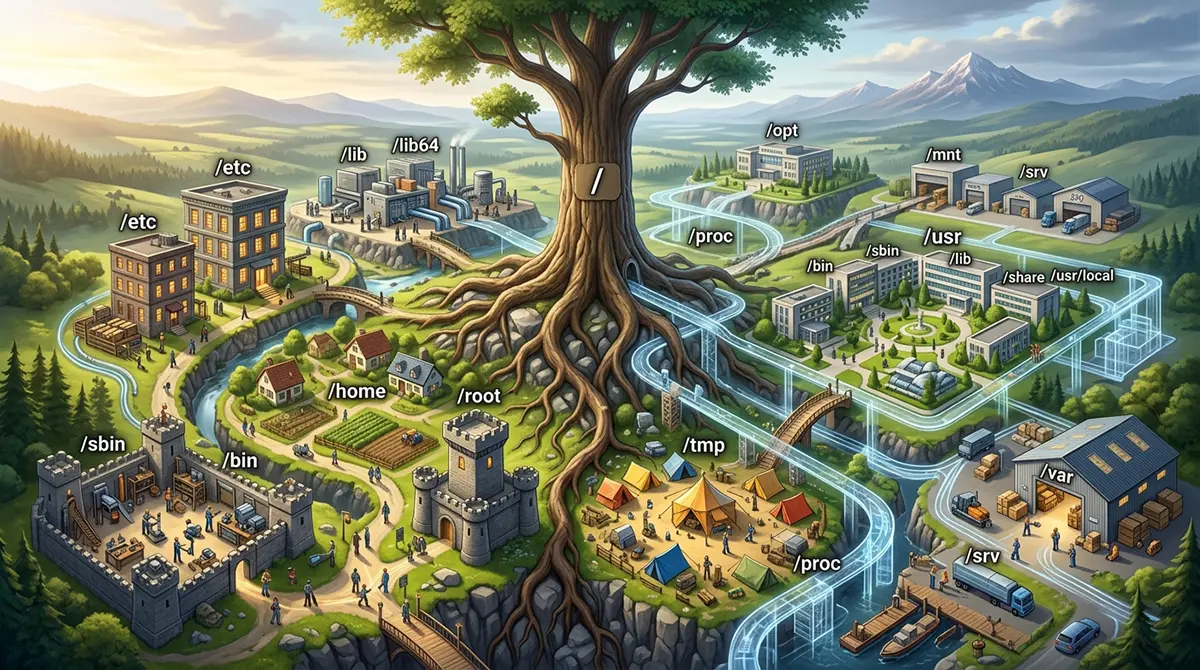
Immediately beneath the root directory lies a carefully structured set of primary directories, each serving a distinct operational function. Understanding the purpose of each directory enables engineers to locate log files quickly during system outages, audit software installations, enforce proper security permissions, and build efficient backup policies.
-
/boot: Contains every file necessary to start the operating system during the initial booting phase, including kernel images, initramfs RAM disk images, and GRUB bootloader configuration files.
-
/bin: Stores essential binary executables required for basic system operation, recovery, and single user maintenance, such as basic commands like ls, cp, mv, cat, and bash.
-
/sbin: Houses system binaries intended exclusively for system administrators, containing essential management tools for disk formatting, firewall control, and system network management.
-
/etc: Concentrates virtually all system wide configuration files in plain text, making system configuration backups, version control, and automated server replication straightforward.
-
/home: Serves as the isolated user workspace environment containing personal subdirectories, personal documents, and hidden user application settings for regular system users.
-
/root: Functions as the dedicated superuser home directory, isolated at the root level to guarantee administrative access even if secondary storage volumes fail to mount.
-
/tmp: Stores short lived, ephemeral temporary files generated by system applications and installation scripts, frequently cleared automatically upon system reboot.
-
/var: Holds variable data that changes dynamically during system operation, including print spools, lock files, package manager states, and critical diagnostic system log files.
-
/usr: Houses read only user utilities, secondary application binaries, dynamic libraries, and static documentation installed by the system package manager.
-
/opt: Serves as an isolated installation space for optional, self contained third party software suites and proprietary applications.
-
/usr/local: Provides a isolated location for locally compiled software and custom binaries built from source, preventing system updates from overwriting manual installations.
-
/mnt: Acts as a temporary manual mount point for system administrators attaching external hard drives, USB volumes, or remote network file systems during maintenance.
-
/media: Serves as an automated mount location for removable storage media such as USB flash drives, memory cards, and optical media attached to modern desktop environments.
-
/srv: Contains site specific data served by system protocol services, including web server roots, public FTP repositories, or version control repositories.
-
/run: Maintains volatile runtime state information, active process ID files, and Unix domain sockets created since the last system boot.
The Power of Dynamic Pseudo File Systems
Modern Linux systems rely heavily on dynamic, virtual file systems that do not exist on physical storage disks, but are generated on the fly in memory by the operating system kernel. The two most prominent virtual file systems are proc and sys.
The proc directory, short for process file system, is a pseudo file system that acts as a window directly into the running Linux kernel. Although proc appears as a collection of directories and files on disk, it consumes zero physical disk space. Instead, the files inside proc represent real time kernel data structures, system hardware metrics, and information about every currently running process. Every active process on the system is assigned a numeric directory inside proc matching its Process ID. Navigating into a process directory allows administrators to inspect its environment variables, file descriptors, memory usage, and command line execution arguments in real time. Additionally, core system files in proc, such as proc cpuinfo and proc meminfo, provide instant diagnostic details regarding CPU architecture and RAM utilization.
Similarly, the sys directory represents the sysfs virtual file system introduced in the Linux kernel to provide a structured, organized model of system hardware and device drivers. While proc focuses on process and runtime kernel statistics, sys provides a hierarchical view of physical devices, kernel modules, power management settings, and bus architectures attached to the machine. System administrators and automated hardware configuration tools use the sys directory to tune device settings, inspect hardware topology, and modify kernel runtime parameters dynamically without requiring a system reboot.
Device Nodes and System Abstraction
System devices and hardware interfaces are exposed to the operating system as file nodes located inside the dev directory. Short for devices, dev contains special device files that act as interfaces for device drivers. In Linux, storage drives are represented as device nodes like sda or nvme0n1, terminal consoles appear as tty devices, and special pseudo devices provide essential functional utilities. Notable special devices inside dev include dev null, which acts as a data sink that discards all input written to it, dev zero, which yields an infinite stream of null zero bytes, and dev urandom, which serves as a source of cryptographically secure pseudorandom numbers. Interacting with files inside dev allows low level scripts and storage utilities to write raw blocks directly to storage hardware, clone disks, or erase storage volumes securely.
Libraries and Shared Functionality
Shared code and functionality required by system binaries are stored within library directories such as lib, lib64, and usr lib. These directories contain dynamic library files, recognizable by their file extension, which function similarly to dynamic link libraries in other operating systems. When an executable binary runs, it dynamically links to these shared library files to execute common function calls, such as memory allocation, mathematical computations, or network communications. Storing shared libraries in centralized lib directories prevents individual software programs from needing to duplicate code, drastically reducing disk memory footprint and simplifying security patching across the operating system.
Operating System Security, Permissions, and File Organization
Understanding the Linux directory layout provides a clear operational advantage when configuring system security, access control lists, and permission models. In Linux, file permissions are strictly enforced based on user ownership, group ownership, and access permission bits for reading, writing, and executing. Because sensitive system binaries reside in protected administrative directories like sbin and usr sbin, standard unprivileged users cannot execute commands that alter system state or modify hardware routing without explicit permission elevation mechanisms such as sudo.
Enterprise Disk Partitioning Strategies
Partitioning strategies and storage architecture planning rely directly on a deep understanding of the Linux file system hierarchy. In enterprise server deployments, placing every directory on a single storage partition is considered a risky practice. If a single logging daemon goes rogue and writes gigabytes of debug logs to var log, or if a user uploads massive files to home, a single partition system will run out of space entirely, causing the operating system kernel to crash or refuse new connections. To prevent such failures, experienced Linux system engineers separate critical directories onto distinct physical storage drives, logical volumes, or network storage mounts.
A robust enterprise partitioning layout typically separates the root filesystem, boot, var, home, and tmp into distinct logical volumes using Logical Volume Manager. Isolating var ensures that runaway log files cannot starve the root filesystem of storage space. Setting specialized mount flags on tmp and home, such as noexec to disable binary execution or nosuid to block privilege escalation, significantly enhances overall operating system hardening against malware and local exploit attempts. Furthermore, separating home onto its own storage volume allows system administrators to perform full operating system reinstallations or distribution upgrades on the root partition without risking the loss of user personal data.
Navigating Absolute versus Relative File Paths
Exploring file path resolution is another essential concept when working with the Linux directory tree. Paths can be specified as absolute paths or relative paths. An absolute path specifies the complete location of a file or directory starting from the root slash, regardless of the user current working directory. For example, referencing a network configuration file via the absolute path /etc/netplan/01-netconfig.yaml guarantees that the system pinpoints the exact file regardless of where the command is executed from.
Conversely, a relative path references a file or directory location relative to the user current working directory inside the terminal session. Relative paths utilize special dot notation, where a single dot represents the current working directory, and two consecutive dots represent the parent directory immediately above the current position in the tree hierarchy. Understanding how to traverse relative and absolute paths efficiently enables developers and administrators to write portable automation scripts, manage containerized application workloads, and streamline daily command line navigation.
Career Opportunities in Enterprise Infrastructure
Software development, system integration, and IT infrastructure operations across major global technology hubs rely heavily on proficient Linux engineering skills. For professionals looking to build high performance careers in enterprise IT, cloud engineering, or systems architecture, deep familiarity with Linux infrastructure opens vast global career opportunities. The demand for qualified systems engineers and cloud specialists capable of managing high availability server architectures is particularly strong in rapidly expanding digital transformation markets. Candidates exploring competitive international compensation packages frequently research metrics such as Linux dubai salary standards when evaluating global tech employment opportunities, as enterprise hubs invest heavily in top tier infrastructure talent.
Securing and maintaining mission critical infrastructure requires continuous technical oversight, pro-active monitoring, and rapid fault resolution. When enterprise operations face unexpected downtime, security vulnerabilities, or database performance bottlenecks, organizations depend on experienced systems engineers who possess an intrinsic understanding of the underlying Linux environment. Whether troubleshooting an unmountable file system, reconfiguring a corrupted boot sequence, or optimizing network socket performance, having access to the best tech support dubai platforms and cloud infrastructure specialists ensures that enterprise services remain resilient, secure, and performant around the clock.
Hard Links versus Symbolic Links
Symbolic links and hard links form another fundamental layer of the Linux file system architecture. A hard link is a direct reference pointing to the exact underlying inode on the physical disk where file data is stored. Because a hard link points directly to the inode data, creating a hard link does not duplicate physical disk space, and deleting the original file name leaves the hard link intact with full access to the original data. However, hard links cannot span across different storage partitions or file systems. Symbolic links, often referred to as symlinks, function as flexible shortcuts that point to another file path name. Symbolic links can span across different partitions, file systems, and network storage mounts, making them invaluable for software versioning, library management, and dynamic directory remapping.
Modern File System Evolution: The UsrMerge Architecture
Modern Linux distributions continue to evolve their implementation of the Filesystem Hierarchy Standard to improve system performance, security, and maintenance simplicity. The consolidation of bin, sbin, lib, and lib64 directories into their respective usr equivalents, known as the UsrMerge project, represents one of the most significant modern file system architecture shifts. By unifying early boot binaries into the usr directory tree and replacing root level binary folders with symbolic links, Linux distributions reduce redundancy, simplify system backups, and enable atomic system updates where the entire usr directory can be swapped or snapshot as a single read only image.
Conclusion
Ultimately, the Linux file system hierarchy is a masterclass in structural software design. By organizing every hardware device, process metric, system setting, executable binary, and user file into a single, predictable, and standardized tree structure, Linux provides an unmatched environment for stability, automation, and enterprise scalability. For every system administrator, DevOps practitioner, and cloud engineer, mastering this directory layout is the foundational key that unlocks total control over the operating system. Understanding where files live, why they are placed there, and how they interact with the kernel empowers technology professionals to build faster, safer, and more resilient technical solutions across any computing environment.