


Selecting the optimal operating system is one of the most critical foundational decisions for artificial intelligence engineers, data scientists, and machine learning practitioners. While macOS and Windows have made substantial strides in supporting developer workflows through tools like Docker and the Windows Subsystem for Linux, Linux remains the undisputed backbone of AI development and deployment. High-performance computing clusters, cloud infrastructure, and state-of-the-art supercomputers almost exclusively run on Linux distributions. Choosing the right distribution for your local development machine ensures a seamless transition from experimental prototyping on a laptop or workstation to production deployment in public clouds or private server racks.
The ideal Linux distribution for AI work must balance multiple competing priorities. First, hardware compatibility is paramount, particularly when setting up proprietary Graphics Processing Unit driver stacks from NVIDIA or specialized accelerator drivers from AMD. Second, access to the latest Linux kernels and system libraries often dictates whether cutting-edge hardware, such as the newest Tensor Core GPUs or AI-centric System on Chips, will function at maximum efficiency. Third, software ecosystem stability determines how much time an engineer spends resolving broken dependencies, library version conflicts, and broken environment paths versus actually training models. Finally, community support and documentation can make or break the troubleshooting experience when esoteric CUDA errors or kernel panics occur.
To help you navigate this complex landscape, this guide evaluates the premier Linux distributions tailored for artificial intelligence and machine learning development. By examining the unique strengths, package management philosophies, and setup considerations of each system, you can select the operating system that best matches your hardware architecture, workflow requirements, and personal expertise.
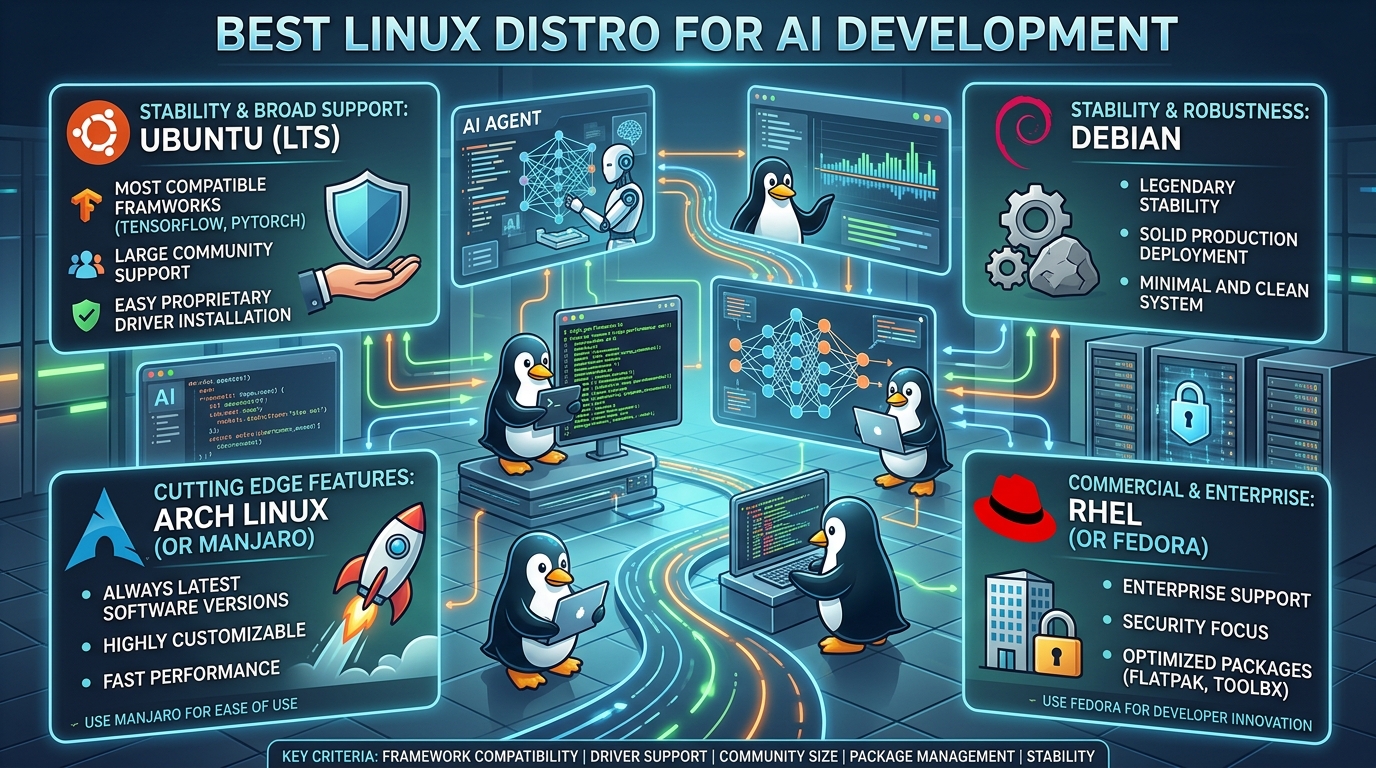
Ubuntu: The Universal Gold Standard for Machine Learning
When discussing machine learning infrastructure, Ubuntu is almost universally accepted as the baseline target platform. Developed by Canonical, Ubuntu has established itself as the default operating system for major AI frameworks, cloud service providers, and hardware vendors. If a research team publishes a new open-source model, a new deep learning framework, or a specialized driver suite, they almost certainly tested it first on an Ubuntu distribution.
The primary advantage of Ubuntu lies in its absolute ubiquity within the artificial intelligence community. Frame-level integration for popular libraries like PyTorch, TensorFlow, JAX, and Hugging Face Transformers is designed with Ubuntu paths and package standards in mind. When software engineers encounter installation bugs or hardware abstraction issues, a simple web query usually returns dozens of precise solutions tailored directly to Ubuntu. Furthermore, hardware manufacturers like NVIDIA provide first-class Debian package repositories specifically targeted at Ubuntu LTS (Long Term Support) releases, making the installation of the NVIDIA driver, CUDA Toolkit, cuDNN, and TensorRT remarkably straightforward.
Ubuntu comes in two primary release cadences: Long Term Support versions, released every two years and supported for up to ten years, and interim releases distributed every six months. For AI development, Ubuntu LTS releases (such as 22.04 LTS or 24.04 LTS) are strongly recommended. LTS releases prioritize rock-solid stability, ensuring that critical system libraries like glibc remain unchanged throughout the life cycle of the release. This prevents sudden system updates from breaking compiled C++ extensions or Python binary bindings that machine learning tools rely upon heavily.
While Ubuntu is user-friendly and supported everywhere, it is not without drawbacks. Canonical has increasingly pushed its proprietary Snap packaging system for desktop software, which some developers find overly restrictive, slower to launch, or problematic when granting broad permission access to local hardware resources. Nevertheless, for developers who want a distribution that works out of the box with minimal driver troubleshooting, Ubuntu remains the safest and most efficient choice.
Accelerate Your Digital Transformation
Looking to optimize your IT infrastructure, streamline business operations, and stay ahead of the competition? Discover how tailored technology advisory services uae can transform your organization. From strategic cloud adoption to cutting-edge cybersecurity, get expert guidance to drive measurable business growth in today’s fast-evolving market.
Pop!_OS: Elevated Performance and Zero-Friction Hardware Setup
Created by System76, a computer manufacturer specializing in open-source hardware, Pop!_OS is an Ubuntu-based operating system designed explicitly for STEM professionals, developers, and creators. While it inherits the vast software compatibility and deep ecosystem support of Ubuntu LTS, Pop!_OS introduces substantial quality-of-life enhancements that directly address common pain points in AI workflows.
The standout feature of Pop!_OS is its dedicated installer image bundled with pre-integrated, proprietary NVIDIA drivers. Installing GPU drivers on Linux has historically been a primary source of frustration for new AI engineers, often leading to unbootable systems, broken display managers, or improper kernel module loading. Pop!_OS eliminates this friction entirely by configuring the correct graphics drivers, CUDA components, and power-management profiles during the initial operating system installation process.
For developers utilizing laptops or portable workstations equipped with dual graphics processing units, Pop!_OS offers an elegant, built-in GPU switching mechanism accessible directly from the system tray. Engineers can easily toggle between integrated graphics to conserve battery life during light text editing or full discrete GPU mode when launching resource-intensive model training sessions. The operating system also incorporates auto-tiling window management natively, allowing developers to manage multiple terminal windows, Jupyter Notebook browser tabs, and GPU monitoring utilities like nvidia-smi with maximum keyboard-driven efficiency.
Underneath its polished interface, Pop!_OS maintains full binary compatibility with Ubuntu repositories. This means any tutorial, script, or Docker image designed for Ubuntu will run identically on Pop!_OS. By combining Ubuntu software compatibility with superior hardware abstraction and modern desktop UX improvements, Pop!_OS stands out as perhaps the most seamless desktop Linux experience for AI developers using modern NVIDIA hardware.
Arch Linux: Unmatched Cutting-Edge Performance and Customization
For developers who demand complete control over every layer of their operating system, Arch Linux offers an entirely different philosophy. Built on a rolling-release model, Arch Linux does not feature static version releases. Instead, system updates deliver the very latest software packages, Linux kernels, and development headers as soon as they are tested and packaged by the maintainers.
The principal advantage of Arch Linux for artificial intelligence engineering is immediate access to bleeding-edge software. Modern machine learning is moving at a breathless pace, where new hardware capabilities and software optimizers require the absolute latest compilers, Python runtimes, and Linux kernel features. On a rolling-release distribution, developers do not have to wait months or years for an LTS distribution to backport a newer kernel or GPU driver required by the latest hardware architectures.
Another major asset of Arch Linux is the Arch User Repository, commonly referred to as the AUR. The AUR is a massive, community-driven package collection that contains user-submitted build scripts for virtually every piece of software in existence. Specialized AI libraries, cutting-edge CUDA extension libraries, niche data science tools, and non-standard development environments that are difficult to build from source on static distributions can frequently be installed with a single command via an AUR helper.
However, the power and flexibility of Arch Linux come with significant responsibility and operational risk. System configuration is entirely manual, meaning developers must configure their own display servers, audio stacks, storage layouts, and system services from scratch. Furthermore, because system packages update continuously, a system upgrade can occasionally break complex GPU driver bindings or custom Python C extensions. Arch Linux is best suited for experienced Linux administrators who enjoy fine-tuning their system performance and possess the technical skills to debug broken system states independently.
Manjaro: The Power of Arch with Accessibility for Professionals
Manjaro Linux bridging the gap between the bleeding-edge performance of Arch Linux and the user-friendly reliability required by daily production software engineers. Built on top of the Arch Linux foundation, Manjaro adopts a rolling-release architecture but introduces a curated testing buffer before releasing software updates to general users.
This curated approach provides machine learning practitioners with a crucial layer of safety. Rather than receiving software updates the moment they are compiled, Manjaro holds updates back for several days or weeks to test them for severe system regressions. This significantly lowers the risk of receiving an unstable GPU driver or broken kernel module update while maintaining access to modern, up-to-date software tooling compared to traditional fixed-release distributions.
Manjaro features a dedicated Hardware Detection utility that automatically scans the machine and installs appropriate proprietary or open-source drivers, including NVIDIA graphics drivers and CUDA environments. It also includes an intuitive graphical kernel management tool, allowing developers to test new Linux kernels for improved CPU scheduling or newer hardware support with a single click, while keeping older, proven kernels installed as a fallback.
Additionally, Manjaro users retain access to the Arch User Repository, giving them access to the expansive Arch package ecosystem without requiring manual operating system installation from a command line prompt. For developers who want the performance benefits of modern software and rolling updates without spending hours configuring system configuration files, Manjaro offers a powerful, production-ready compromise.
Fedora Workstation: The Innovation Hub of Enterprise Linux
Fedora Workstation, sponsored by Red Hat (a subsidiary of IBM), is widely recognized as one of the most innovative and technologically advanced Linux distributions available today. It serves as the upstream community platform where technologies are developed, tested, and polished before being integrated into Red Hat Enterprise Linux, the dominant Linux distribution in large enterprise data centers.
For artificial intelligence developers, Fedora represents a sweet spot between fixed LTS releases and rolling distributions. Fedora releases a new version roughly every six months, with each version supported for approximately thirteen months. This system ensures that developers receive modern Linux kernels, recent Python versions, updated GCC compilers, and current system libraries without the potential operational instability of a continuous rolling-release distribution.
Fedora is renowned for its strict adherence to open-source principles and standard upstream Linux technologies. It was an early pioneer in adopting Wayland for display server management, PipeWire for audio processing, and Flatpak for application sandboxing. For developers working extensively with containerization tools like Podman (a daemonless alternative to Docker native to the Red Hat ecosystem), Fedora provides an optimized runtime environment out of the box.
Installing proprietary NVIDIA drivers on Fedora requires enabling third-party repositories such as RPM Fusion or utilizing flatpak applications, which is slightly less automated than in Pop!_OS. However, once configured, Fedora provides an exceptionally stable, modern, and clean desktop environment powered by stock GNOME. It is an ideal choice for software engineers who work in enterprise environments or plan to deploy their machine learning workloads directly onto Red Hat Enterprise Linux infrastructure.
Debian: Rock-Solid Stability for Production Infrastructure
Debian is one of the oldest and most respected operating systems in the open-source ecosystem. Known as the “Universal Operating System,” Debian serves as the base distribution upon which Ubuntu, Pop!_OS, Linux Mint, and dozens of other popular systems are built. Debian prioritizes absolute stability, predictable behavior, and strict software freedom over novelty.
The core philosophy of Debian is centered around its Stable release branch. Software packages included in Debian Stable undergo exhaustive testing for long periods before being published. As a result, system libraries, development headers, and core utilities are practically immune to unexpected crashes or unexpected API changes. This makes Debian an exceptional host system for production servers, dedicated deep learning clusters, and headless AI inference nodes where uptime is the ultimate priority.
However, this commitment to extreme stability can be a double-edged sword for local machine learning workstations. Because packages in Debian Stable are frozen prior to release, the included software versions, Linux kernel, and graphics drivers can quickly become outdated relative to the rapidly evolving AI landscape. Running the absolute latest NVIDIA hardware architectures or newly released deep learning framework features may require compiling software from source, backporting newer packages, or switching to the Debian Testing branch.
Developers who prefer Debian for its purity, reliability, and minimal resource usage often leverage containerization strategies to overcome outdated host packages. By running a lean Debian base system and encapsulating deep learning toolchains, CUDA drivers, and Python environments inside Docker or Apptainer containers, engineers can combine the rock-solid base system stability of Debian with cutting-edge application software.
Clear Linux: Intel-Optimized High-Performance Computing
Clear Linux OS is an open-source Linux distribution developed by Intel specifically designed for maximum performance on x86 architectures. Unlike general-purpose distributions that compile software packages with broad hardware compatibility settings in mind, Clear Linux is aggressively compiled and tuned to leverage modern CPU instruction sets such as AVX-512, Advanced Matrix Extensions (AMX), and Vector Neural Network Instructions (VNNI).
Artificial intelligence workloads are notoriously compute-heavy, involving billions of floating-point matrix multiplications. While GPU acceleration handles large deep learning models, significant portions of the data science lifecycle, such as data preprocessing, feature extraction, tabular model training (via libraries like XGBoost and LightGBM), and classic statistical computing, execute entirely on the Central Processing Unit. On modern Intel hardware, Clear Linux can deliver substantial performance improvements out of the box compared to standard Linux distributions simply due to its compiler flags and kernel optimizations.
Clear Linux uses a unique stateless architecture that separates user configuration from system default binaries. This design makes system updates fast, predictable, and easily reversible. It also uses a specialized package manager called swupd that organizes software into functional bundles, making it easy to install entire developer stacks, such as machine learning environments or cloud-native toolkits, with single commands.
Despite its impressive raw performance metrics, Clear Linux is a specialized distribution that may not suit every developer. Its primary focus is server and cloud infrastructure optimization on Intel hardware, meaning desktop software availability, community support, and non-Intel hardware optimizations (such as specialized AMD or ARM extensions) are limited compared to Ubuntu or Fedora. It is best suited for dedicated CPU-bound machine learning servers or performance-critical enterprise workloads running on compatible modern hardware.
Key Factors When Selecting Your AI Operating System
Deciding on the best distribution depends heavily on your specific technical background, hardware inventory, and project constraints. Reviewing the following key criteria will help clarify which operating system aligns best with your operational goals.
-
Hardware Accelerators: If your machine relies exclusively on NVIDIA GPUs, distributions with built-in or easily accessible driver support, such as Pop!_OS or Ubuntu, save immense amounts of setup time. If you use AMD ROCm accelerators, check the specific Linux kernel and distribution requirements listed in AMD’s ROCm documentation, which frequently targets Ubuntu and enterprise enterprise-grade distributions first.
-
Software Isolation and Containers: Modern AI workflows increasingly rely on isolated execution environments using Docker, Podman, Conda, or Pixi. If you do almost all your machine learning development inside isolated containers or remote environments, the host operating system matters less for software versioning and more for host stability, hardware driver abstraction, and lightweight resource utilization.
-
Skill Level and Maintenance Tolerances: Beginners and developers who want a reliable, zero-maintenance workstation should lean toward Ubuntu or Pop!_OS. Advanced developers who want maximum execution speed, highly customized window environments, and access to new software releases should consider Arch Linux or Manjaro. Enterprise developers aligning with cloud standards will find Fedora or Debian highly advantageous.
-
Community and Troubleshooting: When an unexpected library linking error occurs inside an obscure C++ extension, having access to millions of community forum posts and documentation pages is invaluable. Larger communities inherently mean faster troubleshooting, making Ubuntu-based and Arch-based ecosystems superior in terms of available documentation.
Essential Post-Installation Tools for Machine Learning
Regardless of the distribution you choose, setting up a production-ready AI development workspace requires installing several essential core tools and abstraction layers.
-
NVIDIA CUDA Toolkit and cuDNN: The foundation of GPU-accelerated computing. Ensure your host system properly loads kernel modules and that runtime paths are explicitly declared in your shell profiles.
-
Containerization Tools: Docker or Podman, combined with the NVIDIA Container Toolkit, allow you to run isolated GPU-accelerated containers without polluting your host operating system with conflicting library versions.
-
Modern Package and Environment Managers: Traditional system Python installs should never be modified directly for machine learning projects. Utilize fast, modern environment managers such as Pixi, Micromamba, or Conda to isolate Python versions, C libraries, and framework dependencies on a per-project basis.
-
GPU Monitoring Utilities: System tools like nvidia-smi, nvtop, or specialized monitoring dashboards help track memory consumption, power draw, and compute engine utilization during intensive training loops.
Ultimately, there is no single best Linux distribution for every developer. Ubuntu and Pop!_OS provide the most reliable, frictionless, and widely supported foundations for the vast majority of engineers. Meanwhile, Fedora, Arch Linux, and Clear Linux offer specialized advantages in modern enterprise standards, bleeding-edge software access, and hardware optimization respectively. By matching the distribution’s core design philosophy to your specific hardware setup and personal technical preferences, you can build a stable, high-performance workspace engineered for artificial intelligence innovation.