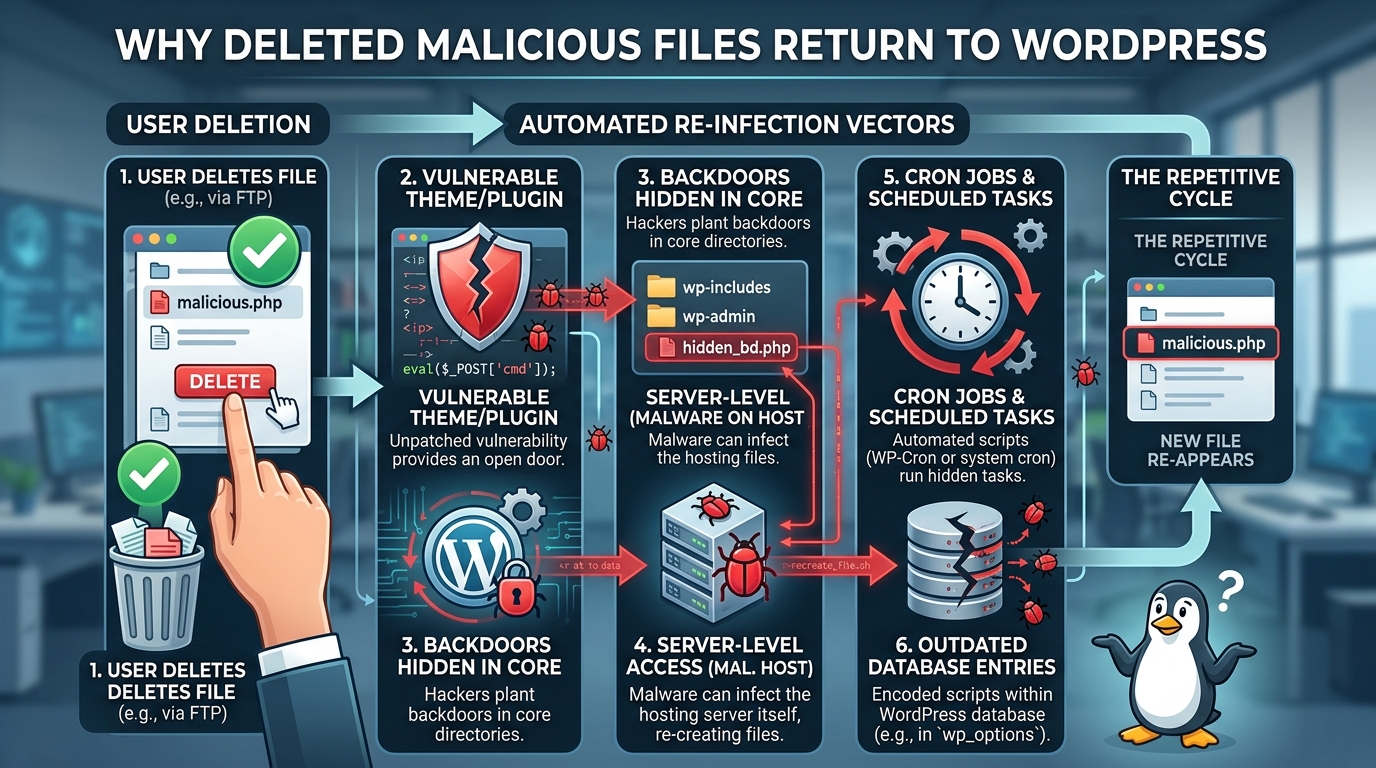



Discovering that your WordPress website has been hacked is one of the most frustrating experiences a site owner, developer, or administrator can face. You open your file manager or log in via Secure File Transfer Protocol, locate the suspicious code or unfamiliar files, delete them, and breathe a sigh of relief. Your site appears to return to normal, and you consider the crisis resolved. A few hours or days later, the exact same malicious files reappear out of nowhere.
This recurring cycle of infection and removal leaves many site owners feeling completely helpless. It can feel as though your server is possessed or that an intruder is actively sitting at a keyboard watching your every move, re-uploading the malicious payload the moment you erase it. In reality, the automated nature of modern cyberattacks means that returning malware is almost always driven by hidden scripts, persistent backdoors, and overlooked vulnerabilities. Deleting a malicious file only removes the visible symptom of a compromise, while the underlying cause remains completely untouched.
Understanding why malicious files return requires a deep dive into how WordPress operates, how automated malware scripts interact with server environments, and how attackers maintain long-term persistence across host environments. By unraveling these mechanisms, you can break the cycle of re-infection and permanently secure your web infrastructure.
The Illusion of Cleanup: Why Simple Deletion Fails
The primary reason malicious files reappear after deletion is that site owners confuse symptom removal with actual remediation. When a medical doctor treats a severe infection, addressing the fever without eliminating the underlying bacteria will inevitably cause the symptoms to return. In web security, a malicious file found inside your upload directory or theme folder is merely the surface-level symptom of an established security breach.
When automated hacking bots compromise a WordPress site, they rarely drop just a single malicious file. Instead, they execute complex deployment scripts that scatter multiple payloads, backdoors, cron jobs, and database modifications across the entire environment. When you manually delete one or two suspicious PHP files, you are typically removing only the files that caught your attention, such as those causing spam redirects or triggering web browser warnings.
Meanwhile, the stealthy components of the malware remain active elsewhere in the file system. These dormant or secondary components are specifically designed to monitor the site, detect when primary payload files go missing, and immediately regenerate them. Until every single point of entry, backdoor, and automated task is identified and removed, simple file deletion will remain an endless game of whack-a-mole.
The Silent Observers: Persistent Backdoors Explained
A backdoor is a piece of code hidden inside a file system that allows an unauthorized user or automated bot to regain administrative access to a server without authenticating through normal login portals. Backdoors are the single most common reason malicious files continuously return to WordPress websites.
Attackers place backdoors in obscure directories where they are unlikely to be noticed during routine checks. Common locations include deep inside plugin folders, nested within theme subdirectories, or hidden inside legitimate core WordPress paths such as the uploads or content directories. These backdoors can be as simple as a single line of obfuscated code capable of executing commands received through custom Web requests.
When you delete a malicious file, an attacker or an automated external script simply sends an HTTP request to the hidden backdoor. The backdoor receives the instructions, fetches a fresh copy of the malware from a remote server controlled by the attacker, and writes the file back onto your server in its exact original location. Because this request bypasses normal authentication logs and administrative dashboards, the re-infection happens silently in a fraction of a second.
Detecting backdoors is notoriously difficult because they are frequently disguised as legitimate core files. Attackers often use naming conventions that mimic authentic WordPress files, such as naming a backdoor script with slight spelling variations or hiding malicious functions inside standard PHP files using base64 encoding and dynamic evaluation functions.
The Internal Engine: Rogue Cron Jobs and Scheduled Tasks
WordPress features a built-in task scheduling system called WP-Cron, which automates routine operational tasks such as checking for plugin updates, publishing scheduled posts, and sending email notifications. Additionally, web hosting environments rely on system-level Linux cron jobs to schedule server maintenance tasks. Cybercriminals heavily exploit both of these scheduling mechanisms to maintain persistent access to compromised environments.
When malware initialises on a server, it frequently creates a new cron job within WordPress or writes an entry directly into the server crontab. This scheduled task is configured to execute a stealthy script at regular intervals, such as every hour or once every midnight.
The primary function of this scheduled script is self-healing. Every time the cron job runs, it scans the file system to check whether its primary operational files are present. If it discovers that you have deleted a malicious payload, the cron script automatically regenerates the deleted file, restores its file permissions, and resumes its malicious operations.
Because cron jobs operate entirely in the background without needing external HTTP traffic, they will continue to regenerate deleted malware even if you block all incoming web traffic or put the website into maintenance mode. Unless you inspect the WordPress database options table and the server crontab directly to clear out unauthorized scheduled actions, deleting the physical files on disk will achieve nothing.
Compromised WordPress Core, Themes, and Plugins
Another major contributor to recurring malware infections is the corruption of legitimate application files. Site owners frequently focus their cleanup efforts on identifying newly added, unfamiliar files, completely ignoring the possibility that authentic core files have been modified.
Malicious scripts often inject code snippets directly into essential WordPress core files, such as index.php, wp-config.php, or wp-settings.php. They also frequently target functions.php files within active or inactive themes, as well as main plugin execution files. When code is injected into these critical entry points, the malicious payload runs every single time a visitor or search engine crawler accesses any page on your website.
If you delete an isolated malicious file located in your uploads folder, but leave the injected code intact inside your theme functions file, the injected code will execute on the very next page load and immediately recreate the deleted file.
Furthermore, keeping outdated or abandoned plugins and active themes on your server provides attackers with a permanent open door. Even if you completely clean all files and backdoors, leaving an unpatched plugin active means that automated exploit bots scanning the internet will continuously discover the vulnerability and re-inject the malware using the exact same entry point over and over again.
Database Injections: Malware Beyond the File System
Many website owners operate under the assumption that website security is strictly a file-level concern. However, WordPress relies heavily on a relational database to store configuration parameters, user credentials, post content, and plugin settings. Modern malware frequently establishes persistence inside the database rather than solely relying on physical files stored on the disk.
Attackers often target specific database tables, such as the options table or the users table. Within the options table, malware can insert malicious JavaScript snippets into fields responsible for site headers, footers, or active plugin configurations. They can also create rogue administrator accounts directly inside the users table, often hiding them by manipulating display queries or assigning them non-standard privilege roles.
When malware resides within the database, deleting files from your server disk accomplishes very little. The moment an administrative session is initiated or a visitor accesses the site, the database query executes, triggering scripts that dynamically generate new malicious files or inject malicious redirect scripts into the rendered Web output.
Cleaning a site with database-level persistence requires searching the database for encoded payload strings, inspecting administrative user lists directly via database management tools, and sanitizing configuration tables to ensure no unauthorized scripts remain stored in site options.
Protect and power your digital presence with Dubai’s leading experts in website malware removal dubai and comprehensive website maintenance support dubai.
Server-Level Persistence and Shared Hosting Vulnerabilities
Sometimes, the root cause of returning malware lies completely outside your specific WordPress installation directory. In shared hosting environments, multiple websites reside on a single physical server, sharing underlying system resources. If the hosting provider does not implement strict isolation controls between user accounts, a cross-site contamination event can occur.
If another website hosted on the same server is compromised, malicious scripts operating on that neighboring site can traverse local directory pathways and infect your files. In this scenario, you could clean your own WordPress directory perfectly, update every plugin, and delete every backdoor, yet your site will continue to become re-infected because the source of the attack lives in an entirely separate, unmanaged hosting account on the same box.
Beyond cross-site contamination, high-level server configuration files can also be tampered with. File types such as .htaccess on Apache environments or configuration blocks in Nginx can be modified to rewrite traffic rules, execute PHP scripts hidden in non-standard locations, or auto-prepend malicious code to every PHP file executed on the system.
If an attacker modifies your server .htaccess file to automatically run a hidden script before any legitimate WordPress file processes, deleting the resulting malware files will prove useless. The server environment itself will continuously re-execute the infection routine every time a web request is handled.
Advanced Evasion Techniques: File Timestamps and Process Injection
Cybercriminals continuously refine their malware to evade detection by standard security tools and system administrators. Understanding these advanced techniques explains why malicious files can be so difficult to locate and permanently eradicate.
One common evasion tactic is known as timestomping. When a new file is created on a server, the operating system assigns it a timestamp reflecting the exact time of creation. Security administrators often search for newly created or recently modified files to isolate malware after an attack. To counter this, sophisticated malware modifies its own file creation and modification dates to match authentic core WordPress files created years earlier. As a result, newly generated malicious files blend perfectly into file system listings ordered by modification date.
Another sophisticated method involves process injection and memory persistence. In environments where PHP processes run continuously, malicious code can reside in the active server memory. Even if you delete the physical file from the disk, the running process remains active in system memory, continuing to serve spam or re-writing the deleted file back to the disk at predetermined intervals. In such cases, clearing file structures must be paired with restarting system services or killing active PHP processes to ensure clean memory state.
Step-by-Step Framework for Permanent Malware Eradication
Eradicating recurring malware requires a disciplined, structured methodology. Merely deleting visible files must be replaced with a comprehensive cleanup procedure designed to remove backdoors, sanitize databases, and close security gaps.
Follow these essential stages to ensure that malware is removed permanently and cannot return.
-
Step One: Isolate the Environment and Take Backups. Place the site in maintenance mode to prevent visitors from executing malicious scripts and to prevent attackers from sending active commands during cleanup. Take a full snapshot backup of both the file system and database, creating a restore point in case recovery actions break site functionality.
-
Step Two: Replace WordPress Core Files. Download a fresh, verified copy of the exact same version of WordPress core from the official repository. Delete your existing core directories, specifically wp-admin and wp-includes, and replace them entirely with clean copies. Replace root level core files such as index.php and wp-settings.php, taking special care to preserve and manually inspect your wp-config.php file for injected code.
-
Step Three: Rebuild Themes and Plugins from Trusted Sources. Do not rely on scanning existing theme and plugin folders, as backdoors can easily hide within complex codebases. Instead, take note of your installed plugins and active theme, delete the existing directories inside wp-content, and re-download clean copies directly from official repositories or verified developers.
-
Step Four: Sanitize the Uploads Directory. The uploads directory is designed strictly for media storage and should never contain executable code. Audit this directory thoroughly and delete any PHP files, JavaScript files, or unusual hidden files. Implement directory execution restrictions using configuration rules so that even if a file is uploaded, the server refuses to execute it.
-
Step Five: Inspect and Audit the Database. Access your database directly using a management tool such as phpMyAdmin. Audit the users table to ensure no unauthorized administrative accounts exist. Inspect the options table for suspicious auto-loaded scripts, foreign code snippets, or altered site URLs. Search for known malicious payload signatures across all tables.
-
Step Six: Clear Cron Tasks and Reset Credentials. Audit all scheduled tasks within WordPress using specialized CLI commands or management plugins, and inspect the server crontab file to remove unauthorized scheduled commands. Immediately change all system credentials, including database passwords, FTP and SSH passwords, hosting panel logins, and all WordPress user passwords.
-
Step Seven: Enforce Server and Application Hardening. Apply strict file permissions across the installation, ensuring directories are set to standard restrictive permissions and files are protected against unauthorized modification. Ensure the site uses the latest supported version of PHP, install a web application firewall, and ensure real-time security monitoring is active.
Long-Term Prevention: Maintaining a Fortified Environment
Once you have successfully broken the re-infection cycle and eradicated all traces of the malware, long-term vigilance is required to keep your server secure. Automated bots continuously scan the internet for vulnerable targets, and an unmaintained WordPress site will eventually be compromised again.
Establish a regular maintenance routine that includes installing core, theme, and plugin updates as soon as security patches are released. Never use pirated, cracked, or nullified commercial themes and plugins, as these distribution channels are frequently bundled with pre-installed backdoors designed specifically to re-infect target sites upon installation.
Enforce strong, unique passwords across all accounts, require multi-factor authentication for administrative access, and restrict login attempts to prevent brute-force attacks. Implement automated, off-site backup solutions so that if an unforeseen security incident occurs in the future, you can restore your entire environment to a known clean state quickly without resorting to manual file cleanup.
By understanding that recurring malware is driven by persistent backdoors, scheduled tasks, compromised databases, and unpatched software, you can move past simple file deletion and establish a robust defense strategy that keeps your WordPress website safe, secure, and permanently free of malicious files.