


Choosing the right operating system for running local artificial intelligence workloads is one of the most critical decisions you will make as a developer, researcher, or enthusiast. While macOS offers impressive unified memory efficiency on Apple Silicon, and Windows remains popular for everyday desktop tasks, Linux is the undisputed champion of AI infrastructure. From massive server clusters training trillion-parameter frontier models to self-hosted instances running quantized large language models on personal workstations, Linux dominates the AI ecosystem. It delivers bare-metal hardware access, lightweight system overhead, native containerization, and first-class driver support for deep learning hardware acceleration.
However, Linux is not a single monolith. The ecosystem is divided into hundreds of distributions, each engineered with different priorities, package update cycles, kernel configurations, and user interfaces. Selecting the ideal Linux distribution for local AI depends heavily on your hardware configuration, your experience level with Linux administration, and your specific use cases. Whether you are deploying local LLMs like Llama or Mistral, running local image generation pipelines using Stable Diffusion, or fine-tuning neural networks, the underlying operating system directly affects your model load times, inference speeds, and GPU memory utilization.
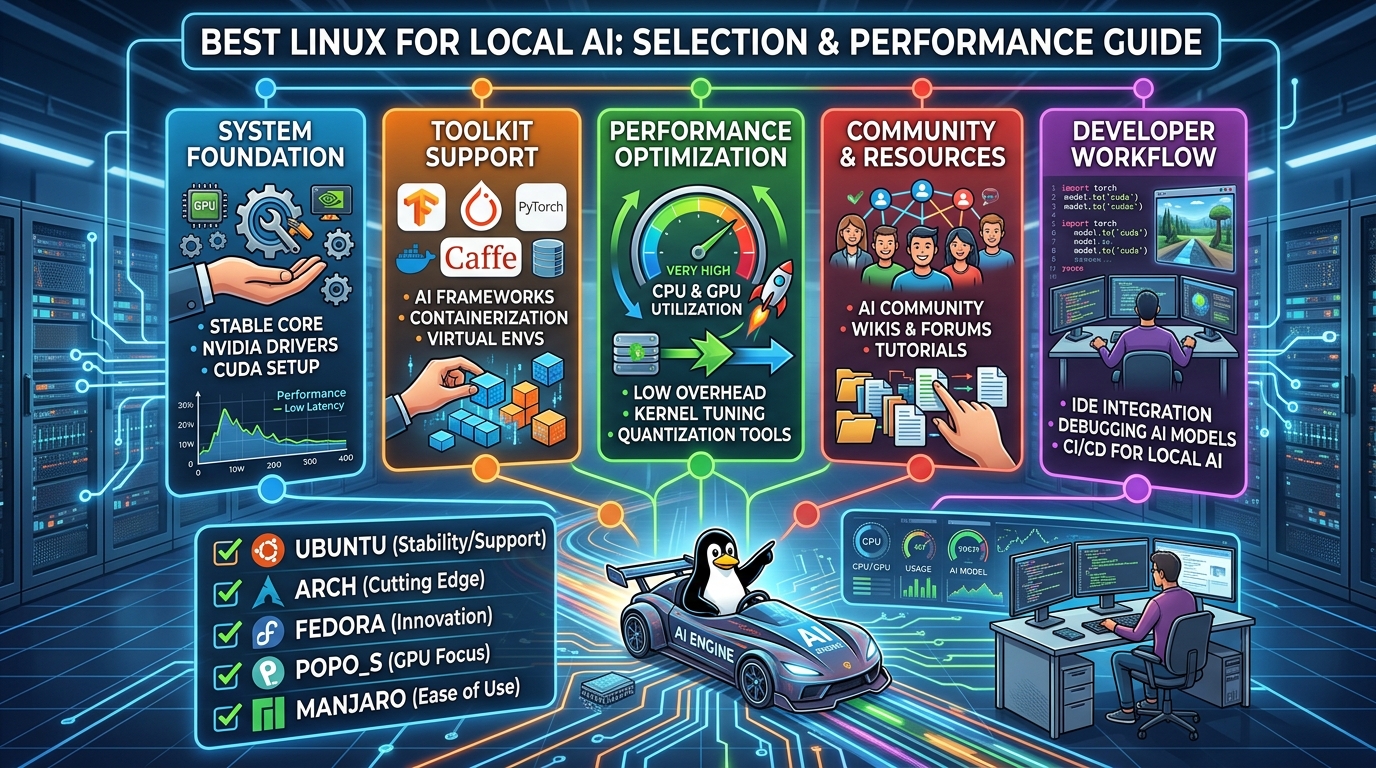
This comprehensive guide breaks down the top Linux distributions for local AI in 2026, examining their strengths, weaknesses, and target audiences. By analyzing stability, package availability, GPU driver integration, and kernel responsiveness, you can select the perfect operating system to power your local AI hardware.
Ubuntu: The Undisputed Industry Standard
If there is a default operating system for artificial intelligence, it is Ubuntu. Developed by Canonical, Ubuntu is the reference platform for virtually every major deep learning framework, hardware SDK, and open-source AI project. When NVIDIA releases a new CUDA toolkit, AMD updates ROCm, or PyTorch releases a major version, Ubuntu is always the primary target platform for testing and optimization. Choosing Ubuntu means you are swimming with the current, ensuring that almost every installation script, container image, and tutorial will work right out of the box without modification.
The primary strength of Ubuntu lies in its massive community and ecosystem support. The vast majority of AI software repositories assume an Ubuntu environment. Docker containers built for AI workloads are overwhelmingly based on Ubuntu base images. When troubleshooting obscure CUDA errors, driver conflicts, or Python dependency issues, a simple web search will yield thousands of solutions tailored specifically to Ubuntu systems. This minimizes the time spent fighting the operating system and maximizes the time spent building and deploying models.
Hardware compatibility is another massive advantage for Ubuntu users. Canonical works closely with hardware vendors, ensuring seamless integration with NVIDIA graphics cards, AMD GPUs, and specialized AI accelerators. The Ubuntu installer includes a dedicated option to install proprietary drivers automatically, taking the headache out of setting up NVIDIA display drivers and CUDA dependencies. Furthermore, Canonical provides Long Term Support versions every two years, offering five years of guaranteed stability, security patches, and driver updates.
Ubuntu is available in two main flavors suitable for local AI: Ubuntu Desktop and Ubuntu Server. Ubuntu Desktop is ideal if you prefer a graphical user interface for running web interfaces like Automatic1111, ComfyUI, or LM Studio. Ubuntu Server is the superior choice for headless machines dedicated purely to hosting API endpoints, running Docker containers, or managing automated inference pipelines. While the GNOME desktop environment on Ubuntu Desktop consumes a small amount of system resources, Ubuntu Server remains lightweight, leaving maximum RAM and VRAM available for your models.
However, Ubuntu is not without its drawbacks. Canonical’s push toward Snap packages has drawn criticism from the Linux community due to slower launch times and higher resource overhead. Fortunately, core AI tools do not rely on Snaps, but managing system dependencies sometimes requires disabling Snaps or adding Personal Package Archives to obtain newer software versions. Additionally, while Ubuntu Long Term Support releases offer rock-solid stability, their default software repositories can quickly become outdated between major releases, requiring users to manually install newer Python versions or specialized toolkits.
Ubuntu is best for beginners, intermediate users, and enterprise environments that prioritize ecosystem compatibility, official documentation, and hassle-free hardware setup. It is the safest and most reliable choice for local AI development.
Accelerate Your Digital Transformation
Looking to optimize your IT infrastructure, streamline business operations, and stay ahead of the competition? Discover how tailored technology advisory services uae can transform your organization. From strategic cloud adoption to cutting-edge cybersecurity, get expert guidance to drive measurable business growth in today’s fast-evolving market.
Fedora: The Cutting-Edge Innovation Hub
For developers who want access to the absolute latest Linux technologies without sacrificing system stability, Fedora is an outstanding choice. Sponsored by Red Hat, Fedora acts as the upstream testing ground for Red Hat Enterprise Linux. It strikes a rare balance between bleeding-edge software packages and high reliability, making it an increasingly popular distribution among AI engineers and software developers.
Fedora ships with one of the newest Linux kernels available, alongside updated compilers, system libraries, and desktop environments. This focus on modern software is a major asset for local AI workloads. New Linux kernels often introduce performance improvements for CPU scheduling, memory management, and hardware support for the latest processors and motherboard chipsets. For users running local AI on newer hardware, such as recent Intel or AMD CPUs, Fedora provides out-of-the-box support for features that older distribution kernels might lack.
Containerized development is where Fedora truly shines. Red Hat has pioneered modern container management tools like Podman, Buildah, and Skopeo, which are integrated natively into Fedora. Podman serves as a rootless, drop-in replacement for Docker, offering superior security and better integration with systemd services. Since local AI workflows are increasingly containerized to avoid local environment contamination, Fedora’s native container tooling provides a smooth and secure environment for spinning up local LLM instances, vector databases, and inference servers.
Furthermore, Fedora offers excellent support for Wayland, modern display protocols, and flatpak integration, making it a polished desktop operating system for daily use alongside AI development. Its inclusion of recent Python versions directly in the default repositories reduces the need to compile Python from source or rely heavily on third-party repositories for standard development tools.
Despite its many advantages, Fedora requires a bit more maintenance than Ubuntu. Because Fedora operates on a rapid six-month release cycle, major system upgrades occur frequently. While these upgrades are generally smooth, major kernel updates can occasionally break third-party kernel modules, such as proprietary NVIDIA drivers. NVIDIA driver installation on Fedora requires using third-party repositories like RPM Fusion, which, while well-documented, adds an extra step compared to Ubuntu’s automated driver installer.
Additionally, AMD ROCm support on Fedora can require additional setup compared to Debian-based systems, as many official AMD scripts targets Ubuntu or Red Hat Enterprise Linux directly. However, for users comfortable with minor system administration, Fedora offers a cleaner, more modern system base free of canonical-specific technologies like Snap.
Fedora is best for advanced users, modern hardware owners, and developers who prioritize containerized AI workflows, fresh kernels, and a pure open-source foundation.
Arch Linux: Maximum Performance and Granular Control
Arch Linux represents the ultimate choice for enthusiasts and power users who demand complete control over every aspect of their operating system. Unlike pre-configured distributions, Arch follows a minimalist philosophy, providing a bare-bones base installation that allows the user to build a custom system from the ground up. For local AI workloads, this granularity offers distinct performance and resource efficiency advantages.
The primary benefit of Arch Linux is its rolling-release model. Instead of discrete version releases every few months or years, Arch updates continuously. Packages are made available to users shortly after upstream developers release them. This means Arch users always have access to the absolute latest Linux kernel, PyTorch builds, CUDA toolkits, and hardware drivers. When a new optimization feature or performance patch is released for local LLM inference engines like llama.cpp or vLLM, Arch users are often the first to receive it through standard system updates.
System bloat is completely eliminated in a properly configured Arch installation. Because you select every background service, desktop environment, and utility yourself, there are no unnecessary background processes consuming CPU cycles or system RAM. In local AI, where keeping system memory free allows for loading larger model weights or extending context window lengths, an ultra-lightweight operating system footprint provides a tangible performance edge.
Another major feature of Arch Linux is the Arch User Repository, commonly known as the AUR. The AUR is a community-driven repository containing build scripts for virtually every piece of software in existence. For local AI practitioners, the AUR is a goldmine. Complex AI tools, experimental web interfaces, specialized quantization libraries, and custom ROCm packages that require extensive manual compilation on other distributions can often be installed with a single command via an AUR helper.
However, the power of Arch Linux comes with significant trade-offs. Arch is not beginner-friendly. Setting up the operating system requires a deep understanding of Linux system architecture, command-line interfaces, and storage management. Furthermore, the rolling-release nature of Arch means that system updates can occasionally introduce breaking changes. A bleeding-edge kernel update might temporarily conflict with the current NVIDIA proprietary driver version, leading to broken CUDA functionality or desktop instability if updates are applied blindly.
Maintaining an Arch system requires active user management, reading release notes, and occasionally holding back specific packages to preserve hardware driver compatibility. If your primary goal is to spend hours running models rather than troubleshooting operating system packages, Arch may introduce unwanted friction into your workflow.
Arch Linux is best for experienced Linux administrators, hardware enthusiasts, and power users who want maximum performance, absolute system customization, and immediate access to the latest software updates.
Debian: Rock-Solid Stability for Dedicated AI Servers
If Arch Linux represents continuous change, Debian represents absolute permanence. Known as the universal operating system, Debian is world-renowned for its uncompromising stability, rigorous package testing, and commitment to open-source principles. It serves as the upstream foundation for Ubuntu, Linux Mint, and dozens of other popular distributions.
For local AI applications, Debian is the definitive choice when building dedicated, headless inference servers or long-running production nodes. When you deploy an AI pipeline on Debian, you can rest assured that system updates will not unexpectedly break your environment. Debian Stable prioritizes predictability over novel features; software versions within a stable release remain frozen, receiving only critical security updates and stability patches throughout the distribution’s lifespan.
This stability makes Debian an ideal host for Docker-centric AI architectures. Many production local AI setups run all inference engines, vector databases, and frontend interfaces inside isolated container environments. In this architecture, the host operating system’s primary job is simply to remain rock-solid, manage hardware resources efficient, and run the container daemon without crashing. Debian excels at this task, operating for months or even years without requiring reboots or manual maintenance.
Furthermore, Debian is exceptionally lightweight. A minimal Debian server installation consumes only a fraction of system RAM and disk space, leaving nearly all hardware resources available for model weights, KV caches, and data processing. It also supports an vast array of hardware architectures, making it suitable for custom ARM setups or older x86 servers repurposed for AI workloads.
The primary challenge when using Debian for local AI is its conservative software package repository. The software versions included in Debian Stable are often several years behind upstream development. While this guarantees stability, it can complicate local AI development if you are running software directly on the host operating system rather than inside containers. Installing modern Python versions, recent CUDA toolkits, or cutting-edge AI frameworks directly on Debian Stable often requires backports, third-party repositories, or manual compilation from source.
Additionally, non-free proprietary hardware drivers, such as NVIDIA graphics drivers, require explicitly enabling Debian’s non-free repositories. While recent Debian releases have made installing non-free firmware significantly easier during setup, it still lacks the polished, automated driver installation experience found in Ubuntu or Linux Mint.
Debian is best for enterprise deployments, dedicated headless local AI servers, container-heavy workflows, and users who prioritize rock-solid system uptime over cutting-edge software packages.
Pop!_OS: The Out-of-the-Box NVIDIA Powerhouse
Developed by System76, a computer manufacturer specializing in Linux workstations and laptops, Pop!_OS is an Ubuntu-based distribution tailored specifically for STEM professionals, developers, and gamers. It takes the familiar, reliable foundation of Ubuntu and refines it into an optimized OS with a heavy focus on hardware acceleration and workflow efficiency.
The standout feature of Pop!_OS for local AI enthusiasts is its dedicated NVIDIA ISO installer. When installing Pop!_OS on a machine equipped with an NVIDIA GPU, the installer includes the proprietary NVIDIA display drivers, CUDA toolkit, and related kernel modules out of the box. This completely eliminates the multi-step installation process and potential driver conflicts that often plague new Linux users attempting to configure CUDA environments.
System76 also maintains a specialized software utility called
system76-cuda, which simplifies the installation and management of different CUDA versions. This is an immense benefit for local AI developers who frequently switch between different deep learning frameworks, as certain older models or custom scripts may require older CUDA versions while modern tools demand the latest releases. Pop!_OS makes managing these parallel GPU acceleration toolkits straightforward.The desktop environment in Pop!_OS, based on customized GNOME with auto-tiling features, provides an efficient workspace for monitoring system resources while developing. Powerful window tiling allows users to easily arrange terminal windows showing GPU utilization metrics alongside code editors, browser interfaces, and log streams. The operating system also handles hybrid graphics switching seamlessly, which is particularly useful for AI developers running models on laptops equipped with both integrated and discrete GPUs.
Since Pop!_OS is built on top of Ubuntu Long Term Support releases, it inherits Ubuntu’s vast software compatibility and extensive community documentation. Virtually any guide, container image, or software package designed for Ubuntu will work identically on Pop!_OS, giving users access to the massive Ubuntu ecosystem without Canonical’s controversial Snap package enforcement.
The limitations of Pop!_OS are relatively minor. It relies on the Ubuntu base release cycle, meaning that non-graphics software packages in the default repositories can gradually become dated between major OS releases. Additionally, while Pop!_OS is fantastic for NVIDIA hardware, it offers fewer specific out-of-the-box optimizations for AMD ROCm users compared to its NVIDIA integrations.
Pop!_OS is best for developers using NVIDIA GPUs, laptop users, and beginners who want a polished desktop experience with zero friction when setting up CUDA acceleration.
Specialized Distros: Linux Mint, Manjaro, and Enterprise Alternatives
While Ubuntu, Fedora, Arch, Debian, and Pop!_OS represent the primary options for local AI development, several other distributions deserve mention depending on specific hardware configurations and personal preferences.
Linux Mint remains one of the most user-friendly Linux distributions available. Built on top of Ubuntu, Mint replaces the GNOME desktop with the light, traditional Cinnamon desktop environment. Mint includes an excellent Driver Manager that makes installing NVIDIA drivers trivial. For users transitioning from Windows who want a familiar interface for running local AI desktop tools like KoboldCPP, LM Studio, or WebUI, Linux Mint offers an exceptionally smooth and stable landing pad.
Manjaro is an Arch-based distribution designed to make Arch Linux accessible to everyday users. It offers a user-friendly graphical installer, automated hardware detection, and curated package repositories that delay Arch updates slightly to ensure stability. Manjaro gives AI developers access to the vast Arch User Repository without requiring manual system architecture from scratch. However, users must still take care when managing GPU driver updates alongside kernel changes.
AlmaLinux and Rocky Linux are binary-compatible, open-source downstream rebuilds of Red Hat Enterprise Linux. These enterprise distributions are engineered for long-term server deployments, offering decade-long support lifecycles. They are ideal choices for organization hosting local AI infrastructure that must comply with strict enterprise security policies, stability requirements, and Red Hat ecosystem standards.
Key Evaluation Metrics for Local AI Distributions
To make an informed decision on which Linux distribution fits your specific workflow, you must evaluate how each operating system aligns with key technical criteria essential for local AI deployment.
-
GPU Acceleration Driver Support: NVIDIA CUDA remains the industry standard for AI hardware acceleration. Distributions like Ubuntu, Pop!_OS, and Linux Mint simplify proprietary NVIDIA driver deployment through automated utilities. AMD ROCm support, while improving rapidly, is most straightforward on Ubuntu Long Term Support releases and enterprise distributions, though Arch offers bleeding-edge ROCm packages.
-
Kernel and Driver Recency: Local AI performance often relies on recent driver features and kernel optimizations. Rolling distributions like Arch Linux and rapid-release options like Fedora provide immediate access to upstream kernel updates, which is crucial for brand-new GPU architectures, NPU support, or recent CPU instruction set optimizations.
-
Containerization Performance: Running AI applications inside Docker or Podman containers isolates complex Python dependencies and system libraries. Fedora leads in native Podman integration, while Debian and Ubuntu serve as the most stable base hosts for standard Docker container daemons.
-
System Resource Overhead: Models load their parameters directly into VRAM and system RAM. Minimizing OS background memory consumption leaves maximum memory available for model context windows and parallel processing. Minimal distributions like Debian Server or custom Arch builds consume less than 500 megabytes of RAM at idle, compared to full desktop environments that may consume 2 to 3 gigabytes.
-
Ecosystem and Documentation: The time spent setting up an environment directly impacts productivity. Ubuntu and Pop!_OS offer the largest library of tutorials, pre-built wheel packages, and community support, ensuring quick resolution of installation errors.
Recommended Distribution Based on User Profile
To simplify your selection process, match your user profile and primary hardware setup to the recommendations below.
-
The Absolute Beginner / Windows Switcher: Choose Linux Mint or Pop!_OS. Both offer graphical hardware drivers, familiar user interfaces, and zero-friction CUDA setups.
-
The NVIDIA Desktop Developer: Choose Pop!_OS or Ubuntu Desktop. You get out-of-the-box driver integration, native software compatibility, and vast community support.
-
The AMD ROCm User: Choose Ubuntu LTS. AMD officially targets Ubuntu LTS releases for ROCm package distribution, making driver and SDK configuration significantly less troublesome.
-
The Headless AI Server Builder: Choose Debian Server or Ubuntu Server. Both provide lightweight, exceptionally stable environments designed for 24/7 uptime, automated docker container management, and remote access.
-
The Bleeding-Edge Enthusiast: Choose Arch Linux or Fedora. You gain access to the absolute latest kernels, newest Python releases, cutting-edge PyTorch optimizations, and advanced container tools.
Hardware Configuration Considerations
Beyond selecting the software distribution, optimizing your local AI performance requires configuring your Linux system to interact efficiently with your underlying hardware components.
Graphics processing units are the primary engine of local AI inference and training. When setting up your chosen Linux distribution, always verify that your system is utilizing the correct proprietary drivers rather than open-source fallback drivers like Nouveau for NVIDIA cards. Ensure that your CUDA or ROCm installations match the framework versions expected by your AI tools. On distributions with systemd, configuring persistent GPU state settings can eliminate latency caused by the graphics card re-initializing between inference calls.
System memory speed and channel configuration play a massive role when running models offloaded to the CPU or when using unified memory architectures. Ensure your motherboard BIOS has XMP or EXPO profiles enabled so your RAM operates at maximum rated speeds. On Linux, configuring swap space correctly is critical; while swapping active model memory to a storage drive degrades performance significantly, having adequate swap space prevents the system Out-Of-Memory killer from crashing background tasks during large model loads.
Solid-state storage performance directly determines how quickly large model files load into memory. High-speed NVMe drives formatted with modern, robust file systems like ext4 or Btrfs ensure rapid load times for 10-gigabyte to 40-gigabyte model weights. Additionally, setting up dedicated storage partitions for your Hugging Face cache and model directories helps keep your primary root operating system partition clean and manageable.
Conclusion
Linux remains the premier platform for local artificial intelligence development, providing unparalleled control, performance, and hardware access. There is no single best Linux distribution for every scenario; instead, the ideal choice depends on your specific balance between system stability, software freshness, and setup complexity.
For the vast majority of users, Ubuntu and Pop!_OS represent the most practical, hassle-free choices, backed by massive community ecosystems and seamless GPU driver support. Enterprise server deployments and container hosts thrive on the rock-solid predictability of Debian. Meanwhile, developers seeking cutting-edge performance, rootless container workflows, and absolute customization will find Fedora and Arch Linux to be exceptionally powerful environments.
By matching your chosen distribution to your technical expertise and hardware configuration, you can establish an optimized, high-performance Linux environment capable of running the latest local AI models with maximum efficiency.