


Containerization has fundamentally altered the landscape of software engineering, shifting how applications are built, tested, and deployed at scale. Docker, as the standard-bearer of this movement, provides a lightweight, portable, and consistent runtime environment that eliminates the age-old developer grievance of “it works on my machine.” However, moving a containerized application from a local development laptop to a high-availability production cluster introduces a myriad of operational challenges. Production environments demand uncompromising security, rigorous performance optimization, predictable resource management, and resilience against failure. Treating production Docker environments like extended development environments is a recipe for cascading failures, security breaches, and nightmarish debugging sessions.
Achieving enterprise-grade reliability requires adopting a mature set of best practices that span the entire container lifecycle. From the initial writing of the Dockerfile to runtime orchestration, logging, security hardening, and resource governance, every layer of the architecture must be carefully scrutinized. Developers and operations teams must work in tandem to establish immutable pipelines that enforce standards automatically. This comprehensive guide explores the definitive best practices for running Docker workloads in production, providing deep technical insights and actionable methodologies to ensure your containerized infrastructure remains robust, secure, and performant under the most demanding enterprise workloads.
Building Lean and Secure Base Images
The foundation of any secure and efficient containerized application begins with the base image. A poorly chosen base image can introduce gigabytes of unnecessary bloat, vastly expanding the attack surface and introducing hundreds of common vulnerabilities and exposures (CVEs) before a single line of your own application code is even written. Building lean images is not merely an exercise in minimizing storage costs; it is a critical security imperative.
Choosing the Right Base Image
Selecting an appropriate base image requires balancing developer ergonomics with strict operational security requirements. Historically, generic full-OS images like Ubuntu or Debian were the default choice, but they package an extensive array of utilities, package managers, and system libraries that are entirely unnecessary for running a compiled binary or an interpreted runtime.
-
Prioritize Minimal Distributions: Opt for intentionally stripped-down operating systems like Alpine Linux or distroless images maintained by organizations like Google. Alpine offers a remarkably small footprint—often under 10 megabytes—while still providing a package manager for essential dependencies.
-
Embrace Distroless Images: Distroless images contain exclusively your application and its runtime dependencies. They do not contain package managers, shells, or any other standard Linux utilities. This severely limits an attacker’s ability to execute arbitrary commands or leverage privilege escalation techniques even if container isolation is compromised.
-
Understand Architecture Compatibility: Ensure your chosen base images align precisely with your target production host architecture, avoiding performance-degrading emulation layers when deploying ARM-based nodes alongside traditional x86 infrastructure.
Multi-Stage Builds for Minimal Footprints
In traditional monolithic build pipelines, developers often had to install heavy compilation toolchains, software development kits, and build dependencies directly inside the production image, bloating the final artifact size. Multi-stage builds completely revolutionize this workflow by allowing multiple FROM instructions within a single Dockerfile.
-
Isolate Build Artifacts: Use a heavy, fully featured base image in the initial build stage to compile source code, download dependencies, and execute test suites.
-
Copy Only the Final Output: In the subsequent production stage, use a minimal base image and explicitly copy over only the compiled binary or final runtime artifacts from the build stage, leaving compilers and source code behind.
-
Prevent Layer Accumulation: Every instruction in a Dockerfile adds a layer to the image. Multi-stage builds ensure that intermediate files, cache artifacts, and build tools never make it into the final registry image, drastically reducing the vulnerability footprint and accelerating pull times across cluster nodes.
Minimizing Attack Surfaces and Enhancing Security
Container isolation relies heavily on Linux kernel namespaces, control groups (cgroups), and security modules like SELinux or AppArmor. However, containers share the host kernel, meaning a security vulnerability or misconfiguration inside a container can potentially jeopardize the underlying host infrastructure. Mitigating these risks demands strict adherence to the principle of least privilege.
Running as Non-Root Users
By default, Docker containers execute processes as the root user inside the container namespace. While container isolation mitigates some risks, running as root is a dangerous anti-pattern. If an application vulnerability allows Remote Code Execution (RCE), the attacker immediately gains administrative root privileges inside the container context, making container escape attacks significantly easier.
-
Explicitly Define User Directives: Always incorporate a dedicated user and group creation step within your Dockerfile, and switch to that user using the
USERinstruction prior to defining your application entrypoint. -
Avoid Shared UID Conflicts: Ensure that the UID assigned to your application user does not conflict with existing system accounts, and carefully verify that file ownership permissions on copied application directories match the runtime user to prevent permission denied errors at startup.
-
Audit Third-Party Images: Many public registry images default to running as root. Inspect third-party Dockerfiles or wrap them within your own custom build pipelines to enforce non-root execution before deploying them to staging or production.
Scanning Images for Vulnerabilities
Security vulnerabilities evolve daily. An image that was completely secure at the time of its initial deployment can quickly become vulnerable due to newly discovered flaws in underlying operating system packages or third-party language libraries.
-
Integrate Automated Scanners: Implement automated container image scanning tools—such as Trivy, Anchore, or Snyk—directly into your Continuous Integration and Continuous Deployment (CI/CD) pipelines.
-
Block Vulnerable Builds: Configure your CI/CD gates to automatically fail the build and block deployment if an image contains critical or high-severity vulnerabilities that lack an available vendor patch.
-
Perform Continuous Registry Auditing: Scanning images during the build phase is insufficient; establish continuous scanning policies on your container registries to detect newly disclosed CVEs in previously deployed production images.
Optimizing Container Lifecycle and Resource Management
In a production environment, resource contention can cause cascading outages. If a single runaway container consumes all available CPU cycles or memory on a host node, neighboring microservices will suffer performance degradation or outright crashes due to Out-Of-Memory (OOM) events.
Setting Resource Constraints
Never run production containers without explicitly defined resource requests and limits. Allowing containers to consume unbounded resources is an invitation for noisy neighbors and cluster instability.
-
Define CPU and Memory Limits: Use Docker’s resource constraint flags—such as
--memory,--memory-swap, and--cpus—or equivalent orchestration configurations to hard-cap the maximum resources a container can consume. -
Calibrate Limits Through Load Testing: Establish resource baselines by conducting thorough performance and load testing. Set resource limits slightly above peak operational requirements to absorb traffic spikes without triggering throttling or termination.
-
Monitor OOM Killer Activity: Keep a vigilant eye on system logs for OOM killer invocations. If a container is frequently terminated due to memory pressure, investigate memory leaks or appropriately scale up its memory limits.
Graceful Shutdowns and Signal Handling
When a container is stopped or redeployed, Docker sends a SIGTERM signal to the primary process (PID 1) running inside the container, granting it a default grace period of ten seconds before forcefully terminating it with a SIGKILL. If your application does not handle SIGTERM correctly, active database transactions can be abruptly severed, cache states can become corrupted, and clients may experience sudden connection drops.
-
Design for Signal Interception: Ensure your application code implements proper signal handlers to capture
SIGTERM, initiate a graceful drain of active connections, complete pending transactions, and safely close open file descriptors before exiting. -
Adjust Stop Timeouts: If your application requires more than the default ten seconds to wrap up operations gracefully, configure the stop timeout parameter accordingly to prevent premature termination.
-
Avoid Shell Form Entrypoints: When defining your Dockerfile
ENTRYPOINTorCMD, use the exec form (bracketed JSON array syntax) rather than the shell form. The shell form executes your application as a child process of a shell wrapper, preventing signals from reaching your application process correctly.
Managing Configuration and Secrets Securely
Hardcoding configuration parameters, API keys, database credentials, or cryptographic certificates directly into source code or baking them into Docker images represents a catastrophic security vulnerability. Images can be inspected, shared publicly by mistake, or accessed by unauthorized personnel.
Avoiding Hardcoded Secrets
The immutable nature of Docker image layers means that once a secret is written to a file during the build process, it persists across image history forever, even if subsequent layers attempt to delete or overwrite that file.
-
Strip Build-Time Secrets: Never pass production credentials as standard build arguments (
--build-arg) unless you are utilizing modern multi-stage build secret mounting mechanisms, as build arguments are exposed in plain text within image history metadata. -
Inject at Runtime: Decouple application configuration entirely from the build process. Inject configuration values and sensitive data exclusively at runtime through environment variables, configuration files mounted via volumes, or dedicated secrets management systems.
-
Enforce Secret Scanning: Implement pre-commit hooks and repository scanning tools to detect accidental inclusion of API keys, SSH keys, or passwords before code is pushed to version control.
Leveraging Docker Secrets and External Vaults
Production environments require robust, encrypted mechanisms for distributing sensitive data to containers without exposing them on disk or in plaintext environment variables, which can often be inspected via container inspection commands.
-
Use Orchestrator Secret Stores: When operating within Docker Swarm or Kubernetes, leverage native secret management utilities that encrypt secrets in transit and at rest, mounting them securely into memory-backed tmpfs directories inside authorized containers.
-
Integrate Enterprise Vault Solutions: For complex enterprise architectures, integrate external secrets management solutions such as HashiCorp Vault, AWS Secrets Manager, or Azure Key Vault to dynamically fetch credentials at application startup and rotate them on scheduled intervals.
-
Limit Environment Variable Sensitivity: Reserve environment variables for non-sensitive configuration parameters like port numbers, feature flags, or log levels, while reserving dedicated storage mounts or memory-mapped files for true cryptographic secrets.
Data Persistence and Storage Strategies
By default, all files created inside a container are stored within the writable container layer. This data is ephemeral; it is tied directly to the lifecycle of the container and is permanently lost when the container is stopped, recreated, or moved to another host node. Production workloads require reliable, performant, and persistent storage strategies.
Understanding Volumes vs. Bind Mounts
Docker provides two primary mechanisms for persisting data on the host machine: volumes and bind mounts. Choosing the correct storage driver drastically impacts data integrity, security, and input/output performance.
-
Prioritize Named Volumes: Always use Docker-managed volumes for persistent database storage, user uploads, and application state. Volumes are managed entirely by Docker, stored in dedicated directories on the host file system isolated from core system processes, and optimized for performance.
-
Reserve Bind Mounts for Development: Avoid bind mounts in production environments unless strictly necessary, as they tie container execution directly to the specific directory structure and file permissions of the underlying host machine, severely degrading container portability.
-
Leverage Network-Attached Storage: For distributed production clusters spanning multiple physical nodes, integrate external network storage plugins or Container Storage Interfaces (CSI) that back Docker volumes with resilient cloud block storage or distributed file systems.
Backup and Recovery Policies
Data persistence is useless without a reliable, automated backup and recovery strategy. Containers make infrastructure ephemeral, but underlying persistent volumes hold the irreplaceable business state.
-
Automate Volume Snapshots: Implement regular, automated snapshot routines for your persistent storage volumes, ensuring point-in-time recovery capabilities in the event of data corruption or accidental deletion.
-
Test Disaster Recovery Protocols: Periodically test your backup restoration procedures in staging environments. A backup is only truly valuable if it can be successfully restored within an acceptable Recovery Time Objective (RTO).
-
Isolate Storage Backups: Store backup archives in isolated, immutable storage locations distinct from your primary production infrastructure to protect against catastrophic system failures or ransomware incidents.
Logging, Monitoring, and Observability
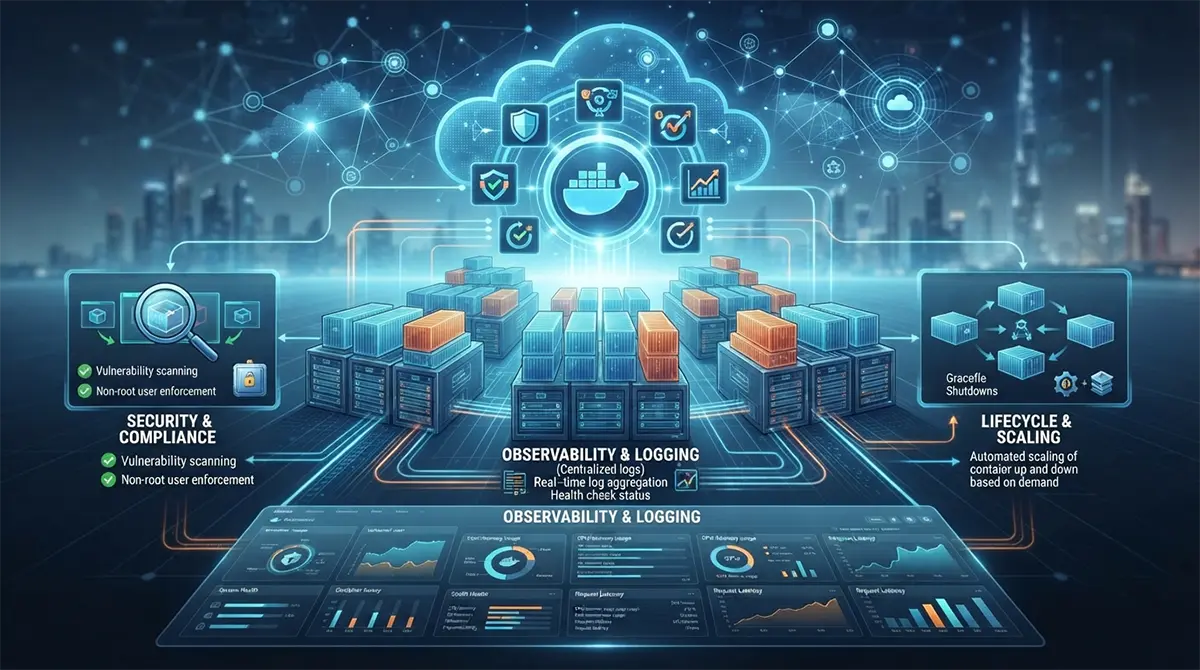
Operating a distributed fleet of production containers without deep observability is akin to flying an aircraft blindfolded through a severe storm. Because containers are ephemeral and can be dynamically spawned or destroyed across cluster nodes, traditional static log-file auditing is entirely inadequate.
Centralized Logging Pipelines
Docker’s default logging driver writes container stdout and stderr streams to local JSON files on the host node. In high-traffic production environments, these log files can rapidly consume all available disk space and are extremely difficult to aggregate and analyze across multiple hosts.
-
Stream to Standard Output: Configure your application to write logs exclusively to standard output and standard error streams in structured formats like JSON, allowing the container runtime to capture them natively.
-
Adopt Remote Logging Drivers: Configure Docker logging drivers to stream log streams directly to centralized aggregation platforms such as Elasticsearch, Fluentd, Logstash, Loki, or managed cloud logging services.
-
Implement Log Rotation: If local logging drivers must be used as a fallback, ensure aggressive log rotation policies are explicitly enforced to prevent unmonitored log files from exhausting host disk capacity.
Health Checks and Metrics Collection
Production container orchestration requires real-time insight into container health to automatically remediate failing instances and scale resources dynamically based on actual demand.
-
Implement Comprehensive Health Checks: Utilize the
HEALTHCHECKinstruction in your Dockerfile or configure orchestrator-level probes that periodically execute internal diagnostic commands within the container to verify application responsiveness. -
Scrape Prometheus Metrics: Expose application performance metrics—such as request latency, error rates, database connection pool saturation, and memory usage—in a format compatible with monitoring systems like Prometheus.
-
Establish Proactive Alerting: Configure alerting rules to notify operations teams immediately when critical thresholds are breached, ensuring rapid incident response before minor anomalies escalate into major production outages.
Global Collaboration and Localized Expertise
Deploying resilient containerized architectures at enterprise scale often requires specialized knowledge, rigorous auditing, and round-the-clock infrastructure management that stretches internal engineering teams thin. Organizations looking to accelerate their digital transformation, optimize cloud expenditure, and implement bulletproof CI/CD pipelines frequently partner with specialized firms providing expert DevOps Services in Dubai to architect, secure, and maintain high-availability container clusters tailored to stringent regional and global compliance standards. Leveraging external domain expertise ensures that your containerized infrastructure aligns with industry best practices from day one, minimizing technical debt and maximizing operational uptime.
Conclusion
Production-grade containerization requires a holistic commitment to security, efficiency, resilience, and operational discipline. By moving away from quick-fix configurations and embracing robust patterns—such as building lean multi-stage images, enforcing non-root runtime execution, setting rigid resource constraints, managing secrets securely, and implementing comprehensive observability—organizations can unlock the true power of Docker. Containerization is not a magic bullet that solves architectural flaws; rather, it amplifies them. By adhering to the meticulous best practices outlined in this guide, engineering teams can build resilient, scalable, and secure container ecosystems capable of handling the most demanding enterprise production workloads with absolute confidence.