


The digital landscape of 2026 presents a paradoxical reality for system administrators and privacy advocates. On one hand, cloud-based email suites dominate corporate and personal communications, offering plug-and-play convenience bundled with massive storage tiers. On the other hand, centralized communication platforms introduce profound privacy vulnerabilities, data ownership concerns, and rigid vendor lock-in. Building a secure mail server from scratch is no longer just a nostalgic exercise for hardcore enthusiasts; it is a vital act of digital sovereignty.
Modern email infrastructure requires navigating a complex gauntlet of security protocols, anti-abuse mechanisms, and cryptographic standards. In an era where automated botnets relentlessly probe public-facing network services, deploying an unhardened mail server is an invitation to disaster. Spammers will hijack open relays, blacklists will swallow your domain reputation within minutes, and malicious actors will attempt credential stuffing against poorly configured IMAP endpoints.
However, when engineered correctly with contemporary security practices, a self-hosted mail server provides unparalleled control over your data pipeline. This comprehensive guide details the architecture, configuration, hardening, and maintenance required to build a bulletproof mail server from the ground up. By mastering every layer—from raw DNS records and MTA configurations to advanced spam filtering and intrusion prevention—you will establish a robust communication hub capable of standing tall against modern cyber threats.
Architectural Overview and Prerequisites
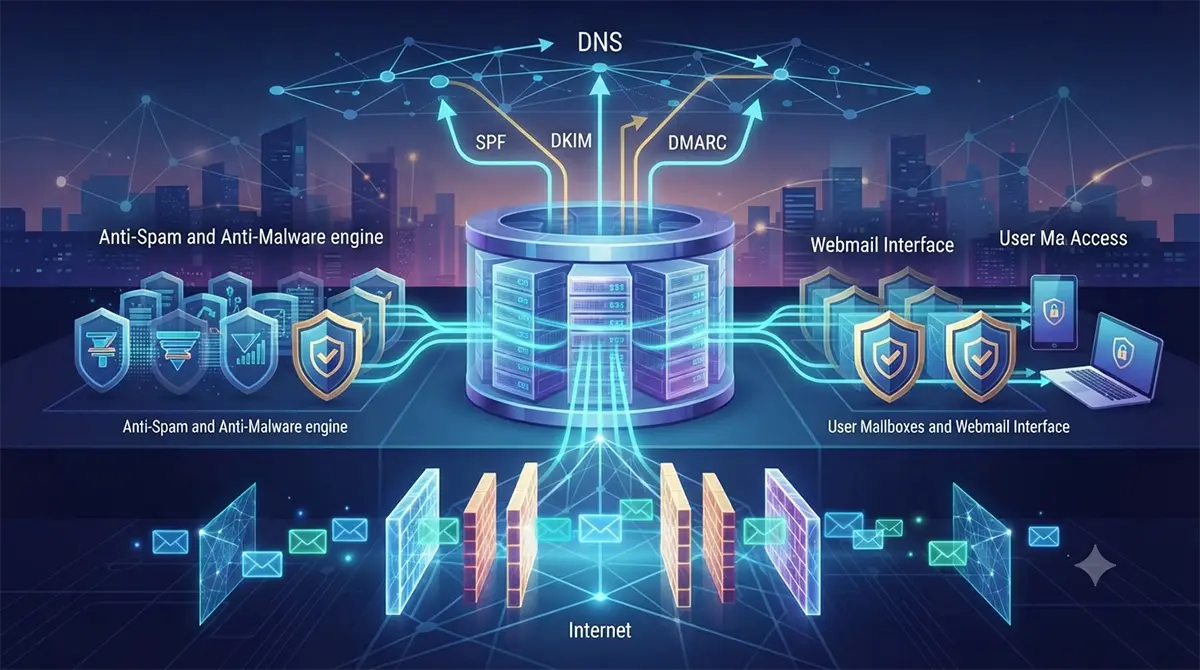
Before writing a single configuration file, you must establish a solid architectural foundation. A modern mail server is not a monolithic application; it is an orchestrated ecosystem of specialized software components working in tight concert. Understanding the functional separation of these components is critical to securing them.
Core Components of the Mail Stack
-
Mail Transfer Agent (MTA): Responsible for transmitting and receiving messages between different mail servers across the internet. Postfix remains the gold standard for this role due to its modular design, exceptional security record, and granular configuration options.
-
Mail Delivery Agent (MDA) and Local Delivery Agent (LDA): Responsible for taking messages accepted by the MTA and delivering them into the correct user mailboxes, handling sieve filtering, and managing quotas. Dovecot dominates this space, acting as both an IMAP/POP3 server and a secure delivery agent.
-
Simple Authentication and Security Layer (SASL): Handles user authentication to prevent unauthorized relaying. Dovecot SASL or Cyrus SASL integrates directly with the MTA to verify user credentials before accepting outbound mail.
-
Content Filter and Anti-Spam Engine: Evaluates incoming and outgoing messages for spam, phishing signatures, and malware. Rspamd has largely superseded older engines like SpamAssassin due to its high performance, asynchronous event-driven architecture, and rich plugin ecosystem.
-
Webmail and Client Interface: Provides end-users with browser-based access to their mailboxes. Roundcube or SnappyMail offers lightweight, responsive interfaces that communicate securely over IMAP and SMTP via local loops.
Network and Infrastructure Requirements
Building a reliable mail server demands specific infrastructure prerequisites that cannot be bypassed with cheap virtual private servers (VPS) hosted on notoriously spam-flagged IP blocks.
-
Dedicated Static IPv4 and IPv6 Addresses: Your server must have a clean, unshared public IP address. Shared hosting IPs frequently carry historical spam blackmarks that will severely damage your email deliverability.
-
Reverse DNS (rDNS) / PTR Record: This is non-negotiable. Your server’s public IP must resolve back to your mail server’s fully qualified domain name (FQDN), such as
mail.example.com. Without a valid PTR record, major providers like Google, Microsoft, and Yahoo will instantly reject your connections. -
Port Openings: Ensure your firewall and hosting provider permit outbound and inbound traffic on standard mail ports: Port 25 (SMTP server-to-server communication), Port 465 (SMTPS submission with implicit TLS), Port 587 (Submission with explicit STARTTLS), Port 993 (IMAPS for secure mailbox access), and Port 995 (POP3S).
Organizations scaling up their internal communication infrastructure often look toward specialized external partners for robust DevOps Services in Dubai to manage high-availability clusters and ensure optimal network routing across international peering points.
Setting Up the DNS Foundation
Email security begins long before packets hit your server’s network interface; it starts at the authoritative DNS zone. Without precise cryptographic and routing records, receiving mail servers will view your messages as untrusted forgeries.
Configuring Basic Records
Your DNS zone must include fundamental records pointing your mail infrastructure to the correct physical endpoints.
-
A and AAAA Records: Create explicit host records for your mail subdomain. For instance,
mail.example.comshould point to your IPv4 address, andmail.example.comshould point to your IPv6 address. -
MX Records: The Mail Exchange record tells the world which server is authorized to receive mail for your domain. Set the priority appropriately (e.g.,
10 mail.example.com.). Multiple MX records can be configured with varying priorities for redundancy.
Implementing SPF, DKIM, and DMARC
Modern email validation relies on three pillars: Sender Policy Framework (SPF), DomainKeys Identified Mail (DKIM), and Domain-based Message Authentication, Reporting, and Conformance (DMARC).
-
Sender Policy Framework (SPF): SPF is a TXT record that lists all IP addresses and networks authorized to send email on behalf of your domain. A typical strict SPF record looks like this:
v=spf1 ip4:203.0.113.15 -all. The-allmechanism ensures that any server not explicitly listed is unauthorized. -
DomainKeys Identified Mail (DKIM): DKIM adds a cryptographic digital signature to the headers of every outgoing email. The receiving server uses the public key published in your DNS to verify that the email was genuinely sent by your domain and has not been tampered with in transit. You will generate a public-private key pair on your mail server using OpenSSL or Rspamd tools and publish the public key as a TXT record under a specific selector (e.g.,
selector1._domainkey.example.com). -
Domain-based Message Authentication, Reporting, and Conformance (DMARC): DMARC ties SPF and DKIM together and tells receiving servers what action to take if authentication fails. It also provides daily XML reports detailing who is sending mail using your domain. A robust, production-ready DMARC policy starts in monitoring mode and progresses to quarantine or rejection:
v=DMARC1; p=reject; sp=reject; rua=mailto:dmarc-reports@example.com; pct=100.
When budgeting for in-house talent or evaluating market rates such as a typical Linux dubai salary, enterprises must factor in the advanced skill sets required to maintain secure mail routing, write flawless zone files, and manage cryptographic lifecycles.
Installing and Hardening Postfix as the MTA
With the DNS foundation established, the next phase involves provisioning the operating system and installing Postfix. For this deployment, we utilize a modern Linux distribution configured with strict access controls and encrypted transports.
Installing Core Packages
Begin by updating your package repositories and installing Postfix alongside essential utility packages. Ensure that legacy MTA packages like Sendmail or Exim are completely purged to avoid port conflicts on Port 25.
Configure your primary hostname via the operating system’s hostnamectl utility to match your FQDN (mail.example.com). Postfix automatically reads this hostname during initialization, but it should be explicitly defined within the main configuration file (/etc/postfix/main.cf).
Securing Postfix Configuration (main.cf)
A secure Postfix configuration requires disabling legacy cryptographic protocols, enforcing strict TLS ciphers, and eliminating open relay vulnerabilities. Open your /etc/postfix/main.cf file and configure the core parameters meticulously.
-
Identity and Networking: Define your server identity, operational domain, and listening interfaces. Restrict listening interfaces to your public IP and localhost loopback rather than binding blindly to all available interfaces.
-
Relay Control: Never allow open relaying. Configure
smtpd_recipient_restrictionsto enforce authentication for external clients while permitting local delivery without authentication only for trusted internal scripts. -
TLS Enforcement: Modern security standards demand the complete elimination of SSLv2, SSLv3, TLSv1.0, and TLSv1.1. Force TLSv1.2 and TLSv1.3 exclusively. Use high-grade cipher suites that prioritize Forward Secrecy (FS).
Plaintext
smtpd_tls_security_level = encrypt
smtpd_tls_mandatory_protocols = !SSLv2, !SSLv3, !TLSv1, !TLSv1.1
smtpd_tls_protocols = !SSLv2, !SSLv3, !TLSv1, !TLSv1.1
smtpd_tls_ciphers = high
smtpd_tls_exclude_ciphers = RC4, aNULL, eNULL, LOW, 3DES, MD5, EXP, PSK, SRP, DSS
tls_high_cipherlist = ECDHE-ECDSA-AES128-GCM-SHA256:ECDHE-RSA-AES128-GCM-SHA256:ECDHE-ECDSA-AES256-GCM-SHA384:ECDHE-RSA-AES256-GCM-SHA384
Additionally, ensure that outgoing mail connections also enforce strict TLS validation (smtp_tls_security_level = dane or encrypt), preventing man-in-the-middle eavesdropping during transit between your MTA and external mail gateways.
Configuring Dovecot for Secure IMAP and Local Delivery
While Postfix handles the transportation of mail across networks, Dovecot manages local storage, retrieval, and user authentication. Securing Dovecot is paramount because it handles sensitive user credentials and stores decrypted message contents on disk.
Authentication and SSL/TLS Hardening
Dovecot must be configured to use secure authentication mechanisms that prevent plaintext password sniffing over the network.
-
Disable Plaintext Auth over Unencrypted Channels: Ensure that
disable_plaintext_auth = yesis set globally. Plaintext authentication should only be permitted over SSL/TLS wrapped connections (IMAPS on Port 993) or secure STARTTLS tunnels. -
Password Schemas: Never store user passwords in plaintext. Configure Dovecot to use robust hashing algorithms such as Argon2id or modular crypt formats with strong work factors (e.g., SHA512-CRYPT with salted parameters).
-
SSL Settings: Align Dovecot’s SSL configuration with your Postfix setup. Enforce TLSv1.2 and TLSv1.3, disable weak ciphers, and point Dovecot to your Let’s Encrypt SSL certificates located in
/etc/letsencrypt/live/[mail.example.com/](https://mail.example.com/).
Integrating Mailbox Storage Formats
Modern mail servers should utilize the Maildir format rather than the legacy mbox format. Maildir stores each email as an individual file within a structured directory hierarchy (typically cur, new, and tmp). This eliminates file-locking race conditions, improves performance under heavy load, and prevents data corruption if a storage write is interrupted.
Configure the mail location path within /etc/dovecot/conf.d/10-mail.conf:
mail_location = maildir:~/Maildir
Ensure that permissions on user home directories and mail storage paths are rigorously locked down. Only the specific virtual mail user or system user should have read and write access to their respective maildirs.
Implementing Advanced Anti-Spam and Anti-Malware with Rspamd
Unsecured mail servers are magnets for spam, phishing attacks, and malware payloads. Integrating an advanced filtering engine like Rspamd directly into your mail pipeline protects your users and preserves your server’s sending reputation.
Architecture and Postfix Integration
Rspamd operates as a high-performance, asynchronous filtering daemon that communicates with Postfix via the Milter (Mail Filter) protocol. When Postfix receives an incoming message, it pauses the SMTP transaction and passes the raw message stream to Rspamd. Rspamd analyzes the message using heuristic rules, statistical Bayesian filtering, fuzzy hashes, DKIM signatures, and external DNS blacklist (RBL) lookups. Based on the calculated composite score, Rspamd instructs Postfix to accept, tag, quarantine, or reject the message.
To integrate Rspamd, configure Postfix’s milter settings in /etc/postfix/main.cf:
smtpd_milters = inet:127.0.0.1:11332
non_smtpd_milters = inet:127.0.0.1:11332
milter_default_action = accept
milter_protocol = 6
Configuring Rspamd Modules
Rspamd comes with dozens of built-in modules that should be carefully tuned for production environments.
-
DKIM Signing Module: Configure Rspamd to automatically sign all outgoing mail leaving your authenticated users. This centralizes key management and ensures that every outbound message carries a valid cryptographic signature without requiring manual Postfix milter wrappers.
-
Greylisting: Enable the greylisting module to temporarily reject incoming emails from unknown senders on their first attempt with a 4xx soft error. Legitimate mail servers will automatically retry delivery after a few minutes, while automated spam bots usually abandon the attempt, filtering out a massive volume of junk traffic before expensive heuristic analysis occurs.
-
Fuzzy Check Module: Rspamd uses fuzzy hashing to fingerprint recurring spam campaigns and unsolicited bulk mail, allowing the filter to block variant spam messages instantly even if the text or sender addresses change slightly.
Ensure high uptime for mission-critical mail services often leads organizations to partner with providers known for offering the Best tech support dubai, ensuring rapid incident response and proactive security patching around the clock.
Webmail Deployment and Client Integration
While power users and administrators typically access their mailboxes via dedicated desktop clients (such as Thunderbird or Apple Mail) or mobile apps configured with IMAP/SMTP over TLS, providing a robust webmail interface is essential for comprehensive usability.
Deploying Roundcube securely
Roundcube is an open-source, feature-rich webmail software written in PHP that provides a clean desktop-like interface. To deploy Roundcube securely, run it behind a hardened reverse proxy (such as Nginx or HAProxy) with PHP-FPM running under isolated system user pools.
-
HTTPS Enforcement: The webmail interface must be served exclusively over HTTPS with HTTP Strict Transport Security (HSTS) enabled. Configure strong security headers, including Content Security Policy (CSP), X-Frame-Options, and X-Content-Type-Options, to mitigate cross-site scripting (XSS) and clickjacking attacks.
-
Localhost Loopback Communication: Configure Roundcube to communicate with your Dovecot IMAP and Postfix SMTP services exclusively over encrypted local loops (
127.0.0.1), ensuring that webmail traffic never traverses unencrypted network segments.
Client Auto-Configuration (Autodiscover and Autoconfig)
To make setting up desktop and mobile mail clients seamless for your users, implement standard autodiscover and autoconfig XML endpoints on your web server. Clients like Outlook, Thunderbird, and mobile mail apps automatically query [http://autoconfig.example.com/mail/config-v1.1.xml](http://autoconfig.example.com/mail/config-v1.1.xml) and [http://autodiscover.example.com/autodiscover/autodiscover.xml](http://autodiscover.example.com/autodiscover/autodiscover.xml) to discover the correct secure IMAP, POP3, and SMTP server settings, port numbers, and authentication methods without manual user intervention.
Firewall Hardening, Intrusion Prevention, and Monitoring
A secure mail server requires active defense mechanisms to detect and neutralize brute-force attacks, credential stuffing, and unauthorized intrusion attempts in real time.
Network Firewall and Port Lockdown
Use nftables or ufw to restrict network access to your server. Only explicitly required ports should be open to the public internet (Ports 25, 80, 443, 465, 587, 993, 995). All other management ports, such as SSH (Port 22) and database ports, should be restricted to trusted administration IP ranges or accessed exclusively via secure VPN tunnels.
Implementing Fail2ban for Automated Defense
Brute-force attacks against SSH, Postfix authentication, and Dovecot IMAP endpoints are constant. Install and configure Fail2ban to monitor system logs for suspicious activity and automatically ban malicious IP addresses via firewall rules.
Create custom jails in /etc/fail2ban/jail.local for Postfix and Dovecot:
-
Postfix Jail: Monitors mail logs for repeated authentication failures, SASL errors, and excessive unrecognized command errors. Bans IPs after 3 consecutive failures for 24 hours.
-
Dovecot Jail: Monitors IMAP login failures and brute-force password guessing attempts, protecting user mailboxes from automated dictionary attacks.
-
Recidivism Jail: Tracks repeat offenders across all jails and issues long-term or permanent network bans against persistent threat actors.
Comprehensive Monitoring and Alerting
Deploy a robust monitoring stack utilizing Prometheus and Grafana alongside node exporters and the Postfix exporter. Monitor key system metrics including disk space utilization (mail spools can fill up rapidly during denial-of-service attacks or delivery queue stalls), memory consumption, CPU load, queue lengths, and SSL certificate expiration dates. Set up automated alerting via webhook or email to notify your operations team immediately if queue sizes spike abnormally or if authentication failure rates exceed safe thresholds.
Maintenance, Backup, and Reputation Management
Building a secure mail server is not a one-time project; it is an ongoing operational commitment. Maintaining pristine mail delivery and server integrity requires disciplined routine maintenance.
Automated Certificate Lifecycle Management
Never rely on manual SSL certificate renewals. Implement Certbot with automated cron jobs or systemd timers to renew your Let’s Encrypt TLS certificates every 60 days. Configure Postfix and Dovecot reload hooks to execute automatically upon successful certificate renewal, ensuring your services always present valid, unexpired cryptographic credentials to connecting clients.
Managing Domain Reputation and Blacklists
Even with immaculate security configurations, your server’s IP address or domain can occasionally find itself listed on external DNS blacklists (RBLs) due to compromised user credentials or aggressive external filtering.
-
Proactive Monitoring: Use automated monitoring tools to check your server’s IP against major blacklists (Spamhaus, Barracuda, SpamCop) daily.
-
Feedback Loops (FBL): Register for abuse feedback loops with major mail providers (Microsoft SmartNetwork Data Services, Google Postmaster Tools). These tools provide invaluable telemetry regarding your domain’s sending reputation, spam complaint rates, and cryptographic authentication performance.
-
Queue Management: Regularly inspect your Postfix mail queue using
mailqandpostqueue. Investigate deferred messages immediately to identify potential outbound spam leaks caused by compromised web applications hosted on your infrastructure.
By adhering to these architectural standards, hardening practices, and ongoing maintenance routines, you will successfully operate a secure, resilient, and sovereign mail server from scratch in 2026.