


When embarking on a journey into the world of Linux and Unix-like operating systems, one encounters a paradigm shift in how data, hardware, and applications are organized. Unlike other operating systems that partition storage into separate drive letters like C: or D:, Linux approaches data organization through a single, unified, and elegant hierarchical tree structure. At the absolute apex of this entire structure lies a single character, the forward slash, which represents the main directory of the system. This main directory is universally known as the root directory.
Understanding the root directory and the meticulously organized universe that stems from it is the single most important milestone for any system administrator, developer, or enthusiast. Without this foundational knowledge, navigating the command line, configuring server environments, managing storage volumes, and troubleshooting system failures can feel like wandering through an endless labyrinth. This comprehensive guide will explore the name and nature of the main directory, dissect the philosophy behind the Filesystem Hierarchy Standard, examine every critical subdirectory in detail, and provide you with the deep technical insights needed to master the Linux filesystem.
The Absolute Beginning: Unveiling the Root Directory
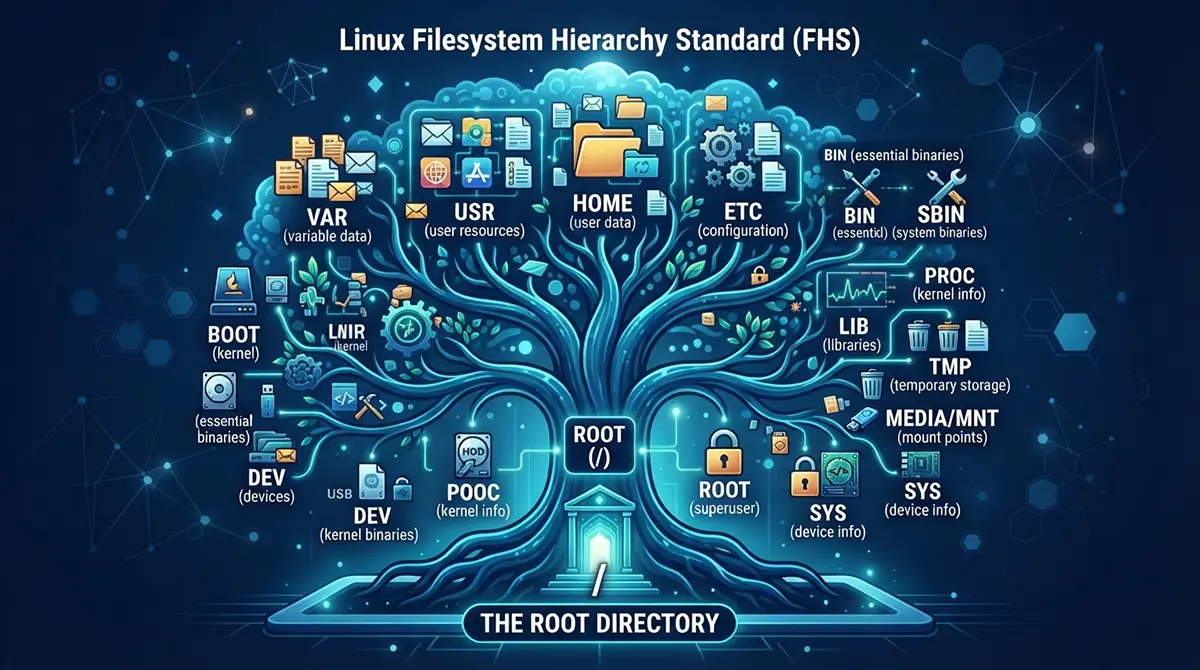
The main directory of a Linux file system is officially called the root directory. In technical notation, path representations, and configuration files, it is denoted exclusively by a single forward slash. If you imagine the Linux filesystem as an inverted tree, the root directory is the seed from which every branch, leaf, and trunk grows. Every file, directory, partition, and connected external storage device on a Linux system exists somewhere underneath this single starting point.
To truly appreciate the root directory, it helps to understand the philosophy inherited from Unix, which states that everything in the system is either a file or a process. This includes not only traditional text documents and application binaries, but also physical hardware components such as hard drives, keyboards, printers, and network interfaces. All of these disparate elements are mapped into the unified directory tree originating from the root directory.
When you boot up a Linux system, the kernel mounts the root filesystem as its very first action. Initially, this filesystem might be loaded into memory as an initial ramdisk or ramfs, or it might be mounted directly from a persistent storage drive attached to the motherboard. Once the root filesystem is active, the operating system uses it as the anchor point to mount all other filesystems, network shares, and virtual kernel interfaces.
The Architecture of Order: The Filesystem Hierarchy Standard
As Linux and Unix variants evolved across different organizations and hardware platforms in the late twentieth century, developers realized that chaos would ensue if every distribution placed its configuration files, binaries, and libraries in completely random locations. To solve this problem and ensure consistency, interoperability, and predictability across diverse Unix-like environments, the Filesystem Hierarchy Standard was created.
The Filesystem Hierarchy Standard defines the layout of the Linux file system and dictates where specific types of files and directories must reside. Adhering to these standards ensures that software written for one Linux distribution can run seamlessly on another, because application installers know precisely where to find shared libraries, configuration files, executable binaries, and variable data storage.
Under the rules of the Filesystem Hierarchy Standard, the root directory itself contains only a carefully curated set of top-level subdirectories. Each of these subdirectories serves a distinct, highly specialized purpose. They separate static files from variable files, shareable files from unshareable files, and system administration tools from ordinary user applications. By maintaining this strict separation, Linux systems achieve remarkable stability, security, and ease of backup.
Dissecting the Core: A Deep Dive into Essential Subdirectories
To master the Linux filesystem, you must become intimately familiar with the primary subdirectories that reside directly beneath the root directory. Each of these directories plays a vital role in the day-to-day operation of the operating system.
The Binaries Directories: /bin and /sbin
The
/bin directory stands for binaries and contains essential command-line utilities and executable programs that are required for the system to boot and function in single-user mode. Commands that every user on the system needs access to, such as ls, cp, mv, mkdir, rm, cat, and bash, reside here. These binaries are vital for basic system recovery and maintenance when higher-level filesystems are not yet available.Closely related to
/bin is the /sbin directory, which stands for system binaries. The programs housed in /sbin are reserved primarily for the system administrator or root user. These utilities include critical system maintenance and repair tools like fdisk, fsck, iptables, reboot, shutdown, and ip. While regular users can sometimes view or execute some of these commands depending on permissions, they are fundamentally designed for administrative control over the machine.Need a Reliable DevOps Partner in Dubai?
Managing servers, monitoring performance, and automating workflows can be overwhelming when you’re trying to scale your business. If you’re looking for hands-on expertise in cloud migration, server hardening, and pipeline automation, We are here to bridge the gap. Reach out to us and let’s build a resilient infrastructure tailored to your needs.
The Configuration Repository: /etc
The
/etc directory is one of the most critical locations on the entire system. Its name historically derives from et cetera, but in modern practice, it is often understood to mean editable text configuration. Every system-wide configuration file, network setting, user database, service parameter, and startup script lives inside /etc or its subfolders.Examples of vital files found within
/etc include:-
/etc/passwdand/etc/shadow, which manage user account information and encrypted password hashes. -
/etc/fstab, which defines static file system mount points and storage partitions. -
/etc/hosts, which maps hostnames to IP addresses for local network resolution. -
/etc/resolv.conf, which specifies DNS server addresses for network connectivity. -
Dedicated configuration subdirectories for services like Nginx, Apache, SSH, MySQL, and Postfix.
Because
/etc holds the blueprint of how your operating system behaves, backing up this directory is essential for disaster recovery. If a server hardware fails, having a pristine copy of /etc allows an administrator to rapidly recreate the exact configuration on new hardware.The User Domain: /home
The
/home directory is where the personal workspace for all non-root users lives. Whenever a new regular user is created on the system, a corresponding subdirectory is created inside /home. For example, if a user named alex is created, their home directory will typically be located at /home/alex.Inside each user’s home directory, you will find personal documents, downloaded files, application configurations, and hidden dot files or dot folders such as
.bashrc, .ssh, and .config that customize their specific shell environment and application preferences. Separating user data from system binaries in this manner ensures that upgrading or reinstalling the operating system does not accidentally wipe out personal files and projects.The Superuser Sanctuary: /root
While
/home houses the home directories for all regular users, the home directory for the administrative superuser, known as root, is located separately at /root. Keeping the superuser home directory outside of /home is a deliberate security and reliability design choice. If the partition containing /home experiences corruption, becomes unmounted, or runs out of disk space, the system administrator can still log in and perform emergency repairs using the isolated environment provided by /root.Variable Data Hub: /var
The
/var directory stands for variable and is designed to hold files to which the system writes data continuously during normal operation. As an operating system runs, it generates logs, queues emails, caches web content, stores database files, and handles print spools. These files grow and shrink dynamically over time, distinguishing them from static files in other directories.Key subdirectories within
/var include:-
/var/log, which houses system logs, authentication logs, kernel messages, and application log files essential for auditing and troubleshooting. -
/var/mail, which stores incoming email spools for local system accounts. -
/var/www, which frequently serves as the default root location for web server document trees. -
/var/lib, which holds persistent state information and database files for various installed packages. -
/var/spool, which contains data awaiting processing, such as print queues and cron job execution queues.
Monitoring disk usage in
/var is a critical task for system administrators, because a runaway application or a sudden surge in log generation can easily fill up the disk partition and crash the operating system.Temporary Storage: /tmp
The
/tmp directory is a designated workspace for temporary files created by applications and users. Files stored in /tmp are generally ephemeral and can be deleted at any time, such as during system reboots or through automated cleanup daemons. Any local user can read and write files in /tmp, making it a useful scratchpad for inter-process communication and short-term data processing. However, because of its open permissions, applications must handle file creation securely within /tmp to prevent security vulnerabilities like symlink attacks.Shared User Applications and Utilities: /usr
Despite its name sounding like user, the
/usr directory stands for Unix System Resources and contains the bulk of user-space applications, shared libraries, documentation, and source code. It is effectively a secondary hierarchy within the main filesystem tree.Important subdirectories within
/usr include:-
/usr/bin, which holds non-essential command binaries for all users, such as text editors, compilers, and desktop applications. -
/usr/sbin, which contains non-essential system administration binaries. -
/usr/liband/usr/lib64, which store critical shared libraries required by binaries in/binand/usr/bin. -
/usr/local, which serves as a dedicated space for locally compiled or manually installed software that is not managed by the system package manager. -
/usr/share, which contains architecture-independent data files such as documentation, man pages, icon themes, and localization files.
Device Nodes and Hardware Interfaces: /dev
The
/dev directory contains special device files that act as interfaces to physical hardware components and virtual devices. In Linux, hardware devices are exposed as files, allowing users and applications to interact with hardware using standard file I/O operations.For instance, your primary hard drive or solid-state drive might appear as
/dev/sda or /dev/nvme0n1. Terminal emulator windows appear as pseudo-terminal devices under /dev/pts. The kernel random number generator is accessed via /dev/random and /dev/urandom. Even empty space or null outputs can be directed to /dev/null, the famous data sink that discards everything written to it.Virtual Kernels and Process Information: /proc and /sys
Both
/proc and /sys are virtual filesystems created entirely in the system memory by the Linux kernel. They do not occupy any physical space on your storage drives. Instead, they act as a real-time window into the internal state of the kernel, hardware configurations, and running processes.The
/proc directory contains numerical subdirectories named after Process IDs, representing every active process running on the system. By reading files within /proc/[PID], administrators can inspect memory usage, environment variables, and execution parameters of specific applications. Additionally, /proc exposes kernel tuning parameters through files like /proc/sys, which can be adjusted on the fly to optimize network throughput or memory management.The
/sys directory provides a structured view of device drivers, kernel modules, and hardware buses connected to the system. It allows administrators to inspect device properties and configure hardware behavior directly through the virtual filesystem interface.Shared Libraries and Dependencies: /lib and /lib64
The
/lib and /lib64 directories contain essential shared library files and kernel modules required to boot the system and execute commands found in /bin and /sbin. Shared libraries are equivalent to dynamic link libraries in other operating systems, containing reusable code routines that multiple applications can call simultaneously. If these libraries are accidentally deleted or corrupted, the system can quickly become unbootable, highlighting their critical importance.Bootloader Files and Kernels: /boot
The
/boot directory holds all the files necessary to successfully boot the Linux operating system. This includes the Linux kernel images, the initial ramdisk images, and configuration files for the system bootloader, such as GRUB. When you turn on your computer, the firmware loads the bootloader from the motherboard, which then reads /boot to load the Linux kernel into RAM and hand over control of the hardware.Mount Points and External Media: /mnt and /media
The
/mnt directory is traditionally used by system administrators as a temporary mount point for mounting external storage volumes, secondary hard drives, or network shares during maintenance tasks.Similarly, the
/media directory serves as the automated mount point for removable media devices such as USB flash drives, external hard disk drives, and optical discs in modern desktop Linux distributions. When you plug a USB drive into a modern Linux desktop environment, the operating system automatically creates a subdirectory inside /media and mounts the storage volume there for easy user access.Optional Third-Party Software: /opt
The
/opt directory is designated for the installation of large, self-contained proprietary or third-party software packages that do not conform to the standard Filesystem Hierarchy Standard layout. Commercial software suites, database engines, web browsers, and enterprise tools often install their entire directory trees inside /opt, keeping their binaries, libraries, and configuration files neatly isolated from the rest of the operating system.Mounting Realities: How Physical Storage Connects to the Tree
One of the most powerful features of the Linux filesystem is its ability to stitch completely different physical storage devices, network locations, and virtual drives into a single continuous tree through a process called mounting.
When a Linux system boots, the root directory is mounted onto a specific storage partition. However, an administrator can attach another hard drive, a solid-state partition, a network storage share using NFS or SMB, or even a cloud storage bucket to any existing directory within that tree. That directory then becomes a mount point.
Once a device is mounted to a directory, any files stored inside that directory are actually stored on the attached external device, yet they appear transparently as part of the unified directory tree. This abstraction allows system administrators to scale storage effortlessly. If the
/var directory begins running out of space due to massive log accumulation, an administrator can attach a new, larger hard drive, mount it directly over /var, and seamlessly expand storage capacity without disrupting applications or changing file paths.Safeguarding the Core: Permissions, Ownership, and Security
Because the root directory and its core subdirectories dictate the behavior and security of the entire operating system, strict access controls are enforced across every file and folder. Linux utilizes a robust permission and ownership model based on user categories, groups, and permission classes.
Every file and directory beneath the root has an assigned owner and a primary group. Furthermore, permissions are divided into three distinct operations:
-
Read, which allows viewing the contents of a file or listing the contents of a directory.
-
Write, which allows modifying a file or adding and removing files within a directory.
-
Execute, which allows running a file as a program or entering and traversing through a directory.
The superuser, operating under the username root, possesses unrestricted administrative power to bypass these permission checks and modify any file on the system. For everyday tasks, security best practices dictate that users operate with restricted privileges using tools like
sudo to execute administrative commands only when strictly necessary. This prevents accidental system damage and mitigates the impact of security compromises.Conclusion
The main directory of a Linux file system, known universally as the root directory and denoted by the forward slash, is a masterpiece of design and organization. By establishing a unified hierarchical tree where every file, directory, and hardware component finds its logical place, Linux provides an intuitive yet immensely powerful environment for computation.
From the essential system binaries in
/bin and /sbin to the dynamic data hubs in /var, the user workspaces in /home, and the real-time kernel telemetry in /proc, each component of the Filesystem Hierarchy Standard works in harmony to deliver stability, security, and flexibility. Mastering this structure transforms the Linux command line from an intimidating black box into a transparent, controllable, and highly efficient digital workspace.