


In the vast and complex landscape of digital communication, sending an email is a simple act that initiates an incredibly intricate technological process behind the scenes. For businesses and individuals alike, ensuring that these messages reach the intended recipient’s inbox rather than a desolate spam folder is a constant battle. One of the most misunderstood yet critical components in this struggle for visibility is Reverse DNS, or more specifically, the implementation of Pointer Records, commonly known as PTR records.
While many administrators focus heavily on content filtering, keyword avoidance, and sender reputation scores based on user engagement, they often overlook the foundational infrastructure that validates their identity as a sender. Reverse DNS is the digital equivalent of an identity verification check. When a receiving mail server gets an incoming message, it does not merely look at the “From” address; it interrogates the very infrastructure sending the mail. If the infrastructure fails to provide a consistent and verifiable identity, the receiving server is mathematically justified in viewing that sender with extreme suspicion.
Understanding why spam filters treat unverified infrastructure with such hostility requires a brief look at the history of email. In the early days of the internet, email was built on trust. As the system grew, so did the incentives for malicious actors to exploit that trust for phishing, malware distribution, and bulk unsolicited advertising. Today, the mail server landscape is a hyper vigilant environment where every connection is audited. If you want your legitimate communications to survive this audit, you must master the configuration of PTR records.
The Technical Foundation of IP Addresses and Domain Names
To understand PTR records, we must first distinguish between the two primary ways we navigate the internet: domain names and IP addresses. Humans prefer domain names, which are easy to remember, like example.com. Computers, conversely, operate on IP addresses, which are numerical strings that serve as the unique identifier for a device on a network.
The standard Domain Name System (DNS) is essentially a giant phonebook that maps domain names to IP addresses. When you type a website address into your browser, your system performs a forward DNS lookup to find the IP address associated with that name. This process allows traffic to reach your web server.
Reverse DNS, as the name suggests, works in the exact opposite direction. It takes an IP address and queries the DNS system to find the domain name associated with it. This is not a standard requirement for everyday web browsing, which is why it is often ignored by casual network administrators. However, for mail servers, this process is fundamental. When your mail server connects to another server to deliver an email, the receiving server immediately takes your IP address and asks the DNS system for the hostname associated with that IP.
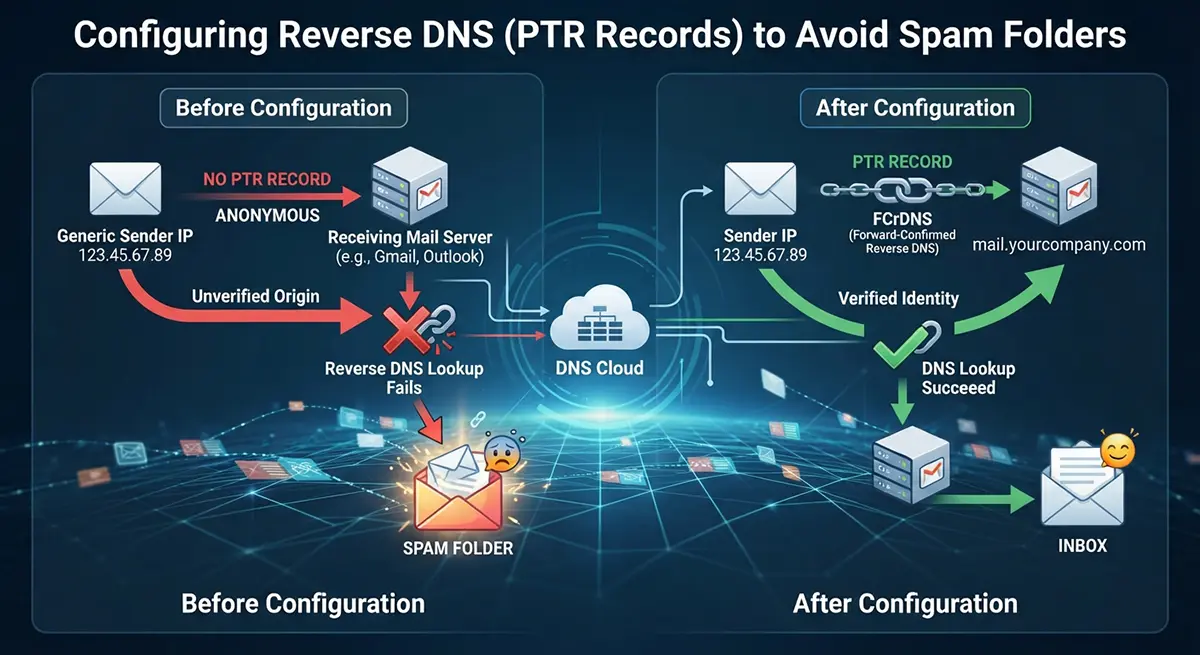
If this reverse lookup fails, or if it returns a hostname that does not match the domain you claim to be sending from, you are immediately flagged. In the eyes of a major inbox provider like Gmail or Outlook, a server without a valid PTR record is a server with an unverified, anonymous origin. Because anonymous connections are the primary vector for malicious spam, these servers are treated as inherently untrustworthy.
The Crucial Role of PTR Records in SMTP Handshakes
The Simple Mail Transfer Protocol (SMTP) governs how emails are transmitted across the internet. During the initial “handshake” between your sending server and the receiving server, your server announces its identity. This is usually done with an EHLO or HELO command, where your server claims, “I am mail.yourdomain.com.”
The receiving server then checks its own blacklist and reputation databases. Crucially, it initiates a reverse DNS lookup on your IP address to verify that your IP truly belongs to mail.yourdomain.com. If the IP resolves to a generic string provided by your internet service provider (ISP), such as 123-45-67-89.dynamic.isp.com, while your server claimed to be mail.yourdomain.com, the verification fails.
This is where the PTR record becomes the deciding factor. A PTR record is a specific type of DNS record that lives in the “in-addr.arpa” domain zone. It effectively tells the internet, “This IP address belongs to this specific hostname.” When the receiving server sees that the PTR record aligns perfectly with your HELO/EHLO hostname and, ideally, forward-resolves back to the same IP address, it gains a level of confidence in your identity. This alignment is known as forward-confirmed reverse DNS (FCrDNS), and it is the gold standard for high deliverability.
Many organizations fail to realize that even if their content is professional, their timing is perfect, and their user list is entirely opt in, they can still be relegated to the spam folder simply because their hosting provider or network team failed to set up this single record. In a competitive market where IT infrastructure can be outsourced to firms like DevOps Services in Dubai to ensure stability, ignoring such a foundational element is a significant oversight that can cripple your outreach capabilities.
Assessing Your Current Infrastructure and Identifying Gaps
Before you attempt to configure or modify your PTR records, you must perform a thorough audit of your current configuration. You cannot fix what you do not understand. Start by identifying the static IP address assigned to your mail server. This is the address that the rest of the world sees when you send an email. If you are using a shared hosting platform, you might be behind a gateway or NAT, which complicates matters significantly.
Once you have your IP address, use common command line tools to test your current setup. The “dig” command or “nslookup” utility is perfect for this. For example, executing a command to perform a reverse lookup on your IP will tell you exactly what the world sees when they investigate your server. If the output returns a generic ISP address instead of your domain, you have confirmed that your PTR record is either missing or misconfigured.
Furthermore, check your HELO/EHLO identity. You can often find this in your mail server logs. Ensure that your server is consistently identifying itself by the same fully qualified domain name (FQDN) that you intend to use for your PTR record. If your server says “I am localhost” or “I am server123.hostingprovider.com” while your PTR record points to “mail.yourcompany.com,” the mismatch will trigger a failure.
During this assessment phase, verify that your forward DNS is also correctly configured. An A record must exist for your hostname that points directly back to the IP address you are using to send mail. This symmetry between forward and reverse lookup is essential for establishing the credibility required by modern spam filters. Without this bidirectional consistency, your server’s reputation will inevitably suffer over time.
Coordinating with Your ISP or Hosting Provider
One of the most common points of frustration for administrators is that they often do not control the IP address space assigned to them. If you are operating on a cloud platform, a VPS, or a dedicated server, the IP address is technically owned by your hosting provider. Consequently, the authority to edit the reverse DNS zone file for that IP address resides with them, not you.
This means you cannot simply add a PTR record in your own domain’s DNS control panel. Instead, you must log into your hosting provider’s management console or contact their support team to request a PTR record update. Some major providers offer an automated interface where you can input the desired hostname for your IP address, while others require a formal support ticket.
When making this request, be precise. Provide the exact IP address and the exact FQDN you want it to point to. Ensure that the hostname you choose follows best practices. It should be a proper FQDN, like mail.example.com, rather than something vague. Avoid using names that sound like dynamic or residential addresses, as these are frequently blacklisted by default.
If you are using a dynamic IP address provided by a residential internet provider, you will likely find it impossible to set up a valid PTR record for email purposes. Residential IP ranges are almost universally blocked from sending SMTP traffic directly. In such cases, the only viable solution is to relay your email through a third party service, such as a dedicated SMTP relay provider or your business ISP’s authenticated mail server. These providers handle the PTR and reputation management for you, removing the burden from your internal infrastructure.
Understanding the Relationship Between PTR Records and SPF, DKIM, and DMARC
It is important to emphasize that a valid PTR record is not a magic shield. It is one piece of a much larger puzzle. Email authentication is a multi layered process. While the PTR record verifies your server’s IP identity, you also need to implement Sender Policy Framework (SPF), DomainKeys Identified Mail (DKIM), and Domain-based Message Authentication, Reporting, and Conformance (DMARC).
SPF is a text record in your DNS that lists the IP addresses authorized to send email on behalf of your domain. If your PTR record identifies your IP as belonging to mail.example.com, but your SPF record does not include that IP address, your emails will still be treated with suspicion. The PTR record establishes the server’s identity, and the SPF record authorizes that server to speak for your domain.
DKIM adds a digital signature to the header of your emails, proving that the content has not been tampered with in transit. DMARC ties everything together by providing instructions to receiving servers on how to handle emails that fail SPF or DKIM checks. It allows you to specify a policy of rejection or quarantine, which protects your domain from being spoofed by bad actors.
When you configure your PTR record, you are essentially setting the foundation upon which these other protocols sit. Without a working reverse DNS setup, your other authentication efforts are significantly weakened. Imagine having a highly secure vault (DMARC/DKIM/SPF) but placing it in an alleyway with no address or street sign (no PTR). People will be unable to find it, or worse, they will mistake it for a dangerous location. By ensuring your PTR record is correctly configured, you are putting your mail server on the right street with a clear, verifiable address.
Managing Multiple IP Addresses and Load Balancing
As your organization grows, you may find that a single IP address is insufficient to handle your outbound email volume. You might begin using a pool of IP addresses or a load balancer to distribute the load. This introduces new complexities into your reverse DNS strategy.
Each IP address in your pool must have its own, unique PTR record. If you have five outbound mail servers, all five IPs must have a PTR record that resolves to a hostname. Typically, it is best practice to have these resolve to distinct hostnames such as mail1.example.com, mail2.example.com, and so on. All these hostnames should have corresponding A records pointing back to their respective IP addresses.
Load balancing adds another layer to this. If you are using a virtual IP that sits in front of multiple servers, the PTR record should point to the domain name associated with that virtual IP. The key, regardless of the architecture, is consistency and the avoidance of ambiguity. Receiving servers are inherently suspicious of large blocks of IP addresses that all share a single, generic PTR hostname, as this is a common pattern used by spammers who rotate IPs to evade blacklists.
If you are scaling your infrastructure, document every IP address and its associated hostname meticulously. Keep a spreadsheet or a configuration management database that tracks these mappings. As you add or replace servers, update your PTR records immediately. Neglecting this maintenance is a fast track to deliverability issues, as old IPs with stale PTR records will quickly fall out of favor with spam filters that rely on long term reputation tracking.
Common Pitfalls and Troubleshooting Strategies
Even when you believe everything is configured correctly, issues can arise. One common problem is a delay in DNS propagation. When you update a PTR record, it can take anywhere from a few minutes to several hours to propagate across the global internet. If you are testing your configuration immediately after making a change, you might see old data and assume your update failed. Always allow sufficient time for changes to propagate before drawing conclusions.
Another frequent issue is the “split brain” scenario where your internal DNS servers are configured differently than your external DNS servers. Your internal staff might see the correct PTR record, but the rest of the world sees a different, incorrect version. Always perform your testing from an external, neutral network, or use online diagnostic tools that query public name servers.
If you continue to find your emails landing in spam folders despite having a perfect PTR record and valid SPF, DKIM, and DMARC setups, your problem might be related to reputation, not configuration. If your IP address was previously used by a spammer, it might be on a blacklist. Check your IP against major blacklists such as Spamhaus or Barracuda. If you find your IP is blacklisted, you will need to clean your reputation by contacting the blacklist providers and requesting removal after you have ensured your infrastructure is secured and your mail practices are compliant.
Avoid common mistakes like using CNAME records for PTR records. PTR records must point to an A record, never a CNAME. A CNAME alias in a reverse lookup can lead to unpredictable behavior and is strictly discouraged by the standards that govern SMTP. Keep your DNS setup simple, robust, and compliant with the latest technical specifications.
The Long Term Importance of Reputation Management
Once your PTR records are perfectly configured, you must maintain them. Email deliverability is not a “set it and forget it” task. It is an ongoing commitment to hygiene and professional standards. Your reputation as a sender is tied to the behavior of the infrastructure you manage.
Consistently monitor your delivery metrics. If you see a sudden spike in bounce rates or a significant number of emails moving to spam, investigate your infrastructure immediately. Is your server being used to relay spam? Are you sending emails to invalid addresses that lead to high bounce rates? Are your recipients marking your messages as spam?
Every interaction between your server and the rest of the internet contributes to a collective profile that providers build about you. A solid PTR record configuration provides the credibility that allows you to start from a place of trust. However, your actual mailing habits will determine if that trust is maintained or lost. Keep your mailing lists clean by removing inactive users, honor unsubscribe requests immediately, and ensure the content you send is relevant and wanted by the recipient.
The journey toward perfect email deliverability is a marathon, not a sprint. It involves a deep understanding of technical protocols, a commitment to rigorous maintenance, and a vigilant eye on industry trends. By mastering reverse DNS, you are securing the foundation of your digital presence. You are telling the world that you are a legitimate, identifiable, and responsible sender. This is a vital step in ensuring that your messages reach their destination, foster connection, and drive the success of your personal or professional communications in an increasingly crowded and skeptical digital world.
Future Proofing Your Mail Infrastructure
As we look toward the future of email, it is clear that security and authentication will only become more stringent. The days of simple, unverified mail delivery are long gone. New protocols and standards are constantly being developed to combat the evolution of spam and phishing tactics. Staying ahead of these changes is essential.
Invest in training for your technical teams or ensure your partnerships with infrastructure providers remain strong. As cloud adoption continues to accelerate, the lines between physical hardware and virtualized infrastructure will blur further, making the role of DNS management even more central to success. Whether you are managing a small business mail server or a global infrastructure, the principles of PTR record configuration remain a constant.
Remember that every technology choice you make impacts your ability to communicate. The effort you put into getting these small, technical details right today will pay dividends in your ability to maintain reliable communication channels tomorrow. Do not let the complexity of the task deter you. Break it down into logical steps, verify your work through testing, and maintain the integrity of your configurations.
Ultimately, the goal is to build an environment where your message can travel across the internet with the confidence that it will arrive safely at its destination. By focusing on the fundamentals, you are building that bridge. You are ensuring that when you send a message, it is treated with the respect it deserves, and that your connection with your audience remains uninterrupted and secure. This is the hallmark of a professional approach to modern digital communication, ensuring that your voice is heard in the noise of the internet.
Navigating the Complexities of Provider Policies
While the technical requirements for PTR records are standardized, the way different hosting providers and ISPs enforce these policies can vary wildly. Some providers, particularly those focused on cheap, high volume hosting, may not provide their customers with the ability to edit PTR records at all. This is a common hurdle for businesses that are just starting out and opting for budget friendly solutions. It is crucial to evaluate whether your chosen provider prioritizes the needs of professional email users.
If you find that your provider is unwilling to assist with PTR record creation, it is often a sign that you have outgrown your current hosting solution. A reputable provider understands that the ability to configure reverse DNS is a fundamental requirement for anyone operating a mail server. If they cannot offer this, they are implicitly forcing you into a position where your email deliverability will be compromised. When negotiating service agreements, explicitly ask about their policy on PTR records and reverse DNS delegation. This simple question can save you dozens of hours of troubleshooting later.
Furthermore, some providers impose limits on the number of PTR records you can modify or require you to purchase specific service tiers to access these features. Understand these constraints early in your procurement process. Sometimes, it is worth the additional monthly cost to have full control over your DNS records, as the cost of having your company’s marketing and transactional emails blocked from reaching customers is far higher than the price of a more professional hosting package.
The Human Element of Infrastructure Management
It is important to acknowledge that technical infrastructure does not exist in a vacuum. It is managed by humans, and human error is perhaps the most significant cause of misconfigured PTR records. Typos in domain names, confusion between different IP subnets, and simple oversight are common culprits. This is why having robust documentation and automated processes is so valuable.
When managing infrastructure at scale, avoid manual entry whenever possible. Use infrastructure as code (IaC) tools to manage your DNS records. By storing your DNS configuration in a version control system like Git, you can track every change, review modifications before they are applied, and easily revert to a previous state if something goes wrong. This level of rigor is what separates high performing organizations from those that are constantly putting out fires.
Consider the role of internal communication as well. Your network engineering team, your systems administrators, and your marketing department all have an interest in email deliverability. The marketing team wants to ensure their campaigns are read, while the technical team is responsible for the infrastructure. If these groups do not communicate effectively, the technical team might change a server IP or a hostname without realizing the impact on the marketing team’s campaigns. Establishing a clear, cross functional process for any changes to your mail infrastructure is an essential component of maintaining high deliverability.
Advanced Concepts in DNS Security
As you become more comfortable with PTR records and basic authentication protocols, you may want to look deeper into the broader landscape of DNS security. DNS Security Extensions, or DNSSEC, is a suite of extensions that provides cryptographic authentication for DNS data. By implementing DNSSEC, you can ensure that the DNS records you publish are not being tampered with by man-in-the-middle attackers.
While DNSSEC is not a direct requirement for PTR records, it adds a layer of trust to your entire domain infrastructure. When a receiving mail server queries your DNS to check your PTR record or your SPF record, DNSSEC allows that server to verify that the information it received is the exact information you published. This creates a chain of trust that makes it much harder for malicious actors to spoof your domain or redirect your traffic.
Implementing DNSSEC is a non trivial task that requires careful management of cryptographic keys, but it is an increasingly standard practice for organizations that prioritize security and reliability. As spam filters become more sophisticated, they are beginning to factor in the use of DNSSEC when evaluating the reputation of a domain. Incorporating this into your long term infrastructure strategy will further solidify your position as a trusted sender.
The Evolving Landscape of Inbox Filtering Algorithms
Inbox providers are not just looking for technically correct configurations; they are running complex, AI driven algorithms that analyze thousands of signals for every incoming email. They look at the volume of mail being sent from an IP, the rate of engagement from recipients, the frequency of complaints, and the historical data of the sending domain.
Your PTR record is the baseline. It tells the algorithm that you are a legitimate entity with a verifiable presence on the internet. Once this baseline is established, the algorithm starts to observe your behavior. If you start sending millions of emails suddenly after a period of dormancy, the algorithm will be suspicious, regardless of how perfect your PTR record is. If you maintain a steady, consistent flow of high quality communication, your “sender score” will improve over time.
This means that technical configuration and content strategy must go hand in hand. You cannot use a perfectly configured PTR record to send low quality, unwanted spam and expect it to stay in the inbox. The algorithms are specifically designed to detect and demote such behavior. Treat your PTR record as your passport to the mail ecosystem, and your content and engagement strategy as the way you earn your reputation within that ecosystem.
Closing Thoughts on Technical Stewardship
The process of configuring and managing PTR records is a microcosm of broader IT management. It requires attention to detail, an understanding of complex systems, and a commitment to continuous improvement. It is a task that may seem mundane, but it carries profound implications for the success of any organization that relies on email to connect with its customers and partners.
By demystifying these concepts and taking proactive steps to implement best practices, you are moving from a state of reactive troubleshooting to one of proactive stewardship. You are taking control of your digital identity. In an era where trust is the most valuable currency on the internet, this is an investment that pays off in every email successfully delivered.
Do not be discouraged by the learning curve. The internet is built on layers of protocols that have evolved over decades, and it is natural for them to feel complex at first. Take your time to research, test, and understand how these pieces fit together. Reach out to your hosting providers, collaborate with your colleagues, and never stop learning. The effort you put into mastering these technical foundations is the difference between being heard and being silenced. Keep your configurations updated, keep your reputation clean, and continue to build and refine the infrastructure that powers your communications.